Travel connectivity guide
Vieux Fort eSIM Guide: Mobile Data in Saint Lucia
Vieux Fort eSIM: Mobile Connection and Internet Guide
Vieux Fort is more than the place where many international visitors first land in Saint Lucia. It is a southern town with its own market, beaches, coastal viewpoints and working rhythms, while Hewanorra International Airport (UVF) sits in the same area. A reliable mobile data plan can help you move from the arrivals hall to your accommodation, find a driver, check a route and make changes as your day unfolds.
An eSIM is a digital SIM profile that you install on a compatible, unlocked device. For a Vieux Fort visit, it can provide mobile data without swapping the physical SIM you use at home. The useful question is not whether a phone will show a signal at every stop: reception depends on the local network, terrain, buildings and the terms of the particular plan. Prepare for the places you expect to visit, keep key details available offline and choose data based on how you travel.
Start with the geography: airport, town and island
Hewanorra International Airport is in Vieux Fort, on Saint Lucia’s southern coast. The Saint Lucia Tourism Authority places it about 40 miles (64 kilometres) south of Castries. That distance matters when planning a transfer: a trip to the north of the island is not a short city ride, and your first internet needs may be concentrated around the airport, the road journey and your hotel rather than a single downtown district.
Vieux Fort is a town and district in Saint Lucia, a sovereign island country in the eastern Caribbean. It is not a separate country or a separate mobile market from the rest of Saint Lucia. A country-level eSIM plan is therefore the relevant starting point; a Caribbean regional plan is a different product scope and should be checked for its exact country list. A plan’s regional label alone does not guarantee that it includes Saint Lucia or that it uses the same partner network in every territory.
At the airport, useful online tasks include confirming a pickup, messaging your accommodation, checking a transfer location and saving the route to your first stop. If you are going directly to a resort outside town, share the flight details and arrival point with the driver before departure. Once you leave the terminal, you may be dealing with luggage, weather and a moving vehicle, so do not rely on being able to research every detail at the curb.
A simple arrival sequence
- Before leaving home, check that your phone is unlocked and supports eSIM, then install the profile over a stable connection if the plan instructions allow it.
- Keep your accommodation address, driver contact and reservation details in a note or screenshot that works offline.
- At Hewanorra, connect the eSIM line for mobile data according to the plan instructions. Keep your home line enabled only if you need it for calls or verification messages, and review its roaming settings to avoid unexpected charges.
- Confirm the pickup point and route while you have a usable connection. Ask the driver to confirm the destination name aloud if the property has a similar name or a hard-to-find entrance.
- After arrival, test a map, a message and one essential booking app before depending on the connection for a longer trip.
What mobile internet is useful for in Vieux Fort
Mobile data is most valuable when it solves a task in context. In Vieux Fort, those tasks often shift during the day: arrival logistics, getting around town, finding a beach access point, coordinating a tour, or checking transport for a longer island crossing. A small amount of preparation reduces the number of times you need to stop and search for a connection.
| Travel moment | What to prepare on your phone | Why it helps |
|---|---|---|
| Arrival at UVF | Pickup name, accommodation address, driver contact | Keeps the first handoff clear after landing |
| Town errands | Map area, market or shop location, return point | Makes short stops easier to combine |
| Beach visit | Route, meeting time, return transport arrangement | Helps coordinate where roads and walking paths diverge |
| Day trip | Destination pins, booking details, offline map | Leaves less to improvise between stops |
| Work or calls | Meeting link, files, backup Wi-Fi location | Gives you a fallback if mobile reception changes |
Choose a plan for your route, not just your first day
The right data allowance depends on how often you navigate online, send photos, upload video, make calls through apps and work remotely. A traveller who mostly uses maps and messages needs a different allowance from someone who streams or joins long video meetings. A short stay in Vieux Fort may still include substantial data use if it is also the starting point for excursions around Saint Lucia.
Before checkout, compare the plan’s destination, data amount, validity period, price, activation rules and supported network details. Saint Lucia is the destination market; Vieux Fort does not have a separate eSIM country code or distinct city-only product implied by its airport location. Local operator offers and travel eSIM offers can have different terms. For instance, Digicel Saint Lucia publishes its own tourist eSIM and plan information, while a travel eSIM’s available network and conditions depend on that specific plan’s details. Do not assume that two products with “Saint Lucia” in the name use the same provider or offer the same services.
A practical selection checklist:
- Length of stay: Confirm how many days the plan remains valid and when the validity clock begins. Purchase timing and first network connection can affect the useful period, depending on the plan.
- Likely data use: Include navigation, photo sharing, browser use, translation and any work calls. Leave room for unexpected route changes.
- Coverage information: Read the listed partner network and coverage notes for Saint Lucia. Coverage can vary between the built-up town, coastal roads, hills and indoor spaces.
- Regional travel: If you will continue to another Caribbean island, verify that the plan lists each destination. A regional name by itself is not a country list.
- Device and line settings: Confirm eSIM support, unlock status and whether the plan requires a particular data-roaming setting.
- Voice and messages: Check whether the plan is data-only. Keep access to any phone number needed for banking, airline updates or account verification.
Getting around: make maps a helper, not the whole plan
The town is a practical base for exploring the south, but Saint Lucia’s roads connect communities and coastlines rather than a compact grid of city blocks. A map is helpful for finding a place, yet it cannot replace confirming a pickup point or checking how you will return. The Saint Lucia Tourism Authority describes minibuses as the main transport used by residents and notes that schedules vary by route. Taxis are also available; fares depend on destination, passenger count, luggage and provider, so agree the fare before setting off.
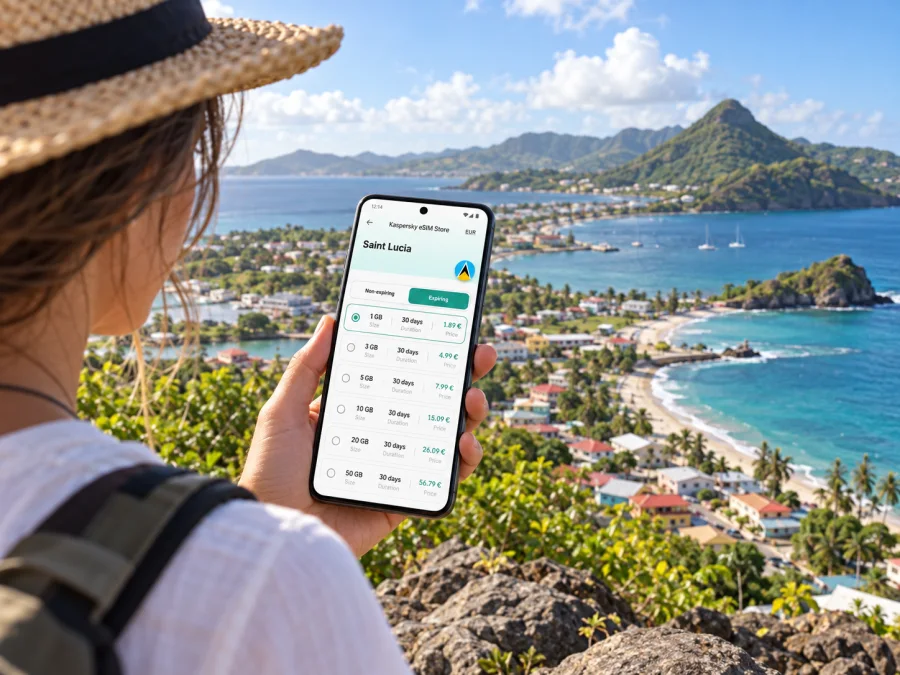
Once you have estimated your route and data needs, compare eSIM options for a trip to Saint Lucia by allowance, validity and destination terms. Kaspersky eSIM Store is an app and website for selecting, purchasing and activating a travel data eSIM. The connection in Vieux Fort depends on the plan’s listed local partner and radio conditions; the town itself is not a separate operator market.
Keep these navigation habits in mind:
- Save the exact name and pin of your hotel or guesthouse, not only the general Vieux Fort label.
- Ask your accommodation how it describes the entrance or meeting point to drivers.
- Carry the route offline before leaving an area with known Wi-Fi.
- Check the road route and the estimated journey time again before departure; local conditions can change.
- Keep your phone charged and bring a power bank for longer excursions.
- Treat a route through a steep or exposed area as a reason to confirm access and transport, rather than as a promise that every road is suitable for every vehicle.
If the data connection drops, avoid repeatedly changing network settings while a vehicle is moving. Save your current location, switch to the offline map, and wait until you can stop safely to retry mobile data or message your contact. A screenshot of the route and accommodation details can be more useful than a series of failed map refreshes.
Town centre, market and local errands
The town centre and market offer a useful first walk if you want to see daily life beyond the airport corridor. The Saint Lucia Tourism Authority describes the Vieux Fort Town & Market as a local hub with small shops, street vendors and fresh produce. Use a map to orient yourself, but check locally for the market’s current hours and any changes to opening days. Business listings can be outdated, and market activity may vary.
For a relaxed visit, avoid trying to navigate while crossing streets or carrying shopping. Pin the place where you started, choose a clear return point and send it to your travel companion. If you are buying food or supplies, remember that payment methods vary by business; mobile data can help you check a reservation or message your host, but it does not replace carrying an appropriate payment option.
Beaches and viewpoints near Vieux Fort
Vieux Fort’s southern setting makes coastal stops part of the local itinerary. The tourism authority highlights Anse des Sables and Sandy Beach, as well as Moule à Chique, a headland viewpoint. These are distinct outings, not interchangeable pins: check which beach or access point you intend to reach and confirm the return arrangements before leaving town.
At Sandy Beach and other exposed shorelines, wind and sea conditions may shape how long you want to stay. Do not rely on a live map or photo upload as a substitute for checking local advice about conditions. Save the location of your vehicle, driver meeting point or accommodation, and make sure everyone in your group has the same plan for returning.
Moule à Chique offers elevated coastal views and is often treated as a scenic drive from Vieux Fort. A map can guide you to the area, but confirm road access, weather and transport with a local host or driver before setting out. Mobile coverage should not be treated as guaranteed along every segment of a hillside route. Download your map, keep the return route available offline and tell someone where you are going if you travel independently.
The Maria Islands Nature Reserve lies offshore near the southern coast. It is a conservation area, so access is managed and should be arranged through authorised guided visits rather than assumed to be an open beach outing. Check current access and tour conditions before you plan around it. Downloading meeting details and contact information in advance is especially helpful when an excursion begins away from your hotel.
Where to stay and work from
Accommodation choices around Vieux Fort range from properties close to the airport and southern coast to stays farther along the island. The best location depends on whether you are catching an early flight, spending most of your time in the south, or using the town as a stop before travelling north. Ask the property about its exact location, transfer options and Wi-Fi before booking; a map distance alone does not tell you whether the road or transfer schedule suits your plans.
Device preparation and eSIM installation
Check eSIM compatibility for the exact device model and regional version you own. Some models have different SIM configurations depending on the country where they were sold, and a device may also be carrier-locked. Check whether your device supports eSIM and confirm that it is unlocked before choosing a plan. Keep the device’s operating system up to date, but do not start a major update on a weak airport connection.
Install the eSIM while you have dependable Wi-Fi and enough battery. Follow the plan’s instructions carefully: some profiles can be installed before travel and activated later, while other plans start validity at purchase or first connection. The purchase terms determine the correct timing. Do not delete a working eSIM profile as a troubleshooting shortcut; some profiles cannot be installed again after removal.
A general setup sequence is:
- Confirm that the device is unlocked and eSIM-compatible.
- Read the selected plan’s activation and roaming instructions from beginning to end.
- Connect to stable Wi-Fi, open the phone’s mobile or cellular settings and add the eSIM as directed.
- Label the line clearly, for example “Saint Lucia data,” so you can distinguish it from your home SIM.
- Choose which line should use mobile data, and decide whether the home line should remain available for calls or SMS.
- Once you reach Saint Lucia, enable the eSIM line and any data-roaming option required by that plan. Check that mobile data is assigned to the correct line.
- Test a message and a map before leaving the airport area.
For platform-specific steps, follow the Android eSIM installation guide or the iOS eSIM installation guide. Menus vary across phone models and operating-system versions, so use the on-screen labels shown on your own device and the selected plan’s current instructions.
If the connection is slow or unavailable
Try this in order, while stationary:
- Check that airplane mode is off and the eSIM line is enabled.
- Confirm that the eSIM is selected for mobile data rather than your home SIM.
- Check the plan’s instructions for data roaming and enable it only for the travel line if required.
- Move to an open area or a different part of the building, then wait briefly for network registration.
- Restart the phone if the plan instructions recommend it, then test a simple webpage or message.
- Review the plan status, remaining data and validity in the relevant app or account.
- Contact the provider named in the plan details if the problem continues; have your device model, location and error message ready.
Short stays, stopovers and onward travel
For a short stop, prioritise pickup details, accommodation contact information, a map and a way to reach your group. Download what you need before landing, conserve battery and confirm with your driver whether an excursion fits the available time. For a longer stay, check your data balance before days spent away from the hotel and verify that any regional plan lists each country on your onward itinerary.
Frequently asked questions
Is Vieux Fort a separate eSIM destination from Saint Lucia?
No. Vieux Fort is a town and district in Saint Lucia. Select a plan for Saint Lucia, then check its partner network and coverage notes for the places you will visit. A regional plan is a separate choice and should explicitly include the relevant countries.
Is Hewanorra International Airport in Vieux Fort?
Yes. The airport is in Vieux Fort, on the south of Saint Lucia. It is about 40 miles (64 kilometres) from Castries, so allow for an island transfer rather than planning it as a quick trip across a compact city.
Will an eSIM work everywhere in Vieux Fort?
No mobile plan can promise a signal at every point. Reception varies with the local network, terrain, buildings, indoor location and service conditions. Check the network specified for your plan, prepare offline maps and ask your accommodation or tour operator about remote stops.
Can I make regular phone calls with a travel eSIM?
Only if the chosen plan specifically includes voice service and a number. Many travel eSIM plans focus on data. Check the plan details before purchase; internet messaging and app calls use data and are not the same as ordinary cellular calls or SMS.
Should I install the eSIM before travelling?
Often it is convenient to install over reliable Wi-Fi before departure, but activation timing differs by plan. Read the plan’s rules first so you do not start its validity too early. Keep the QR code or installation information accessible until setup is complete.
How much data should I choose for a Vieux Fort trip?
Estimate how often you will navigate, message, upload photos, browse and use work or video apps. Offline maps and downloads reduce mobile use, while video and hotspot use can increase it. Choose using the displayed data allowance and validity rather than a generic figure for every traveller.
A practical Vieux Fort connection checklist
Before travel, save your airport pickup details, accommodation address and offline maps. Check your phone’s regional model, unlock status and eSIM compatibility. Select a Saint Lucia plan by its allowance, validity, activation rule and stated network; do not infer a specific local operator from the country name alone.
On arrival, select the correct data line, confirm the plan’s settings and test a map or message before heading out. For local buses, taxis and beach trips, confirm the route, fare or return arrangement with the person providing the service. Carry a charger, keep essential details offline and allow for reception to vary beyond the town centre.
Prepare your eSIM for Vieux Fort
Before you fly, use Kaspersky eSIM Store’s app or website to choose an eSIM plan for Saint Lucia that fits your dates and expected data use. Review the exact plan conditions, install it according to the instructions, and activate it at the time specified by the provider. That preparation gives you a clear starting point for airport pickup, directions and everyday mobile internet while you explore Vieux Fort and the south of Saint Lucia.


