Travel connectivity guide
Vík eSIM: Mobile Internet for Your Iceland Trip
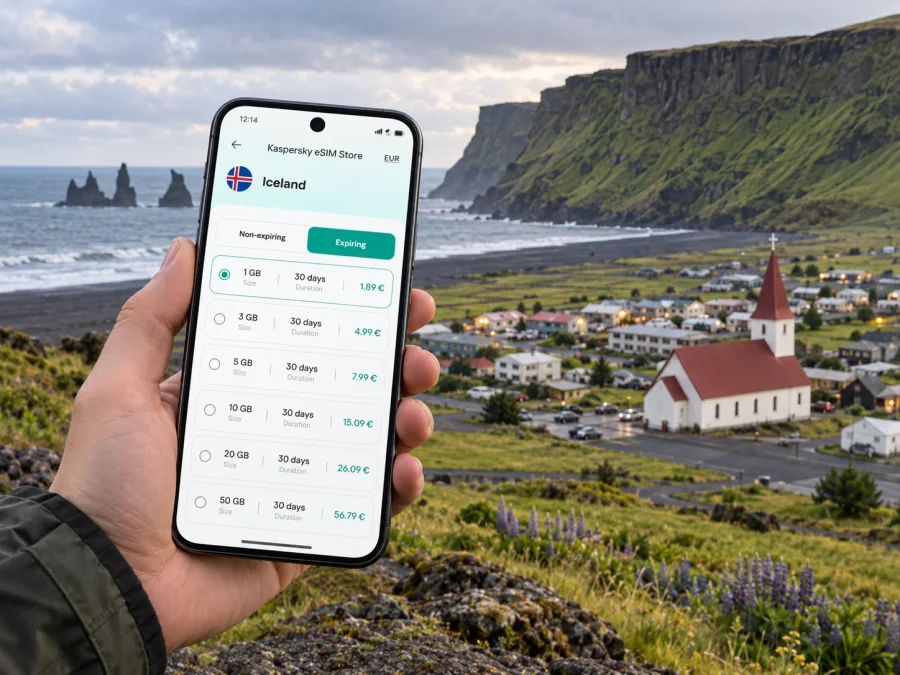
Vík eSIM: mobile connection and internet for your trip
Vík í Mýrdal, usually called Vík, is a small village on Iceland’s South Coast and an overnight stop between Reykjavík and places farther east. A phone can help you check a booking, find your guesthouse, follow a route, or contact a driver. An eSIM can provide mobile data without replacing your physical SIM, if your device supports it and the selected plan covers Iceland.
Vík is not a large city with a dense transit grid. Many visitors arrive by road and use it as a base for nearby coastal sights or as one stop on a longer drive. Save directions, confirm transport details, and plan for the stretches beyond the village centre.
When mobile data is useful in Vík
The first need often comes before sightseeing. After a long drive or a transfer from Reykjavík, you may want to find the entrance to your accommodation, message the host about arrival, or check whether a pre-booked activity has changed its meeting point. A working data connection makes those small tasks easier, especially when you are coordinating several reservations on the same day.
In the village, online maps can help you orient yourself between accommodation, food stops, shops, and the main road. Vík is compact enough that many central errands may be done on foot, but visitors still need to know where they are going, particularly in poor weather, low light, or when carrying luggage. Keep the address of your stay available offline as well; a phone battery or signal can become less dependable just when you need it.
Mobile data may help you open a route, confirm a booking, contact a driver, check road information before a South Coast drive, read a notice, use work or messaging tools, and let family know you have arrived.
An eSIM does not make a remote road safe or guarantee a signal at every viewpoint. Download maps and booking details before leaving reliable Wi-Fi, and keep your phone charged.
Arriving and getting your bearings
Most international visitors reach South Iceland through Keflavík International Airport and Reykjavík, then continue toward Vík by road or on an organised trip. Vík is not served by an international airport. Treat Reykjavík and Vík as separate stages: the transfer is a substantial road leg, not a short city ride.
If you are driving, arrange the vehicle and first night’s accommodation before setting out, particularly if you arrive late or travel in a season with limited daylight. Save the lodging address, check-in directions, and host contact details offline. For a coach, shuttle, or tour, confirm the current pickup point, time, baggage rules, and return arrangements with the provider. Rural services can be less frequent or seasonal than urban buses; do not assume a connection runs at the time you need.
When you reach Vík, follow your lodging’s directions rather than assuming it is beside a central stop. If your arrival time changes, contact the host early. Mobile data can simplify coordination, but share your expected arrival time before setting out in case service varies along the road.
A simple arrival sequence
- Check the route, weather, and road information before leaving your transfer point.
- Save the address, check-in details, ticket, and meeting point for offline use.
- Confirm the exact drop-off location with the driver or tour company.
- Orient yourself around your accommodation first, then plan the next day’s route.
- Charge your phone overnight and download the next leg before departure.
Moving around the village and nearby coast
Vík’s centre is small compared with Reykjavík, and visitors staying centrally may reach everyday stops on foot. Distances still depend on where you stay and where you plan to go. Check walking time on a map; wind, rain, darkness, road conditions, and luggage can make a short distance feel different from a clear-weather stroll.
Nearby beaches, viewpoints, waterfalls, and trailheads are not all casual walks from the centre. A rental car gives flexibility but requires attention to road conditions, parking, fuel, and weather. A guided excursion can reduce driving decisions. A scheduled bus or shuttle may suit a point-to-point trip only if its current timetable matches your plans. Confirm services in advance instead of relying on an unverified connection.
Review a route before moving and download the map area: rural coverage can vary with terrain and location. Save the road number, destination, booking, and accommodation address. If you take a wrong turn, stop safely before checking your phone.
| Visit pattern | Prepare | Mobile data can help with |
|---|---|---|
| Overnight in Vík | Address, check-in details, walking route | Finding the property and contacting the host |
| Self-drive South Coast stop | Offline map, rest plan, road information | Reviewing the next leg and communicating when service is available |
| Guided excursion | Meeting point, pickup time, operator contact | Checking updates and opening the booking |
| Coach or shuttle | Current timetable, ticket, stop location | Finding the stop and checking messages |
| Short work stay | Workspace details, meeting schedule, backup files | Email, calendar, and collaboration tools where service permits |
This is a planning aid, not a guarantee about a service or signal. Verify current transport details with the provider and local safety guidance. Save essentials before leaving Vík for a longer drive.
Planning time in Vík
Some visitors arrive in the afternoon, stay overnight, and leave early; others spend several days exploring the coast. A short stop calls for accommodation directions, departure details, navigation, and a way to contact your party. A longer stay may involve daily route planning, work calls, or itinerary changes based on weather.
Vík can also be a stop on a regional itinerary continuing east toward Kirkjubæjarklaustur, Skaftafell, or the Jökulsárlón area, or back toward Reykjavík. These extensions add driving time. A map estimate is not a fixed journey time: stops, conditions, daylight, and road notices affect the day. Decide what you will do if conditions change, keep your lodging and tour contacts offline, and avoid pressing onward just to preserve a booking.
Download large files, playlists, and offline entertainment over Wi-Fi where available. This leaves mobile data for navigation, messages, and booking changes when you are out. A connection can help you get information and coordinate, but it cannot assess road or coastal safety for you.
Choosing an eSIM plan for Iceland
Choose a plan based on where you will travel, how long you will stay, and what you expect to do online. For a Vík itinerary, check that the plan’s coverage applies to Iceland, then compare its validity period and data allowance with your trip. A plan suited to a short city break may not match a multi-day drive with frequent map use, photo uploads, or remote work.
Before you decide, ask yourself:
- Is Iceland included in the plan’s destination coverage?
- Does the validity period cover the full time you expect to use mobile data?
- How much data might maps, messaging, browsing, and calls over apps require?
- Will you use hotel Wi-Fi for downloads and larger transfers?
- Does the plan’s description explain any limitations that matter to your route?
- Is your phone unlocked and able to add an eSIM profile?
Estimate data from your habits: messaging and maps usually use less than video meetings, photo backups, or streaming. If you need work access, check your tools’ requirements and download documents beforehand. Choose an allowance for your expected use and review the plan terms before purchase.
Kaspersky eSIM Store is an app and website where you can choose, arrange, and activate an eSIM with a suitable plan for mobile internet on an international trip. You can review eSIM plan options for Iceland while planning the Vík leg of your journey. The relevant plan terms determine its destination coverage, data allowance, and validity; check those details for your dates and route before you travel.
Install and prepare before departure
Set up your eSIM over stable Wi-Fi and allow time to read the device and plan instructions. Screens differ by device; follow the guidance for your operating system. Installing a profile and starting a plan are not always the same action, so check the selected plan’s activation conditions.
- Confirm your phone supports eSIM and is not carrier-locked. Regional versions can differ, so check your device’s eSIM compatibility before purchase.
- Review Iceland coverage, validity, data allowance, and activation terms.
- Keep access to the account or email used for the order and save the installation details securely.
- Label the travel profile and decide which line will handle mobile data.
- Save maps, reservations, transport details, and important contacts offline.
For device guidance, follow the Android eSIM installation instructions or the iPhone and iOS eSIM installation instructions. Check whether the plan requires data roaming for its eSIM, and understand any roaming charges from your regular provider. When you have service, confirm the travel profile is selected for data.
Connectivity on a rural South Coast itinerary
The South Coast is a road-trip landscape, not a continuous built-up corridor. Coverage can vary, so download maps and key information before leaving Vík. Keep both a saved map and a short written note with the next destination, main road, and lodging address.
Before driving, check road and weather information, confirm opening or meeting details, then put the phone away. If conditions change, stop somewhere safe before contacting your accommodation or revising the route. Do not assume data will be available at every viewpoint, and never handle the phone while driving.
A map pin shows a place; it cannot assess surf, wind, footing, or access conditions. Follow posted signs and local safety guidance. For a multi-stop day, save destinations in order, note likely rest and fuel stops without assuming they will be open, and leave room to shorten the route if conditions call for it.
Staying in touch during a work trip or stopover
Vík may be an overnight between meetings in Reykjavík and another South Coast stop, or a brief addition to a longer trip. Check the details instead of assuming a typical city workday: workspace, Wi-Fi quality, and working hours vary by property. If a call matters, download documents in advance, carry a charger, and agree on a realistic meeting window. Mobile data may support email and online meetings where local service and plan conditions permit, but do not treat one connection as guaranteed for a critical call.
For a short stopover, decide how your travel eSIM and regular number should work. A data-focused plan may not include voice calls or SMS; check its terms and your home provider’s roaming rules. Messaging or calling apps can be useful when both parties can reach each other there and you have an active connection. Finish large downloads at the accommodation, save the next map, confirm the first appointment, and charge devices overnight.
Common questions
Is Vík a useful base?
It can work as an overnight or multi-night stop for parts of the South Coast, depending on your route and season. Consider accommodation, driving time, activities, and return plans. Vík is a village, not a large city with dense transport and services.
Do I need mobile data if my accommodation has Wi-Fi?
Wi-Fi can cover indoor use, while mobile data helps with navigation, messages, bookings, and changes away from the property. Save essential details offline and check the plan’s Iceland terms.
Will an eSIM work throughout the drive?
Coverage depends on the selected plan’s network and local conditions. Do not assume service at every point on a rural route. Keep offline maps and contacts ready.
Can I install an eSIM after arriving?
That depends on Wi-Fi access, device settings, and the plan’s installation and activation instructions. Setting it up before departure gives you more time, but follow the selected plan’s terms.
Does a data eSIM include a phone number?
Not necessarily. Check whether voice calls or SMS are included. Internet messaging apps require an active connection and the other person to be reachable there.
What if I lose signal outside Vík?
Use saved details and offline maps; wait until a safe place with service before changing plans. Pull over safely before using a phone and follow local emergency guidance.
Get ready for your Vík trip
Before travelling, check that your device can use eSIM, review the Iceland coverage and plan conditions, and install the profile with time to spare. Save your accommodation directions, bookings, maps, and key contacts for offline access. In Vík, mobile internet can make navigation and coordination easier, while a flexible itinerary and careful road planning remain essential.
When you are ready to prepare your connection, choose an eSIM plan for your trip to Iceland through Kaspersky eSIM Store, an app and website for selecting, arranging, and activating an eSIM for mobile internet abroad. Check the plan details against your dates and South Coast route, then keep offline information ready for the stretches where service may vary.


