Travel connectivity guide
Vivo X300 128GB 5G eSIM: Compatibility & Setup
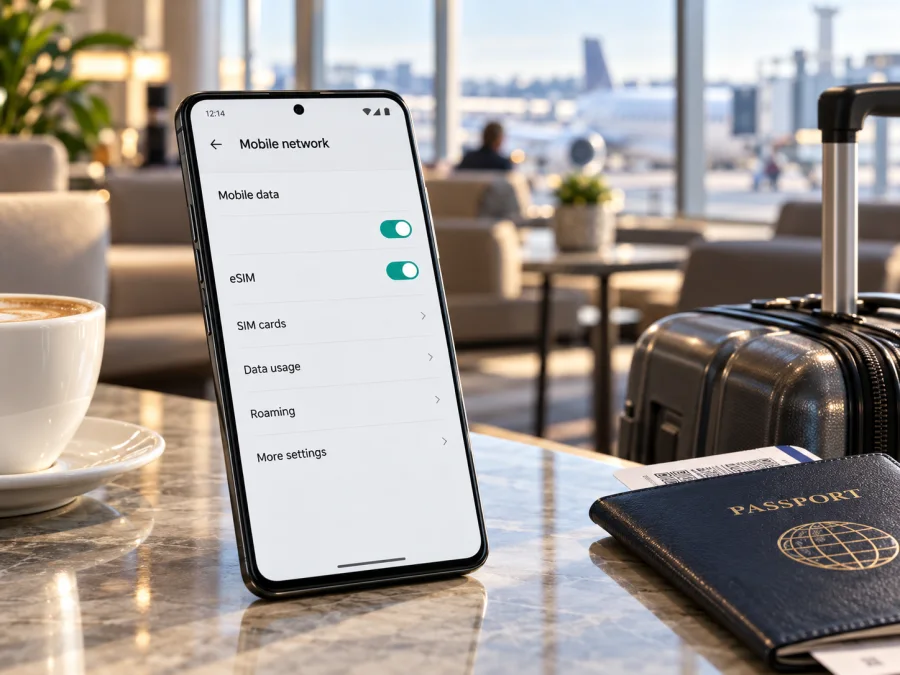
Vivo X300 128GB 5G eSIM: compatibility and setup guide
Short answer: vivo’s international X300 specification lists eSIM configurations, including SIM1 + eSIM1 and eSIM1 + eSIM2. But the exact Vivo X300 128GB 5G variant cannot be confirmed from vivo’s current public specifications: the global and China product pages list storage configurations from 256GB, and the China page specifies two nano-SIM cards. Treat eSIM support for this exact listing as conditional on its regional model. Check the phone’s EID and eSIM menu before choosing a travel plan.
The storage label matters because a retail title may combine a familiar model name with a seller’s memory description without identifying the manufacturer’s regional code. A phone can support 5G and still lack eSIM. An international X300 may support eSIM even when a similarly named domestic-market version uses physical SIM cards. The reliable answer comes from the handset, its full model code and the official specification for its sales region.
Does Vivo X300 128GB 5G support eSIM?
The global vivo X300 specification lists “SIM1 + SIM2 / SIM1 + eSIM1 / eSIM1 + eSIM2.” It also says eSIM availability can vary by country or region and carrier. This confirms eSIM for the international configuration described on that page, not every phone carrying the X300 name.
The exact 128GB capacity is not listed on the official global specification reviewed: it lists 12 GB + 256 GB and 16 GB + 512 GB. The China product page lists 12 GB or 16 GB RAM with 256 GB, 512 GB or 1 TB storage and describes dual nano-SIM. The official specifications reviewed therefore do not verify a “Vivo X300 128GB 5G” variant. The listing could be inaccurate or describe a different market/version; verify its model code and storage in Settings before relying on it.
| Check | Manufacturer information | Practical meaning |
|---|---|---|
| International X300 | Global vivo page lists physical SIM and eSIM combinations. | An international unit may support eSIM, subject to region, carrier and software. |
| China-market X300 | China page lists two nano-SIM cards and does not list eSIM. | Do not assume a China-market unit can use a travel eSIM. |
| India-market X300 | India page lists 256GB and 512GB options; it does not confirm this 128GB listing. | Check the actual device and market-specific information. |
| 128GB storage | Not listed in the current global or China X300 specs reviewed. | Ask the seller for the full model code and confirm the storage shown by the phone. |
| 5G | X300 pages list 5G, with details by market. | 5G support does not prove eSIM support or plan/network compatibility. |
Vivo’s pages describe devices sold in different markets; they do not certify this seller’s exact listing. An eSIM-enabled international specification is a useful reference, while the actual model code and built-in eSIM controls settle the question for the unit in hand. If the phone has no EID and no eSIM option after an official update, ask vivo or the seller before buying a plan. Do not infer compatibility from the name, storage label or 5G badge.
Why regional and carrier versions matter
Manufacturers can sell different hardware and software under the same family name. SIM tray design, eSIM provisioning, network bands and carrier approval can vary by market. The X300 difference appears on vivo’s official pages: the global page lists eSIM combinations, while the China page describes dual nano-SIM. The global page also notes that eSIM availability depends on country/region and carrier. An imported phone should be checked against the page for its market, not a different regional model.
A carrier-supplied phone may also be network-locked or limited to profiles approved by that carrier. Even when a phone can store an eSIM profile, it may not register on a particular network if it is locked, the service is not provisioned for travel, or local network support does not match. Ask the original carrier or seller whether the phone is unlocked. Request the exact model code from Settings → About phone, the original sales region and confirmation of the stated 128GB storage. Keep the invoice and return terms in case the listing does not match the handset.
Check compatibility before choosing a plan
On Android, eSIM controls may appear under Settings → Network & internet, SIM cards & mobile networks, or a similarly named mobile-network menu. OriginOS labels can differ by version and region. Search Settings for “eSIM,” then look for Add eSIM, Add mobile plan, Download a SIM or Manage eSIMs. You can inspect the setup screen without scanning a code or installing a plan.
Also check for an EID (Embedded Identity Document number), the identifier associated with embedded SIM hardware. Search Settings for EID, or look under About phone → Status/SIM status. Some phones show it when *#06# is entered in the dialler, but behavior can vary. If the code does not show an EID, use Settings or contact vivo support. Keep the EID, IMEI and any activation QR code private; share them only with trusted support when needed.
An EID is a helpful indicator, but check the eSIM menu and exact model as well. A regional build, operator policy or outdated software can affect what appears. Update the phone over Wi-Fi, restart and check again. If no EID and no eSIM setup option are available, treat the phone as incompatible until vivo or the seller confirms the model code supports eSIM.
Use this checklist before selecting a travel eSIM:
- [ ] Confirm the full model code and sales region in About phone.
- [ ] Check for both an EID and an eSIM setup option.
- [ ] Compare the model code with vivo’s information for the same region.
- [ ] Confirm that the handset is unlocked for another provider’s eSIM.
- [ ] Install official system updates, restart and check once more.
- [ ] Review the plan’s destination, data allowance, validity and activation conditions.
- [ ] Keep Wi-Fi or another connection available during installation.
Compatibility checks are most useful when they identify the phone you actually own, rather than a model family with several regional configurations. Keep the model code available when comparing the phone with manufacturer information or a compatibility tool. For a second check, check whether your device is compatible. If the exact “Vivo X300 128GB 5G” is not recognized, use its model code rather than selecting another X300 variant as a proxy.
How to install an eSIM on the Vivo X300
Menu wording varies by Android/OriginOS version. Follow the installation method shown on your phone and by the plan provider. See the Android eSIM installation guide. The iPhone installation guide is for travelers setting up a plan on an iPhone; those steps do not apply to this Android handset.
- Confirm compatibility. Check the model, EID and eSIM controls. Make sure the phone is unlocked and online over Wi-Fi.
- Review the plan. Check its destination, validity, installation method and activation timing. Keep QR and activation details private.
- Open mobile-network settings. Find the SIM/mobile-network menu and choose Add eSIM or the equivalent option. If it is missing, stop and check the model code.
- Install the profile. Scan the supplied QR code or use the provider’s supported app/manual method. Enter any manual details exactly as supplied. Some QR codes can be used only once.
- Name the line. Use a clear label such as “Travel data” to distinguish it from your regular SIM.
- Wait for setup to finish. Keep Wi-Fi connected while the profile downloads. It may take a few minutes; do not close the flow or delete the profile during setup.
- Choose when to use it. If travelling later, leave the profile installed and follow the plan’s activation rules. Installation and the start of plan validity may be separate events.
- Select mobile data. In SIM settings, choose the travel eSIM for data. Keep calls and SMS on your regular number if preferred and supported.
- Set roaming if required. Enable data roaming on the travel profile only if the plan instructions require it. Check the home SIM’s roaming setting separately.
- Test at the destination. Turn Wi-Fi off briefly, confirm that mobile data uses the travel line and allow time for network registration.
Kaspersky eSIM Store is an app and website where travelers can choose, arrange and activate an eSIM plan for mobile data abroad. It is not the mobile network itself; connection depends on the plan, local network, device and service terms. Use the Android installation instructions for more setup detail.
Use the eSIM for mobile data while travelling
You can install the profile before departure over reliable Wi-Fi, but check when the plan’s validity begins. Some plans become active at purchase or installation; others start when the phone connects to a supported network in the destination. Follow the plan’s own conditions. If delayed activation is offered, align it with your arrival and itinerary.
At your destination, turn on the travel profile, select it for mobile data and enable its data roaming if required. Make sure the home SIM is not selected for data by mistake. Start with automatic network selection. Use manual selection only when the plan’s instructions or support team recommend it.
A travel eSIM can help with maps, translation, ride-hailing, messages and reservations away from Wi-Fi. Estimate usage before choosing a plan: video calls, streaming and cloud photo backup can use more data than basic navigation and text. Download maps over Wi-Fi, review data usage in the phone and plan account, and remember those counters may update at different times.
For a multi-country itinerary, check that every destination is included; a “regional” or “global” label does not guarantee every stop is covered. Compare the plan’s validity with your dates. Many travel eSIMs are for data only and do not provide a standard phone number, voice calls or SMS unless the terms say so. Internet calls and messaging apps can use the data connection, subject to their account requirements.
When ready, you can browse the Kaspersky eSIM Store to select a destination and compare the plan details shown there. Choose only after confirming device compatibility, coverage, data amount and validity. The app and website help users choose, arrange and activate the plan; local connectivity depends on the relevant network and plan terms.
Common problems and checks
No “Add eSIM” option
Check the model code and sales region. This may be a physical-SIM regional edition, or the listing may be inaccurate. Install official updates, restart, and search Settings for “eSIM” or “SIM.” If the EID and setup option are still missing, contact vivo or the seller before buying a plan.
QR code will not scan
Increase brightness on the screen showing the code, reduce glare, clean the camera lens and make sure the whole code is visible. If the code is on the X300 itself, use an in-app or manual option if offered. Confirm that the code belongs to this plan and has not already been used. Do not post it publicly.
Profile does not download
Check Wi-Fi, automatic date and time, available storage and system updates, then restart. Retry only if the provider allows it. An “already used” message may mean an earlier attempt consumed a one-time code; contact plan support before deleting or reinstalling the profile.
Installed, but no service
Check that the plan is valid at your location and its activation condition has been met. Turn the eSIM on, select it for data and enable its roaming if required. Toggle airplane mode or restart. Try automatic network selection first; follow the plan’s instructions if a supported network must be selected manually. A 5G icon is not necessary: the connection may use 4G/LTE depending on coverage, bands and the plan. If registration still fails, check for a carrier lock and contact the plan provider.
Data uses the wrong SIM or does not work
In SIM settings, select the travel profile for mobile data and disable automatic data switching if appropriate. Turn off data roaming on the home line if you want to avoid using its data abroad. With Wi-Fi off, test a browser and check that mobile data is enabled, the plan is active and data remains. If only one app fails, check its settings before changing network/APN values. Usage counters may not update instantly.
Calls or messages do not arrive
A travel data plan may not include a phone number, voice calls or SMS. Keep the regular SIM enabled if you need your number, and check home-operator roaming costs. Internet calling and messaging apps may work over the travel data connection.
The phone came from an operator or reseller
Ask whether it is unlocked and whether another provider’s eSIM is allowed. A profile may install but fail to connect if the phone is restricted or the network does not accept it. Keep the model code and exact error message for support; do not send QR or activation details through public channels.
Practical travel scenarios
Short city break: Confirm compatibility at home, choose a plan whose coverage and validity match the trip, and install it over Wi-Fi. Follow its activation timing, then set it as the data line after arrival and test with Wi-Fi off.
Several countries: List each stop and check it against the plan’s coverage. Do not assume a profile that works in the first country automatically covers the next. After a border crossing, allow the phone to register on a supported network and check the plan details if service does not return.
Keep a home number: Leave the regular SIM enabled if needed for calls or one-time codes, but select the travel eSIM for data. Review roaming settings per line; a setting for one profile may not apply to the other.
Imported phone: Verify model code, EID, eSIM menu, unlock status and plan compatibility before departure. If the seller calls it 128GB but the official X300 pages show other storage configurations, ask for clarification and return terms before travel.
Frequently asked questions
Is every Vivo X300 128GB 5G eSIM-compatible?
Not confirmed. vivo’s global X300 page lists eSIM combinations, but the official storage specifications reviewed do not list 128GB. The China page lists dual nano-SIM. Check the actual model, EID and eSIM menu.
Does 5G mean eSIM is supported?
No. 5G is a network capability; eSIM is a separate SIM feature. A 5G phone can use physical SIMs only, and an eSIM-enabled phone still needs a compatible plan and network.
Can I use a physical SIM and an eSIM together?
The global X300 specification lists physical-SIM/eSIM combinations, but regional configurations differ. Check the available options on your device and select the intended line for mobile data.
Do I need to remove the physical SIM?
Usually an eSIM is added through Settings, but the active SIM combinations depend on the model and carrier. Follow the setup screen if it asks you to change a configuration.
Should data roaming be on?
Only if the travel plan requires it, and on the travel eSIM line. Check the home line separately to avoid unexpected roaming data use.
Can I transfer the eSIM to a new phone?
Do not assume so. Some activation codes are single-use and some profiles cannot be moved after activation. Check the plan conditions before deleting the profile or replacing the device.
What if there is no EID?
Update official software, restart and check About phone, SIM status and mobile-network settings. If there is still no EID or eSIM setup option, treat the handset as unsupported unless vivo confirms its exact model code.
Before you travel: verify the phone, then choose a plan
For the exact Vivo X300 128GB 5G, the safe answer is conditional. vivo documents eSIM for its international X300 configuration, while the current global and China storage pages reviewed do not identify a 128GB version and the China page lists dual nano-SIM. The phone’s EID, eSIM menu, regional model code and unlock status determine whether this particular unit can use eSIM. If those checks remain unclear, ask vivo or the seller before purchase and keep Wi-Fi or another connection option available.
After compatibility is confirmed, compare coverage, data amount, validity and activation timing with your itinerary. Kaspersky eSIM Store is an app and website where you can choose, arrange and activate an eSIM plan for mobile data abroad. Review the plan conditions, install over a reliable connection and select the travel profile for data when ready. A few checks at home can make the setup clearer when you arrive.


