Travel connectivity guide
Vung Tau eSIM: Mobile Internet for Your Trip
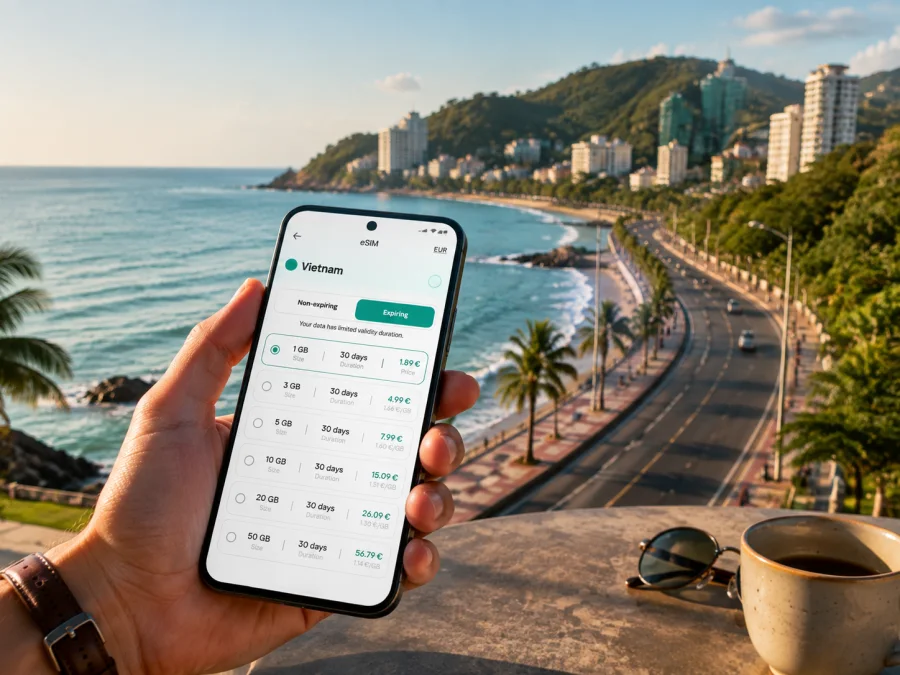
Vung Tau eSIM for mobile connection and internet on your trip
Vung Tau is a coastal city in southern Vietnam where a promenade, a beach, a hillside road, and a seafood restaurant can all be part of the same day. That variety makes a practical mobile connection useful for finding a hotel, confirming a pickup, opening a map, translating a message, or checking a booking.
An eSIM, or virtual SIM card, lets you prepare mobile data for Vietnam without removing your physical SIM. Kaspersky eSIM Store is an app and website that helps you choose, arrange, and activate an eSIM with a suitable data plan for an overseas trip. For Vung Tau, choose by destination, data volume, and validity.
When mobile internet is useful in Vung Tau
The first and last parts of a trip often involve more decisions than the relaxed beach time between them. Mobile data can help you:
- send your accommodation details to a driver after a transfer from Ho Chi Minh City;
- follow a map between Front Beach, Back Beach, the hills, and coastal viewpoints;
- check a pickup point instead of relying on a landmark;
- read updated information before walking to a lighthouse, museum, pagoda, or viewpoint;
- translate short messages about check-in, luggage, or a meal;
- use work chat, email, and documents during a business stay;
- keep in touch with family while your usual physical SIM remains in the phone.
In brief: An eSIM for Vung Tau is useful for mobile data during arrival, navigation, transport coordination, messages, bookings, and work. Select the country or regional plan that matches your route, then check the phone and activation conditions before departure.
Match the plan to your itinerary
Some visitors travel to Vung Tau for a short seaside break. Others arrive in Ho Chi Minh City first, then continue to the coast, or use Vung Tau as one stop in a longer southern Vietnam route. If the plan is intended for Vietnam, confirm that Vietnam is included in its destination area. If you will cross a national border later, review the next destination separately.
Plan around three time windows:
- Before departure: check the phone, choose the destination, review data and validity, and keep the activation information accessible.
- The transfer: use data for the airport exit, driver messages, navigation, or a change of transport.
- The city stay: use the profile for maps, reservations, messages, work, and trips between beaches and hills.
A quick choice guide
| Trip pattern | Main data tasks | What to check |
|---|---|---|
| One or two beach days | Maps, messages, rides, light browsing | Whether a light allowance covers your actual use |
| Several days of exploring | Maps, photos, bookings, translation | Whether validity covers the whole stay |
| Business travel | Email, documents, calls, possible hotspot use | The plan and device conditions for work |
| Ho Chi Minh City plus Vung Tau | Data during the transfer and in both cities | That the Vietnam destination area covers the route |
| Several countries | Data in multiple destinations | Whether a regional option includes every stop |
Do not choose by data size alone. Someone who mainly opens maps and sends messages has a different pattern from a traveler who joins calls or uploads video. Review the volume, duration, destination, price, activation terms, and any stated limits together. Choose the option that fits your trip.
Arrival: from the airport transfer to your hotel
If your international flight lands at Tan Son Nhat International Airport in Ho Chi Minh City, you still have a transfer before reaching Vung Tau. Depending on your booking and the current schedule, that journey may be by private car, taxi, bus, or a water connection from the city. Keep your booking confirmation and exact accommodation address ready; transport arrangements can change.
An eSIM helps because arrival is a sequence rather than one destination. Before leaving the terminal, you may need to:
- send a precise meeting message to a driver or travel companion;
- open the accommodation pin and compare it with the booking address;
- confirm whether the pickup point is at the airport, a pier, a bus station, or a street;
- save the hotel name, address, and contact details in an offline note;
- update your estimated arrival time after a delayed flight or busy road.
For a late arrival, take a screenshot of the booking, write the address so it can be shown to a driver, and keep your home SIM available for messages if needed.
Choose a convenient area for your stay
The coast gives different parts of Vung Tau different travel rhythms. Accommodation around Front Beach is convenient for the waterfront, evening walks, central restaurants, and movement along the western side of the peninsula. The Back Beach area suits travelers who want easy access to the broad eastern beach and nearby accommodation. Around the smaller beaches and southern hills, viewpoints may be the priority, but a pickup or return journey may require more precise navigation.
Check the property’s exact address rather than relying on “near the beach”. Save:
- the property name and full address;
- a map pin and the nearest recognizable road;
- check-in instructions, contact details, and the nearest practical pickup point.
For a short stopover, staying near the main place you want to visit can reduce transfers. On a longer stay, group days around the coast, central streets, and hillside attractions.
Moving around Vung Tau
Walking is pleasant for compact waterfront stretches, but the beaches, hills, food streets, and viewpoints are not all in one block. A taxi or private car is practical when you have luggage, are traveling in the heat, or need a direct trip between a hotel and an attraction. Local buses can suit travelers with more time who are comfortable checking the current route and stop. A rented motorbike offers flexibility, but only when you are confident with local traffic and meet the applicable legal, safety, and rental requirements.
| Situation | Useful preparation |
|---|---|
| Hotel to beach | Pin the entrance and check the return route before leaving. |
| Going uphill | Save the attraction and hotel as separate points; allow for walking. |
| Carrying luggage | Confirm the address and choose a direct pickup point. |
| Taking a bus | Check the current route, direction, stop, and payment method. |
| Renting a motorbike | Confirm documents and safety requirements; keep navigation simple while riding. |
| Returning after dinner | Agree on one visible pickup point rather than “near the beach”. |
Route estimates are not guarantees. Traffic, weather, weekend demand, and vehicle access can alter a journey. If you have a timed booking, leave margin and keep the address ready to show on the phone.
Once your route and data needs are clear, you can review Vietnam eSIM plans for the journey and compare the stated conditions before continuing with the arrival plan.
Prepare the eSIM before the trip
Make the technical decisions before the transfer begins. Start with the device, then the destination, and only then the data plan.
1. Check device compatibility
Make sure your phone supports eSIM and is not locked by your home operator. Models can differ by region, so do not rely only on the product family name. Check your device compatibility before choosing a tariff.
2. Choose Vietnam as the destination
In Kaspersky eSIM Store, select the destination that matches your route and review the available options. For a Vung Tau trip, the relevant country is Vietnam. Read the stated data volume, validity period, price, activation conditions, and other limitations before confirming.
3. Arrange the profile with stable internet
Complete the purchase and keep the QR code or profile information accessible. Installation commonly needs an internet connection, so preparing at home or on reliable Wi-Fi can be easier than waiting outside the airport.
4. Install the eSIM
Follow the instructions for your operating system: use the Android eSIM installation instructions or the iOS eSIM installation instructions. Add the profile carefully and give it a clear label such as “Vietnam trip”.
5. Select the data line
In mobile settings, choose the travel eSIM for mobile data when you are ready to use it. Keep your regular line for calls or messages if that suits you, and check which line is selected for data so the phone does not use the wrong profile.
6. Activate at the right time
Some travelers install before departure and turn on the travel line after landing; others complete setup after arrival. Follow the chosen plan’s conditions. Connection may take a few minutes, and some devices may require data roaming to be enabled for the eSIM profile. If you plan to activate later, keep the installation information safe.
What the eSIM can and cannot replace
For a Vung Tau trip, an eSIM is primarily a mobile-data arrangement. Unless a particular tariff says otherwise, it does not provide a standard local phone number, ordinary voice calls, or SMS. Messaging and calling apps can work over mobile data, while your regular SIM remains in the phone for the functions you choose.
An eSIM does not replace a charged battery, a saved hotel address, or a review of transfer details. Performance can depend on the selected tariff, local network conditions, the device, and the surroundings. Read the coverage description and conditions for the chosen option rather than assuming one setting suits every part of the day.
Business trips and short stopovers
A business traveler may need email, documents, chat, and video meetings near the coast, while a stopover traveler mainly needs a transfer, check-in, and onward departure. Before choosing a plan, decide whether you will:
- join meetings from the hotel;
- send large files or use cloud documents;
- use the phone as a hotspot for a laptop;
- check messages only;
- travel elsewhere after the meeting.
Check the plan’s stated conditions and your device’s hotspot behavior before relying on it. Download meeting details and save the venue address. For a stopover, save the next departure and accommodation details offline, and confirm that the plan’s validity covers the stop.
Trips out of Vung Tau
The city can be a base for a wider southern Vietnam itinerary. A day or overnight route may continue toward Long Hai, Phuoc Hai, Ho Tram, Ho Coc, Ba Ria, or back to Ho Chi Minh City. These places are different destinations, and travel times and transport availability vary, so check the specific route before leaving.
If the eSIM plan covers Vietnam and remains valid for the onward dates, the same profile may be suitable for maps and messages outside Vung Tau. For another country, review the destination area again. Do not assume that a plan selected for one country applies across a border.
Before leaving, save a compact route card:
- departure point and destination address;
- transport type and booking reference;
- departure window;
- accommodation contact and return or onward connection;
- a backup note with essential details.
Troubleshooting after activation
If the eSIM does not connect as expected, check that the profile is enabled and selected for mobile data, then confirm whether data roaming is required. Turn airplane mode on briefly, restart the phone if needed, and review the destination, validity, and remaining data before contacting the available Kaspersky eSIM Store support channel.
Do not delete the profile while troubleshooting unless the instructions tell you to. Note the device model and exact message on screen before asking for help.
Vung Tau eSIM checklist
- [ ] The phone supports eSIM and is not operator-locked.
- [ ] Vietnam is included in the selected destination area.
- [ ] Data volume and validity match the full route.
- [ ] The QR code or profile details are accessible.
- [ ] The Android or iOS installation steps are available.
- [ ] The travel eSIM has a recognizable label.
- [ ] Hotel, transfer, and first meeting details are saved.
- [ ] Home SIM settings are understood before enabling the travel line.
- [ ] A charging plan and offline backup are ready.
Frequently asked questions
Do I need an eSIM if my hotel has Wi-Fi?
Wi-Fi can cover time inside the hotel, but mobile data is useful on the transfer, between attractions, and while arranging a pickup. Your need depends on your existing roaming option and how much you move around Vung Tau.
Is a Vietnam plan suitable for Ho Chi Minh City and Vung Tau?
If it covers Vietnam and is valid for the travel dates, it is intended for the country route rather than one city only. Read the destination and validity conditions for the chosen option.
Should I install before flying or after arriving?
Both can work. Installing before departure gives you stable internet and time to check settings; activating after arrival can help control when the travel line is used. Follow the chosen plan’s conditions.
Prepare your Vung Tau connection
The practical setup is simple: check the phone, choose Vietnam, review the data and validity, install the profile, and decide which line will handle mobile data. Save the hotel address and first transfer details before leaving the airport. In Vung Tau, the eSIM can support a Front Beach walk, a Back Beach morning, a business meeting, a hillside viewpoint, or a journey onward along the coast.
When you are ready, choose an eSIM plan for your trip to Vung Tau, review its conditions, and prepare the profile before departure. Kaspersky eSIM Store helps you complete the selection and activation steps so you can focus on navigating the city.


