Travel connectivity guide
Wad Madani eSIM: Mobile Internet Guide
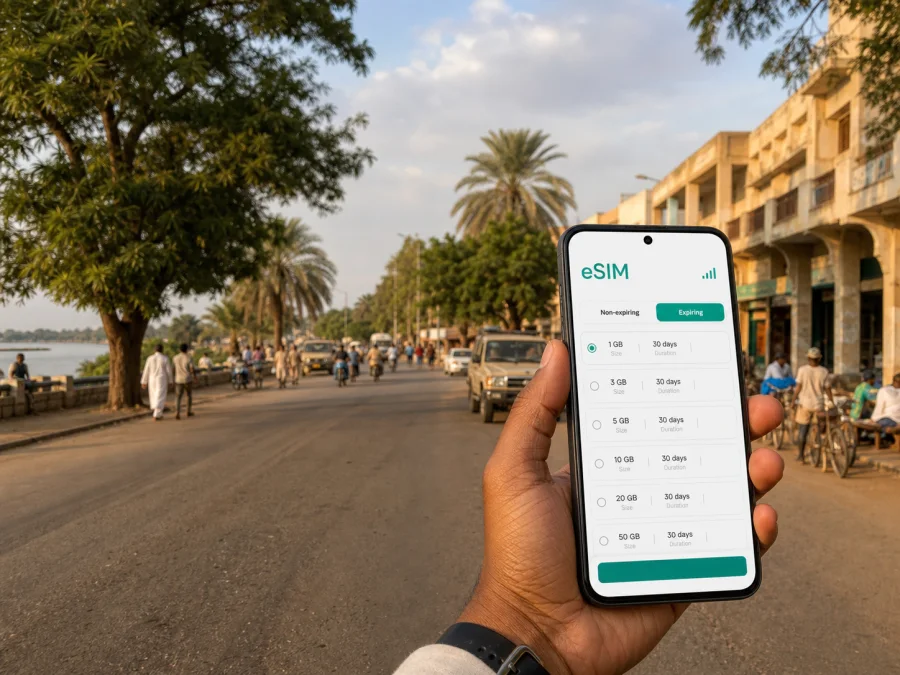
Wad Madani eSIM: mobile connection and internet for your trip
Wad Madani is a practical base for work, family visits, stopovers and journeys through central Sudan. In the first hours after arrival, a working mobile internet connection can help you contact a host, confirm a booking, find a meeting point, share your location, check a route or coordinate a road transfer. An eSIM, or digital SIM, can prepare that data connection without removing your everyday physical SIM card.
The right choice depends on how you will use mobile data in Wad Madani. A short stopover, several days of meetings, a hotel stay and an onward route create different demands. This guide focuses on arrival, movement, navigation, work and preparation.
Why mobile internet matters in Wad Madani
Wad Madani is a Sudanese city associated with the Blue Nile and the wider Al Jazirah area. A visitor’s day may combine an appointment, a family visit, a hotel transfer and an onward trip. The distance between these activities, the time of day and the availability of local help are not always predictable. Mobile data lets you handle small changes without making every decision depend on a hotel connection or public Wi-Fi.
It can help you:
- confirm accommodation or meeting details;
- message a driver, colleague, host or family member;
- check a map while travelling between places;
- send a work update or share a location;
An eSIM does not replace every form of communication. In a travel data plan, it normally provides mobile internet rather than a new ordinary telephone number. Calls and SMS are not included unless the selected plan says otherwise. You can keep your usual number where your home operator allows it, and use internet-based messaging for conversations that require data.
Short answer: an eSIM for Wad Madani is a digital SIM profile for mobile data in Sudan. Check device support, operator-lock status, geographic scope, data allowance, validity and activation conditions before purchase.
Arrival planning: the first hours in the city
The arrival plan should be easy to follow when you are tired, carrying luggage or dealing with a change. Know where the eSIM profile is stored, how to select it for mobile data and which line remains your default for calls or messages.
Before leaving
Complete these tasks while you have a reliable internet connection:
- Confirm that your phone supports eSIM and is not locked to another operator. Check your device compatibility before choosing a plan.
- Decide whether the eSIM is for Wad Madani only or for a wider Sudan itinerary. The geographic scope should match the full route.
- Estimate the trip length, including arrival and departure days, and compare it with the validity period.
- Think about your data habits: navigation and messages need less data than video calls, photo backup or hotspot use.
- Save installation details, addresses, contacts and reservations where you can find them offline.
Installing the profile before departure can reduce tasks after landing. If you install after arrival, make sure you have another temporary way to access the installation information and the internet needed for setup. The best timing depends on the plan’s activation rules, so read its conditions rather than assuming that installation and validity always start together.
On arrival in Wad Madani
Set the travel eSIM as the line for mobile data when that is the purpose of the plan. Keep data switching under control so the phone does not unexpectedly use your home line. If the device asks for data roaming for the travel eSIM, check the selected profile and plan instructions first; roaming on the home line can create separate charges.
Test the connection with a small action: open a text page, send a short message or refresh a route. If the first attempt does not work, check the selected data line, mobile data and roaming settings. Connection can take a few minutes, and local signal conditions can vary. Avoid deleting a profile while troubleshooting; an eSIM may not be transferable or reinstallable after activation under the plan’s conditions.
Moving around Wad Madani
Before setting out in Wad Madani, load the destination, identify a nearby recognizable point and save the address in a note. In an unfamiliar district, compare the map with what you can see around you; streets, entrances and local descriptions may not match a booking or message.
Navigation and meeting points
For a meeting, ask for the destination, a nearby landmark or junction, the preferred entrance and a contact. If someone is meeting you after a road transfer, agree on a simple place and time window.
Use this routine before leaving accommodation:
- open the route while you have time to read it;
- check the approximate direction and the next major turn;
- save the destination details and an offline contact;
- send your expected arrival window;
- preserve enough battery for the return journey.
Mobile data can recalculate a route, but it cannot remove the need for local judgment. If a route looks unclear, pause in a suitable visible place and contact your host or colleague.
Transport and transfers
Movement in Wad Madani may involve walking, a hired car, a local ride or an intercity road transfer. The practical data requirements are similar: confirm where the vehicle will meet you, keep the driver’s contact accessible and share changes promptly. Do not assume that a particular ride-hailing application, payment method or continuous data service is available at every point. Ask the person arranging the journey which local process is expected.
For a longer transfer from the city, save the essential itinerary before departure. A travel eSIM can support messages and navigation when the plan and local conditions allow it, but carry offline directions, contacts and a backup power source.
Accommodation, districts and daily routines
Your eSIM setup should follow your Wad Madani routine. Ask accommodation for the exact address and a recognizable nearby point, then save them in your phone and an offline note.
If you rely on Wi-Fi at the property, keep mobile data available for the journey to and from it. Shared Wi-Fi should not be your only way to contact someone after leaving the building. A travel eSIM gives you another mobile-data option, subject to the selected plan and local availability.
A day with several stops
For several visits, record each address, contact, arrival window and return route in one note. Add the departure point for an onward journey. The note should make the next action obvious, not replace the full itinerary. Avoid sending identity documents through an unverified contact.
Business trips and remote work
Separate essential and optional data use. Essential use includes messages, email, a map and a short call. Optional use includes large uploads and long video meetings; schedule heavy tasks for a suitable trusted connection when possible.
Before the first workday, check:
- the meeting time, location and contact method;
- whether you can reach the venue without a live route;
- whether hotspot use and background updates fit the plan.
An eSIM can simplify the data side of a business trip, but it does not guarantee a particular speed, signal level or ability to use every application. The experience depends on the selected plan, the local network and surrounding conditions.
Choosing an eSIM plan for Wad Madani
Select a plan by use case rather than by a headline number. Start with the country or region where you need data. If your journey begins in Wad Madani and continues elsewhere in Sudan, check whether the plan covers the entire route. A plan limited to one destination or area may not fit an onward transfer.
Compare these points:
- Validity period. Match the duration to the days when you expect to use data, including arrival and departure days where the conditions permit.
- Data allowance. Light messaging and maps differ from regular video calls, tethering or media uploads. Include background sync in your estimate.
- Activation conditions. Read when the plan starts, what counts as activation and whether installation can be completed in advance.
- Management options. Check how the profile, balance and support information will be accessed.
| Trip pattern in Wad Madani | Main data priorities | Planning question |
|---|---|---|
| Short stopover | Messages, a route and confirmations | Does the validity cover the arrival window? |
| Several days of visits | Maps, messaging and browsing | Can background data be paused? |
| Business schedule | Email, coordination and documents | Is hotspot use permitted and sufficient? |
| City stay plus onward route | Navigation and changing arrangements | Does the scope include every stop? |
There is no single correct allowance for every traveller. A light-data plan may be restrictive for someone working from a phone or sharing a connection. Review the conditions and price displayed for the selected Sudan direction before payment.
When your dates, route and usage pattern are clear, you can choose an eSIM plan for travel to Wad Madani. Kaspersky eSIM Store is an app and website that helps you select, arrange and activate an eSIM with a suitable plan for mobile internet during an international trip. The underlying service and network depend on the selected plan and its local partners; Kaspersky eSIM Store is not a mobile operator.
Setup checklist
Use this checklist before departure and again after arrival:
- [ ] The device supports eSIM and is not operator-locked; check your device compatibility.
- [ ] The chosen plan covers Sudan and the places in your itinerary.
- [ ] Validity and activation conditions fit the expected trip.
- [ ] The QR code or profile information is accessible.
- [ ] Your home line is clearly identified and the correct data line is selected.
- [ ] You know whether data roaming is required for the travel eSIM.
- [ ] Addresses, contacts and reservations are saved offline.
- [ ] Background updates are reviewed and the phone has enough battery.
How to install and activate the eSIM
Install the profile on a supported, unlocked device with internet access. Menu names vary by model and operating system, so use the relevant Android installation instructions or iOS installation instructions alongside the plan details.
Step-by-step sequence
- Check the device. Confirm eSIM support and operator-lock status using the device compatibility check.
- Open mobile-network settings. Find the option to add a mobile plan or eSIM.
- Scan or enter the profile. Use the QR code or installation information supplied with the selected eSIM. Keep the code private.
- Name the line. Use a label such as “Wad Madani trip” so it is easy to identify beside your home line.
- Select mobile data. Choose the travel eSIM when you want to use that plan.
- Review data roaming. If the plan requires it, enable roaming for the travel profile and make sure the home line is not selected for data.
- Test carefully. Open a small page or send a short message, then check which data line is being used.
Installation and activation are related but not identical. Adding a profile does not by itself explain when validity begins. The selected plan’s conditions determine that point. If you install before departure and use the plan only in Wad Madani, follow the stated activation instructions.
Managing data and solving common problems
Pause automatic updates and high-resolution media backup over mobile data when possible. Hotspot use may consume data more quickly and may be limited by plan conditions.
If data does not work, use this order:
- Wait briefly if the profile was newly activated.
- Confirm that the travel eSIM is turned on and selected for mobile data.
- Check the plan’s country or regional scope and activation status.
- Check data roaming for the travel profile if its instructions require it.
- Briefly use airplane mode, then turn it off.
- Restart the phone if needed.
- Contact support with the plan details and steps already tried.
Do not delete the eSIM as a first response. Some profiles cannot be moved to another device or installed again after activation. If the issue is limited to one location, try again later in an open area.
FAQ about eSIM use in Wad Madani
Is an eSIM useful for a short stopover?
Yes. It can provide data for messages, a route, a booking confirmation or contact with a driver during a limited arrival window. Choose validity and data allowance for the stopover, and confirm the activation conditions.
Do I need data roaming?
Sometimes. Some travel eSIMs require roaming to be enabled for the eSIM profile. Check the plan instructions, select the travel line for data and keep the home line’s data roaming under control.
Final preparation for your trip
Keep addresses, contacts, route notes and documents offline. Charge the phone and review the selected Sudan plan’s price, data allowance, validity, activation, top-up and refund conditions before payment.
Follow this order: define the Wad Madani itinerary, check the device, select a plan and read its conditions, install the eSIM, select it for mobile data, test a small action, and keep navigation and contacts offline.
When you are ready, review the available eSIM option for Sudan and choose a plan for your Wad Madani journey. Kaspersky eSIM Store helps you select, arrange and activate an eSIM for mobile internet abroad through its app and website. Review the plan’s scope, duration, activation and features before completing the purchase.


