Travel connectivity guide
Wadi Rum eSIM: Mobile Connection and Internet Guide
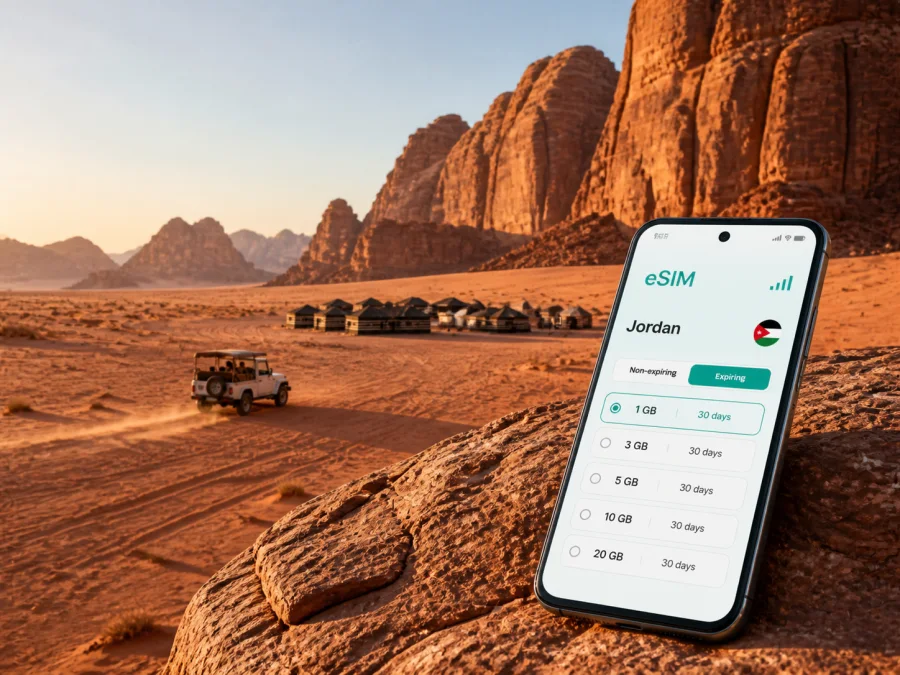
Wadi Rum eSIM: Reliable Mobile Connection and Internet for Your Desert Trip
Wadi Rum is a destination where the landscape is part of the experience: red sand, rock formations, narrow valleys, open horizons and nights spent in or near a desert camp. It is also a place where a little preparation makes a practical difference. You may need a map while travelling from the village to a camp, a message to a guide, a booking confirmation, a translation, or a way to let people at home know that you have arrived.
An eSIM, or digital SIM card, can help you prepare mobile internet for Wadi Rum without removing your primary physical SIM card. With a suitable plan, you can use data on a compatible phone in Jordan and keep your normal number available when your own operator allows it. Kaspersky eSIM Store is an app and website where you can choose, arrange and activate an eSIM with a suitable plan for mobile internet during an overseas trip.
Quick answer: is an eSIM useful in Wadi Rum?
Yes, it can be useful for an overnight camp, a guided excursion, a transfer from Aqaba or a short stop on a wider Jordan itinerary. The benefit is having a prepared data option for the parts of the journey where a mobile connection is available, without needing to search for a physical SIM card immediately after arrival.
Wadi Rum is in southern Jordan and is best understood as a protected desert area, village and network of camp-based visitor experiences rather than a dense city with a single central district. Plan around a transfer, meeting point, local guide, camp and excursions beyond built-up areas.
The Wadi Rum Protected Area is a mixed natural and cultural World Heritage property, inscribed in 2011. Mobile internet is useful before and between activities: for navigation to a meeting point, checking a message from a host, viewing a reservation and coordinating the next leg of your route.
When mobile internet helps during a Wadi Rum trip
Arrival and the first transfer
Many visitors reach Wadi Rum as part of a wider Jordan itinerary. You might be coming from Aqaba, Petra or Amman, or arriving after a flight and continuing by road. The most useful moment for data is often before the desert activity begins: you can read the latest instructions from your camp, identify the agreed meeting place, and send a message if your transfer changes.
Before leaving the last well-connected stop, save:
- the name and contact details of your camp or guide;
- the address or map pin for the visitor meeting point;
- the vehicle description and meeting instructions, if provided;
- your booking confirmation and next accommodation;
- emergency contacts and travel insurance details.
An eSIM does not replace a confirmed transfer or a local guide. It simply makes it easier to use data for coordination when the network is available. If a camp asks you to meet at a specific point, copy the details into a note and take a screenshot rather than relying on a live page.
Navigation between the village, camps and meeting points
The visual openness of the desert can make distances feel deceptively simple. A pinned location may still need to be interpreted together with the instructions from your host. Roads, tracks and camp entrances are not interchangeable, and a map application may not display every practical detail of a desert transfer.
Use mobile internet for the tasks it handles well:
- Open the route to the agreed starting point.
- Check the name of the person or company meeting you.
- Confirm the time and any change to the plan.
- Send your live location only when you are comfortable doing so and when it helps the recipient find you.
- Download or save the route and booking information for later use offline.
For an excursion inside the protected area, follow the guide’s instructions about where to leave a vehicle, when to return and how to move safely around rock formations. Data supports communication, but it is not a substitute for local knowledge or a charged battery.
Choosing a Jordan eSIM plan for Wadi Rum
The right plan depends on how you will use data across the whole trip. Wadi Rum may be one overnight stop in a longer Jordan route, so include Aqaba, Petra, Amman or other destinations in your calculation.
Before selecting a plan, compare the following conditions:
| What to check | Why it matters for Wadi Rum |
|---|---|
| Country or region of validity | The plan should match Jordan and the rest of your route if you are travelling beyond Wadi Rum. |
| Validity period | The period should cover arrival, the desert stay and the journey onward, not only the night in camp. |
| Data allowance | Maps, messages, booking pages and occasional photos require less data than frequent video, tethering or large uploads. |
| Activation terms | Read when validity begins and whether activation or first data use starts the period. |
| Top-up conditions | Check whether additional data can be added and how the balance is managed. |
| Device requirements | The phone must support eSIM and must not be locked to an operator; check compatibility before purchase. |
| Network conditions | Availability and speed depend on local networks, terrain and the selected plan’s conditions. |
Match the plan to your route, not just the camp night
For a short visit, a smaller allowance may be enough with offline maps and light messaging. A longer itinerary or regular navigation, photo sharing, remote work or hotspot use may require more data if the plan permits it.
There is no single correct amount of data for every traveller. A useful way to estimate is to list your actual actions rather than guess from the destination name:
- Light use: messages, occasional map checks, booking confirmations and weather checks.
- Regular use: navigation several times a day, social posts, photo sharing and frequent voice calls in messaging apps.
- High use: remote work, video meetings, cloud backups, streaming or hotspot use.
Add every day in Aqaba, Petra, Amman or other stops. Review the allowance, duration and price shown for the selected option before completing the purchase; conditions can vary by destination and plan.
When you are ready, you can choose an eSIM plan for a trip to Jordan through the relevant country page. Kaspersky eSIM Store helps you select, arrange and activate the eSIM option for your journey; it does not act as a mobile network operator.
Practical connectivity scenarios in Wadi Rum
For a one-night stay from Aqaba, focus on the meeting point, host messages and return transfer. On a wider Jordan road trip, include every destination in the plan. For a business stop, download meeting materials before entering a remote area.
How to prepare an eSIM before travelling
Install while you have a stable connection and enough battery. Confirm eSIM support and operator-unlocked status; models can differ by region. You can check your device compatibility before purchase.
Use this preparation sequence:
- Check the device. Confirm eSIM support and operator-unlocked status. Keep your primary SIM if you want its normal number available.
- Choose the destination and plan. Select Jordan and review the allowance, validity, activation conditions, supported networks and top-up rules.
- Complete the order. Keep the profile information available in the app or site account.
- Install the eSIM. Open mobile-network settings and follow the on-screen or QR-code process.
- Label the lines. Name the new profile clearly, such as “Jordan travel”.
- Choose mobile data. Set the Jordan eSIM as the data line. Turn off automatic data switching if you do not want the primary line to use roaming data.
- Test the settings. Verify that the profile appears in the mobile-network menu and that you know how to enable or disable it. Service depends on destination, local network and plan conditions.
For device-specific steps, use the Android eSIM installation instructions or the iOS eSIM installation instructions. Add the profile, select the data line and match the settings to the plan.
Install before departure or after arrival?
Installing before departure is usually more convenient because you can access your account and resolve questions while you have your normal connection. Some plans begin validity under specific activation or first-use conditions, so read the plan before turning the line on.
If you install after arriving in Jordan, use suitable Wi-Fi as a temporary setup aid. Have the QR code or profile details ready, and keep booking and transfer information on the phone.
What to do if the connection is not available
Remote terrain can affect service. If data is not working, check:
- Make sure the Jordan eSIM is enabled.
- Confirm that it is selected for mobile data.
- Check whether data roaming needs to be enabled for that eSIM according to the plan instructions.
- Turn airplane mode on briefly, then turn it off.
- Move to a safe, more open location if your guide says it is appropriate.
- Check the plan status and remaining data in the relevant account or app.
Do not delete the eSIM profile as a first step. If the issue continues, keep the profile details and contact support. Ask the guide or host about a local meeting-point problem.
Battery, offline maps and the limits of an eSIM
Navigation, a bright screen, camera use and temperature can reduce battery life. Carry a charged power bank where practical and save your reservation, camp contact and return meeting details offline.
An eSIM is a digital SIM profile for a compatible device. In the context of Kaspersky eSIM Store, it is intended for mobile internet during an overseas trip and is not automatically a replacement for your normal number. Unless a specific plan says otherwise, do not expect ordinary calls, SMS or a separate local number. Messaging applications can handle calls and messages over data.
The actual experience depends on the selected plan, supported local networks, device settings, terrain and your location. A plan does not mean service will be available inside every canyon or throughout every off-road route. Save maps and booking details offline and postpone large uploads when data is limited.
FAQ about eSIM and Wadi Rum
Is Wadi Rum a city or a protected desert destination?
Wadi Rum is commonly used for the wider protected desert area and the visitor settlement and camp region around it. Plan around a meeting point, transfer and accommodation rather than a dense city centre.
Can I use an eSIM across a Jordan itinerary that includes Wadi Rum?
Check that the plan is valid in Jordan and covers the dates of your complete route. If you continue to another country, verify that the plan includes that destination.
Will the eSIM work in every part of Wadi Rum?
No connection should be treated as guaranteed in every location. Terrain, local network availability, device settings and the plan affect service, so keep essential details offline.
Can I keep my regular SIM card active?
Many compatible phones can keep a primary SIM and an eSIM profile together, but the exact options depend on the device. Choose the travel eSIM for data and check the primary line’s roaming settings.
Does an eSIM include calls and SMS?
Not unless the specific plan states that it does. A travel eSIM is commonly used for mobile internet. Use messaging applications over data, and retain your normal line if you need its number.
What should I check before buying?
Check eSIM compatibility, operator-unlocked status, Jordan validity, duration, data allowance, activation rules, top-up options and service conditions. Models may differ by region, so verify the exact device.
What is Kaspersky eSIM Store?
Kaspersky eSIM Store is an app and website that helps you choose, arrange and activate an eSIM with a suitable plan for mobile internet during an overseas trip.
Your Wadi Rum connectivity checklist
Use this short list on the day before departure:
- [ ] The phone supports eSIM, is not operator-locked and has passed the compatibility check.
- [ ] The selected plan is valid in Jordan and covers the entire itinerary.
- [ ] The duration, data allowance and activation rules are clear.
- [ ] The eSIM profile is installed or the QR code is ready.
- [ ] The Jordan eSIM has a clear label in the mobile-network settings.
- [ ] Your booking, camp contact and transfer instructions are saved offline.
- [ ] Your next destination and return meeting details are available without a live connection.
- [ ] Your primary SIM’s data-roaming setting matches your preferences.
- [ ] The phone and power bank are charged.
- [ ] You know which line is selected for mobile data.
This preparation gives you a practical way to coordinate without making promises about remote coverage. It also leaves more attention for the landscape and the guide who makes the visit possible.
Prepare mobile internet for your trip
If Wadi Rum is part of your Jordan route, review the full itinerary before selecting a plan. Choose the duration and data allowance that fit your arrival, camp stay and onward travel; check your device; install the profile while you have a stable connection; and save the essential details offline.
When you are ready, choose an eSIM plan for Jordan and prepare your Wadi Rum trip with a connectivity plan. Kaspersky eSIM Store helps you choose, arrange and activate the eSIM option for mobile internet abroad, while the actual service remains governed by the selected plan and local network conditions.


