
Travel connectivity guide
Wangdue Phodrang eSIM for City Travel
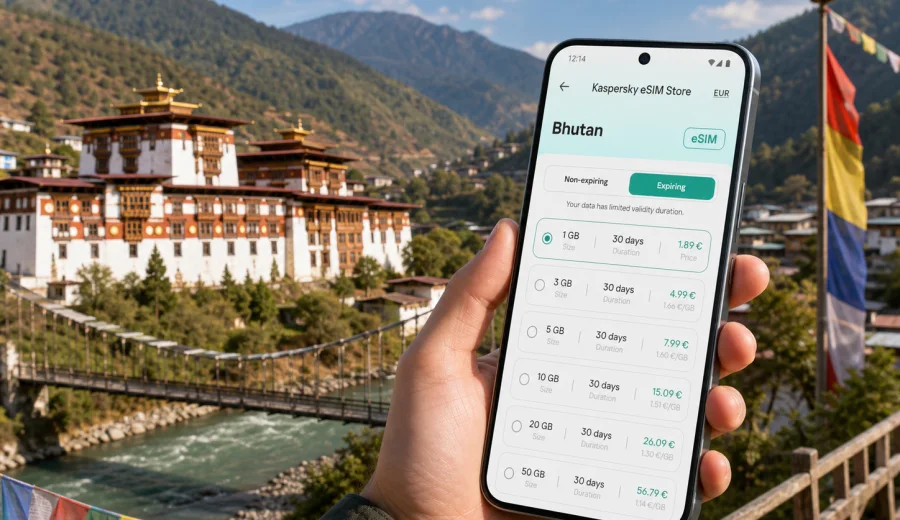
Wangdue Phodrang eSIM: mobile connection and internet for a city trip
Wangdue Phodrang is a practical base for seeing central-western Bhutan: the rebuilt dzong above the river, the Bajo area, nearby Punakha, rural roads toward Phobjikha Valley, and long scenic drives through mountain passes. It is not a city where you can rely on one simple pattern of connectivity. Your route may move between a hotel, a taxi, a village road, a viewpoint, a cafe, and a day trip in a valley where you need maps more than messages.
That is why mobile internet planning matters before you arrive. An eSIM gives you a digital SIM profile for mobile data on a compatible phone, so you can prepare internet access for Bhutan without waiting to find a physical SIM counter after a long journey. For Wangdue Phodrang, that preparation is especially useful because most visitors arrive by road, often after landing in Paro and passing through Thimphu or Punakha.
This guide focuses on real city travel needs: arrival, local movement, navigation, hotel Wi-Fi gaps, business calls, stopovers, and day trips from Wangdue Phodrang. It also explains how to choose an eSIM data plan through Kaspersky eSIM Store while keeping the right expectations about device compatibility, plan validity, and mobile data use.
Why eSIM is useful in Wangdue Phodrang
Wangdue Phodrang is compact compared with major Asian capitals, but the travel pattern is wider than the city center. You may stay in Bajo, visit Wangdue Phodrang Dzong, cross toward Punakha, drive to rural viewpoints, or continue deeper into Bhutan. A mobile connection is useful because the trip is built around movement.
Typical moments when mobile internet helps:
- checking the route from your hotel to Wangdue Phodrang Dzong or Punakha;
- messaging a driver when pickup times shift;
- confirming hotel details after a long road transfer;
- using maps when roads fork between valleys and villages;
- translating short phrases at shops, cafes, or guesthouses;
- checking weather before a mountain drive;
- sharing your live location with travel companions;
- joining a work call from a hotel or cafe when Wi-Fi is weak;
- keeping boarding, booking, and permit documents accessible in cloud storage.
The point is not to be online every minute. The point is to have controlled mobile data ready when travel logistics depend on it.
Arrival: what to plan before the road to Wangdue Phodrang
Most international travelers reach Bhutan through Paro International Airport, then continue by road. Wangdue Phodrang is usually part of a route that may include Thimphu, Punakha, Dochula Pass, or Phobjikha Valley. That means your first data needs may appear before you actually reach the city.
Before you leave for Bhutan, prepare these items:
- your hotel address and phone number saved offline;
- screenshots of booking confirmations and permits, if applicable;
- the expected driving route and rest stops;
- offline map areas for Paro, Thimphu, Punakha, and Wangdue Phodrang;
- a data plan that covers Bhutan and lasts for your full stay;
- charger, power bank, and cable for long road sections;
- a messaging app that your guide, driver, hotel, and colleagues can use.
An eSIM can be installed before departure on a compatible device, then activated according to the plan instructions. This makes the arrival day calmer: you can focus on immigration, luggage, pickup, and the mountain road instead of solving connectivity from scratch.
City focus: where mobile data helps most
Wangdue Phodrang is not only one landmark. Your mobile internet needs change by place and activity.
| City situation | Why internet helps | Practical data use |
|---|---|---|
| Hotel check-in in Bajo or nearby areas | Confirm booking, message reception, open maps | Low to moderate |
| Visit to Wangdue Phodrang Dzong | Navigation, photo backup, messaging | Low |
| Road transfer from Punakha | Driver contact, route checks, arrival updates | Moderate |
| Day trip toward Phobjikha Valley | Maps, weather, messaging, translation | Moderate to high |
| Remote work from a hotel | Email, documents, video calls if needed | High |
| Stopover on a longer Bhutan route | Booking changes, transport coordination | Moderate |
The most reliable approach is to use mobile data for essential travel actions and keep heavy uploads for stable Wi-Fi. If your plan includes enough data, you can still use video calls and cloud backup, but do it deliberately so the allowance lasts through the trip.
Choosing a data allowance for Wangdue Phodrang
The right eSIM plan depends on trip length and behavior, not only the destination. A traveler who uses maps and messages for three days needs far less than someone joining daily video meetings.
Use this simple planning model:
| Trip style | Typical needs | What to prioritize |
|---|---|---|
| Short cultural stop | Maps, messages, hotel coordination | Small data volume, enough validity days |
| Photography route | Cloud backup, social posts, navigation | More data or Wi-Fi backup for uploads |
| Business visit | Email, calls, documents, hotspot use | Larger data volume, clear validity period |
| Multi-city Bhutan route | Paro, Thimphu, Punakha, Wangdue Phodrang, valleys | Country coverage and longer validity |
| Family travel | Several phones, shared plans, transport coordination | Separate compatible devices and predictable usage |
For most city travelers, the first question is not "how much data is the maximum?" It is "what will I need when Wi-Fi is not available?" In Wangdue Phodrang, that answer usually includes maps, messaging, hotel coordination, and occasional browsing. For business travelers, add email attachments, calendars, calls, and possibly mobile hotspot use if your selected plan and device settings allow it.
Practical scenarios in the city
You arrive after a long drive
After several hours on mountain roads, you may want to confirm the hotel location, message your host, check dinner options, or tell family you arrived. If mobile data is ready, you do not need to wait for the hotel Wi-Fi password before taking care of the basics.
You move between Wangdue Phodrang and Punakha
The two areas are often visited together. You may cross between them for sightseeing, meals, or accommodation. Mobile maps help when the driver is late, when you want to confirm a pickup point, or when a short stop becomes a longer detour.
You use Wangdue Phodrang as a road-trip point
Trips toward Phobjikha Valley, Trongsa, or other parts of central Bhutan can involve long road sections. A prepared data plan helps with weather checks, route updates, and communication, but offline maps still matter because signal quality can vary in mountain areas.
You work during the trip
If you need to join calls or send files, treat mobile data as a backup and a mobility tool. Hotel Wi-Fi may be enough for routine browsing, but an eSIM helps when you need a more private connection than public Wi-Fi or when the hotel network is slow during busy hours.
For a short stopover, use mobile data first for logistics: the next hotel, departure time, driver messages, and the next day's route. Entertainment and large uploads can wait for Wi-Fi.
How Kaspersky eSIM Store fits into the trip
Kaspersky eSIM Store is an app and website where you can choose, arrange, and activate an eSIM with a suitable data plan for mobile internet during international travel. It helps you compare available plan conditions such as data volume, validity period, destination, and price before you decide.
For a Wangdue Phodrang trip, choose the country destination, not a separate city page. The city is in Bhutan, so you should look for a plan that covers Bhutan and matches your route length. If your itinerary includes several countries, compare whether a country, regional, or broader plan is more suitable for your full route.
When you are ready to plan the connection for this trip, you can prepare an eSIM for travel in Bhutan and choose a data allowance that fits your stay in Wangdue Phodrang and nearby places.
Before you buy: compatibility and device checks
Not every phone or tablet supports eSIM, and some devices may be locked by the mobile carrier that sold them. Check this before you purchase a plan, especially if you are using an older phone, a device bought through a contract, or a model made for a specific regional market.
Before buying, confirm:
- your device supports eSIM;
- your device is not locked to one mobile carrier;
- your operating system is up to date enough to install an eSIM profile;
- you can access email or the app during setup;
- you understand when the plan validity period starts;
- you know whether data roaming must be enabled for the eSIM line.
You can also use the internal compatibility check: check your device. It is a small step, but it prevents the most frustrating travel problem: buying a data plan and discovering later that the device cannot use it.
How to install and activate an eSIM before Wangdue Phodrang
The exact setup flow depends on your phone and selected plan, but the general logic is simple: choose the destination, select a data plan, complete the order, install the eSIM profile, then activate it according to the instructions.
For detailed setup steps, use the appropriate guide:
A practical setup checklist:
1. Install the eSIM while you still have stable Wi-Fi.
2. Keep your primary SIM active if you need your usual number for banking codes or calls.
3. Label the new line clearly, for example "Bhutan travel data".
4. Set mobile data to use the eSIM line when you are ready.
5. Enable data roaming for the eSIM if the plan instructions require it.
6. Test only what the instructions recommend before departure, so you do not start using data too early.
7. Save the support and plan details offline.
An eSIM normally provides mobile data. It does not automatically include a local phone number, voice calls, or SMS unless those services are stated in the specific plan conditions. For calls and messages in Wangdue Phodrang, many travelers use internet-based messaging apps.
Hotel Wi-Fi and mobile data: use both sensibly
Hotel Wi-Fi can be useful in Wangdue Phodrang, especially for larger tasks such as uploading many photos, downloading documents, or updating apps. Mobile data is better for movement and moments when you cannot depend on a hotel network.
Use Wi-Fi for:
- large photo and video uploads;
- app updates;
- entertainment streaming;
- long cloud backups;
- downloading offline maps for the next day.
Use eSIM mobile data for:
- navigation in town and on road transfers;
- ride, driver, and hotel messages;
- email and calendar checks;
- weather and road planning;
- translation and quick browsing;
- secure access when public Wi-Fi feels unsuitable.
This split keeps your data plan under control while still giving you internet where it matters most.
Trips from Wangdue Phodrang
Wangdue Phodrang is well placed for routes that continue across Bhutan. Mobile data planning should follow the journey, not only the hotel address.
| Route idea | Connectivity notes |
|---|---|
| Wangdue Phodrang to Punakha | Short movements, frequent photo stops, hotel and restaurant searches |
| Wangdue Phodrang to Phobjikha Valley | Longer drive, weather checks, offline maps recommended |
| Wangdue Phodrang to Trongsa | Extended road day, battery and data management matter |
| Wangdue Phodrang to Thimphu | Useful for arrival updates, route timing, and next hotel coordination |
In rural or mountainous sections, do not depend only on live maps. Download offline maps and keep essential addresses saved. Mobile data adds flexibility, but offline preparation keeps the trip steady when signal conditions change.
FAQ
Is an eSIM enough for a trip to Wangdue Phodrang?
For many travelers, an eSIM data plan is enough for maps, messaging, browsing, email, and app-based calls. If you need a local phone number, standard voice calls, or SMS, check the plan conditions carefully because many travel eSIM data plans focus on mobile internet.
Should I install the eSIM before arriving in Bhutan?
It is usually more convenient to install it before departure while you have stable Wi-Fi. Activation timing depends on the selected plan instructions, so read them before you travel.
How much data do I need?
Light users who rely on maps and messages need less data than travelers who upload videos, use hotspot, or join video meetings. Match the plan to your behavior and trip length rather than choosing by city name alone.
Prepare mobile internet before the trip
Wangdue Phodrang rewards travelers who plan the practical details early. Roads, valleys, hotels, and day trips are easier when your phone is ready for maps, messages, weather checks, and booking updates. Install the eSIM on a compatible device, keep offline backups, and use mobile data for the moments when movement matters.
Kaspersky eSIM Store helps you choose, arrange, and activate an eSIM with a suitable data plan for international travel. Before your Wangdue Phodrang itinerary begins, choose an eSIM data plan for Bhutan so your mobile internet setup is ready for the city, nearby Punakha, and the road ahead.