
Travel connectivity guide
Warwick eSIM for Bermuda travel
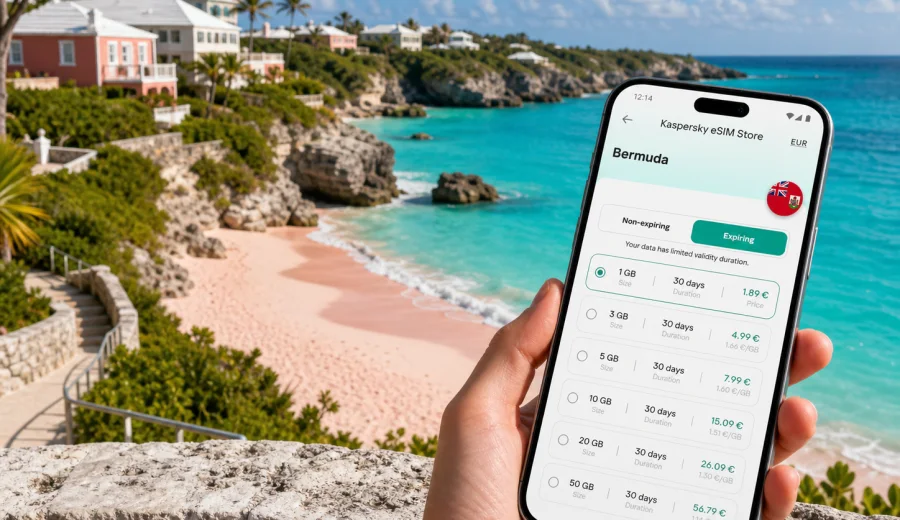
Warwick eSIM: mobile connection and internet for a Bermuda trip
Warwick is a practical base for a Bermuda trip if you want beach time, quiet hotels, and fast access to the rest of the island. The parish sits on the South Shore, close to pink-sand beaches, coves, golf, local restaurants, and the roads that lead east toward Hamilton and the airport or west toward Southampton and Dockyard. For a visitor, mobile internet is more than a convenience: it helps with bus stops, taxi pickup details, walking routes, hotel updates, and flexible plans.
An eSIM is useful in Warwick because much of the day happens away from a hotel lobby. You may start with breakfast near Middle Road, spend the morning around Warwick Long Bay, move to Jobson's Cove, continue toward South Shore Park, and then head into Hamilton for dinner. Public Wi-Fi may be available in some hotels, cafes, or offices, but it is not the same as having mobile data ready while you are between places. With an eSIM on a compatible phone, you can prepare mobile internet before the trip and activate it when the selected tariff conditions allow.
This guide focuses on Warwick, Bermuda: arrival, movement, beaches, hotels, business trips, stopovers, and trips.
Why mobile internet matters in Warwick
Warwick is not a high-rise city district where everything is concentrated around one station. It is a coastal parish with beaches, residential roads, resorts, guesthouses, shops, and green spaces. Distances can look short on a map, but routes often follow winding roads, cliff paths, and bus corridors. Mobile data helps you handle those small decisions that shape the trip.
Common Warwick travel moments where internet helps:
- checking the route from L.F. Wade International Airport to your hotel or rental apartment;
- confirming whether your accommodation is closer to South Road, Middle Road, or the beach side;
- using maps when walking between Warwick Long Bay, Jobson's Cove, and nearby coves;
- checking bus connections before leaving for Hamilton, Horseshoe Bay, or Dockyard;
- messaging a taxi driver, tour host, hotel desk, or colleague;
- looking up restaurant hours before taking a taxi across the island;
- receiving banking, airline, and booking notifications during the day;
- using translation, cloud documents, or work apps on a business trip.
Warwick rewards flexible movement. Mobile internet lets you adjust without going back to the hotel just to reconnect.
A quick answer for Warwick visitors
If you are staying in Warwick for a short holiday, choose an eSIM tariff with enough data for maps, messaging, ride coordination, light browsing, and photo sharing. If you plan to work from the hotel, use video calls, upload large files, or tether a laptop, choose a larger data package and check whether hotspot use is allowed by the selected tariff.
Before buying any eSIM, check your device. Your phone or tablet must support eSIM and should not be locked to a carrier that prevents adding another mobile plan. eSIM usually provides mobile data for travel; ordinary voice calls and SMS are not included unless the chosen tariff specifically says so. For calls, many travellers use internet-based messaging and calling apps over mobile data.
Arrival: from the airport to Warwick
Bermuda's airport is on the eastern side of the island, while Warwick is toward the central-southern area. The route can include taxi travel, pre-arranged transfer, hotel pickup, or a combination of bus and walking if your luggage is light and the timing works. Visitors should also remember that Bermuda has its own transport rules and a more limited car-rental model than many destinations, so planning mobility matters.
Mobile data is useful immediately after landing for four reasons.
| Arrival task | Why data helps |
|---|---|
| Finding the driver or pickup point | You can message, share your location, and confirm the exact meeting area. |
| Checking the address | Warwick hotels and guesthouses may be listed by road, parish, beach area, or nearby landmark. |
| Adjusting to delays | If immigration, baggage, or traffic changes the schedule, you can update the hotel. |
| Saving offline details | You can download maps, booking confirmations, and emergency contacts once connected. |
If you install an eSIM before departure, read the activation rules carefully. Some tariffs begin when installed, some when connected to a supported network, and some have a fixed validity period after activation. The safest approach is to prepare everything before flying, then activate according to the tariff instructions when you are ready to use mobile data.
Moving around Warwick
Warwick is made for small movements: beach to beach, hotel to restaurant, bus stop to trail, taxi to meeting. The parish is also a convenient base for wider Bermuda trips because the island is narrow and main routes connect quickly to Hamilton and the western parishes.
For local movement, mobile internet helps with:
- map orientation on South Road and Middle Road;
- estimating walking time between coves and beach access points;
- checking whether a bus stop is on the correct side of the road;
- comparing taxi time with bus time;
- coordinating scooter or electric microcar pickup where available;
- confirming whether a restaurant, beach bar, or shop is open before you go;
- sending your live location to a travel companion.
Warwick has scenic routes, but some roads have limited sidewalks, and beach paths may not be obvious at first glance. A reliable map connection reduces the chance of walking farther than necessary with beach bags or business clothes.
Warwick beach days and data use
The South Shore is the visual heart of many Warwick trips. Warwick Long Bay is known for a broad beach setting, while Jobson's Cove is a smaller sheltered spot that many visitors include in the same outing. Nearby coastal areas make it easy to spend several hours moving between sand, paths, viewpoints, and lunch stops.
A beach day usually uses less data than a workday, but it still benefits from mobile internet:
- checking the weather before leaving;
- navigating to the correct entrance or parking area;
- messaging friends when people split up along the beach;
- using maps to find restrooms, food, or the next bus stop;
- paying attention to battery and data use if you take many photos and videos;
- uploading media later on Wi-Fi instead of using mobile data for large files.
For a relaxed beach-focused Warwick stay, a moderate data package is often enough if you keep video streaming and cloud backups for hotel Wi-Fi. For a content-heavy trip, choose more data so you are not forced to manage every upload.
Choosing an eSIM data package for Warwick
The best eSIM tariff for Warwick depends on how long you stay, how often you leave the hotel, and how data-heavy your habits are. Do not choose only by the largest number of gigabytes. Look at validity period, destination, activation rules, supported networks if shown, price, and whether tethering is permitted.
Use this simple planning guide:
| Trip style in Warwick | Typical mobile data need |
|---|---|
| 1-2 day stopover | Maps, messaging, bookings, airport and hotel coordination. |
| 3-5 day beach stay | Daily navigation, restaurant checks, social apps, occasional photo sharing. |
| One-week holiday | More route planning, weather checks, bookings, media uploads, wider island trips. |
| Business trip | Email, documents, meeting apps, taxi coordination, backup connection for hotel Wi-Fi. |
| Family trip | Shared logistics, group messaging, maps, attraction planning, possible higher total use. |
Once your device is compatible and your travel dates are clear, you can choose an eSIM tariff for Bermuda through Kaspersky eSIM Store and compare available options by data volume, duration, destination, and price. Kaspersky eSIM Store is an app and website that helps you choose, arrange, and activate an eSIM with a suitable data tariff for international travel; it is not a mobile network operator and does not provide a local phone number unless a particular tariff states otherwise.
How much data to plan
Data use varies, but the pattern is predictable. Maps, messaging, email, and light browsing are usually manageable. Video streaming, cloud photo backup, app updates, and laptop tethering can consume data quickly.
| Activity | Data impact | Warwick travel note |
|---|---|---|
| Messaging, maps, bookings | Low to medium | The everyday base for beach days and transport. |
| Photo sharing and social apps | Medium | Upload large albums later if your package is small. |
| Video calls and streaming | High | Better on hotel Wi-Fi unless you planned extra data. |
| Laptop hotspot | Medium to very high | Check tariff conditions before relying on tethering. |
For Warwick, separate essential data from entertainment data. Essentials keep maps, bookings, transport, and messaging available. Entertainment data covers streaming, heavy uploads, and casual browsing. If you are unsure, cover the essentials first and pause automatic cloud backups on mobile data.
Hotels, work, and local routines
Many Warwick visitors stay in hotels, resort-style properties, guesthouses, or short-stay rentals. Accommodation Wi-Fi can help with long calls and large uploads, but it does not help when you are walking back from a beach access road, waiting for a taxi, or moving between South Road and Middle Road. Before arrival, save your address, check-in instructions, map pin, transfer details, meeting addresses if needed, and a screenshot of your eSIM setup information.
Transport scenarios from Warwick
Bermuda trips often combine taxis, buses, hotel shuttles, ferries from other areas, scooters, or small electric rental vehicles where permitted. Warwick's central-southern position is practical, but timing still matters.
Practical data scenarios:
- Bus day: check direction before boarding between South Road, Hamilton, and western beaches.
- Taxi evening: message the driver or hotel desk when leaving a restaurant.
- Beach-hopping: find the next beach entrance or return route.
- Airport departure: keep flight status and transfer details accessible.
The island is compact, but missed connections cost time.
Installation and activation checklist
Install your eSIM when you have stable Wi-Fi and enough time to follow the instructions carefully. The exact steps depend on the device and the selected tariff. For detailed setup, use the Android installation guide or the iOS installation guide.
Before you leave:
- confirm that your device supports eSIM and is not carrier-locked;
- choose Bermuda as the destination;
- read the data volume, validity period, and activation rules;
- install the eSIM using Wi-Fi;
- label the eSIM clearly, for example "Bermuda data";
- keep your primary SIM available for banking or two-factor messages;
- check whether data roaming must be enabled for the eSIM profile.
After arrival, turn on the eSIM line for mobile data, prevent unintended roaming on your home SIM, open a map or browser to confirm the connection, and monitor remaining data if available.
Compatibility and device preparation
Not every phone that looks modern supports eSIM, and some devices are sold with regional or carrier restrictions. Before choosing a tariff, check your device and confirm that you can add an eSIM profile.
Also check that your phone is updated, you know where mobile data line selection is located, you can access the purchase email or app account, and you will have Wi-Fi during installation. If you travel with two devices, the phone is usually the better place for the eSIM because it stays with you for maps, taxis, and beach-to-hotel movement.
Warwick trip examples
For a beach weekend, use mobile data for airport coordination, maps, weather, restaurants, and messaging. For a family holiday, it helps with shared bookings and route planning. For a business stay or short stopover, it is most useful for meeting details, transfer updates, and flight information.
Mistakes to avoid
- Waiting until you are outside airport or hotel Wi-Fi to begin installation.
- Buying a package without checking device compatibility.
- Assuming an eSIM data tariff includes a local phone number.
- Leaving cloud backup, app updates, and streaming on mobile data.
- Choosing a validity period shorter than the full stay.
- Depending only on public Wi-Fi for maps and transport coordination.
FAQ: eSIM and mobile internet in Warwick
Is an eSIM useful for Warwick, Bermuda?
Yes. It helps with maps, messaging, bookings, beach movement, hotel coordination, and transport.
Can I install the eSIM before travelling?
In many cases, yes. Read the tariff rules so you know when validity starts and when to activate mobile data.
Will an eSIM give me a Bermuda phone number?
Usually no. Travel eSIM tariffs are commonly for mobile data. Voice calls and SMS are included only if the conditions say so.
Final preparation for Warwick
Before your trip, make mobile internet part of the same checklist as your passport, hotel booking, and airport transfer. Confirm compatibility, choose a tariff that covers Bermuda, install it while you have Wi-Fi, and keep activation instructions easy to find. For Warwick, this preparation is useful because the best parts of the trip are spread out: South Shore beaches, local roads, quiet hotels, restaurants, day trips, and transfers across the island.
When your dates and device are ready, you can prepare an eSIM tariff for your Bermuda trip through Kaspersky eSIM Store and choose the data volume and validity period that fit your Warwick itinerary.