
Travel connectivity guide
Washington DC eSIM for mobile internet
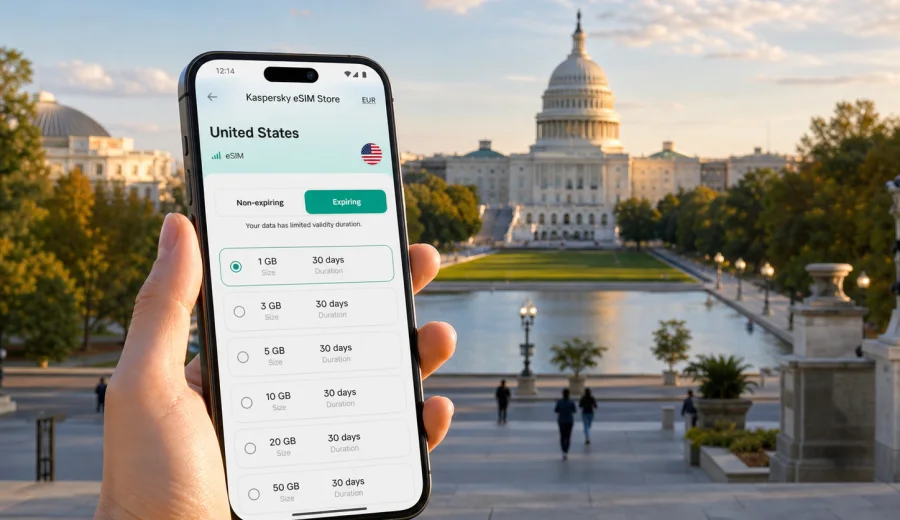
Washington DC eSIM: mobile connection and internet for your trip
Washington DC is a city where a reliable mobile connection becomes part of the trip itself. You may need maps when you leave Dulles, Reagan National, or Baltimore/Washington International, a ride-hailing app near the terminal, a Metro route into the city, a hotel check-in email, a restaurant reservation, or a work call between meetings. An eSIM can help you prepare mobile internet before you arrive, without looking for a physical SIM card after a long flight.
This guide is for travelers who are coming to Washington DC for sightseeing, business, conferences, government-related meetings, university visits, family trips, stopovers, or a longer route through the United States. The focus is practical: where internet is useful in the city, how to estimate data needs, what to check before buying an eSIM plan, and how to use Kaspersky eSIM Store as an app and website for choosing, arranging, and activating an eSIM with a suitable data plan for your trip.
Why eSIM is useful in Washington DC
Washington DC is compact on the map, but your day can spread across airports, Metro lines, museum entrances, hotels, neighborhoods, security checkpoints, and short trips into Virginia or Maryland. Mobile internet helps you keep those pieces connected.
Typical moments when an eSIM can be useful:
- finding the right airport pickup zone after arrival;
- checking Metro, bus, rideshare, or walking routes between neighborhoods;
- loading timed-entry details for museums or government buildings;
- coordinating with colleagues during a business trip;
- using messaging apps when your regular number is not practical for calls;
- checking hotel details, restaurant bookings, and mobile tickets;
- navigating between the National Mall, Georgetown, Dupont Circle, Capitol Hill, Navy Yard, and Arlington;
- staying online during a short layover or stopover when airport Wi-Fi is not enough.
Washington DC also has many moments when you may not want to depend only on public Wi-Fi. Hotels, cafes, museums, airports, and conference venues often provide Wi-Fi, but access can be uneven, crowded, password-protected, or limited to a specific area. An eSIM data plan gives you another option for maps, messages, browser searches, ticket pages, and translation tools while you move around the city.
Arrival scenarios: airport, train, and first ride
Your first hour in Washington DC is often the most data-heavy part of the trip. You are switching from airport signs to real-time decisions: which line to take, whether a rideshare is faster, where the hotel entrance is, and how to update someone waiting for you.
| Arrival point | Why mobile internet matters | Practical eSIM use |
|---|---|---|
| Ronald Reagan Washington National Airport | Close to the city and connected by Metro | Check train directions, rideshare pickup, hotel route, and meeting time |
| Washington Dulles International Airport | Farther from central DC, with transit and car options | Compare travel time, load navigation, message your hotel, track ride pickup |
| Baltimore/Washington International Airport | Useful for some regional routes | Plan rail or car transfer, check delays, keep maps available across the route |
| Union Station | Major rail and bus arrival point | Navigate to Metro, taxi, hotels, Capitol Hill, or downtown offices |
If you install your eSIM before departure, you can land with the setup already in your phone. You may still need an internet connection for the initial installation process, and activation details depend on the selected plan and device. The practical advantage is that you can reduce the number of decisions you make while tired, carrying luggage, and trying to find transport.
Where mobile internet helps most in the city
Washington DC rewards planning. Many visitors move between formal appointments, timed museum visits, security lines, and neighborhoods that feel close but require a real route. Mobile internet is useful less as a luxury and more as a steady layer of trip control.
Use eSIM data for these city tasks:
1. Navigation on foot. The National Mall is walkable, but distances can feel longer than expected. Maps help you choose the nearest Metro station, cafe, entrance, or restroom.
2. Transit decisions. Metro, buses, taxis, rideshares, scooters, and walking can all make sense depending on weather, time of day, and luggage.
3. Hotel coordination. Many hotels are downtown, near Dupont Circle, Foggy Bottom, Georgetown, NoMa, Navy Yard, or Arlington. Mobile internet helps with check-in forms, directions, and late arrival messages.
4. Business travel. If you are moving between an office, embassy, conference venue, and dinner, you need dependable access to email, calendars, messaging, and maps.
5. Short breaks. In a city with museums, parks, campuses, monuments, and restaurants close together, internet helps you change plans without returning to the hotel.
Choosing an eSIM plan for Washington DC
For a Washington DC trip, choose an eSIM plan for the United States, not a city-only product. The city sits between Maryland and Virginia, and many realistic itineraries cross those borders without feeling like a separate journey. You might stay in Arlington, fly through Dulles, visit Alexandria, attend a meeting in Bethesda, or take a day trip outside the District.
Think about three inputs before choosing a plan:
- Length of stay. A two-day conference, a five-day museum trip, and a three-week U.S. route need different validity periods.
- Data behavior. Maps, messaging, email, and tickets use less data than video calls, cloud backups, social video, and hotspot use.
- Route. If Washington DC is only one stop in a wider United States trip, choose a plan that fits the full route, not just the first city.
Here is a practical way to estimate your data needs:
| Traveler style | Typical data use | What to consider |
|---|---|---|
| Light visitor | Maps, messages, email, bookings | A smaller data package may be enough if you use hotel Wi-Fi for heavier tasks |
| Museum and city traveler | Maps, searches, tickets, photos, messaging | Choose more data if you often upload media or change plans during the day |
| Business traveler | Email, calendar, documents, calls over apps | Allow extra data for work apps and possible tethering, if the plan supports it |
| Family or group organizer | Navigation, tickets, restaurant searches, coordination | Choose enough data for repeated checks and shared logistics |
| Multi-city traveler | DC plus New York, Philadelphia, Boston, or other U.S. stops | Match the plan validity and data volume to the whole U.S. itinerary |
If you want to prepare before departure, Kaspersky eSIM Store helps you choose and arrange a suitable data plan for the destination. For a Washington DC city trip, use the United States destination page to choose an eSIM plan for travel in Washington DC and review the available data volume, validity period, and plan conditions before you activate it.
Washington DC neighborhoods and trip patterns
The right amount of mobile internet depends on how you move through the city. Washington DC is not only the National Mall. Your practical data needs change by district, schedule, and travel style.
| Area or route | Common trip pattern | Why data helps |
|---|---|---|
| National Mall and Smithsonian area | Museums, monuments, timed entries, long walks | Maps, ticket pages, weather checks, meeting points |
| Capitol Hill | Meetings, sightseeing, restaurants, Union Station | Navigation between buildings, security timing, messages |
| Downtown and Penn Quarter | Hotels, offices, restaurants, events | Calendar updates, rideshare, reservations, evening routes |
| Georgetown | Shopping, dining, waterfront walks | Walking navigation, ride pickup, restaurant searches |
| Dupont Circle and Adams Morgan | Hotels, cafes, nightlife, embassies | Maps after dark, messaging, transit choices |
| Navy Yard and The Wharf | Waterfront, sports, restaurants, events | Ticket access, crowd navigation, return transport |
| Arlington and Alexandria | Hotels, business visits, airport access | Cross-border navigation, rides, meetings, day trips |
How to install and activate eSIM for a Washington DC trip
The exact installation flow depends on your device and the selected eSIM plan, but the preparation logic is simple. Before you buy, make sure your phone or tablet supports eSIM and is not locked in a way that prevents adding another mobile plan. If you need to check compatibility, use Check your device before you continue.
Basic setup steps:
1. Choose the United States as your destination and select a plan that matches your trip length and expected data use.
2. Complete the purchase and open the eSIM details in your account, email, app, or website flow.
3. Install the eSIM while you have a stable internet connection.
4. Set the eSIM as the mobile data line when you are ready to use it.
5. Follow the plan instructions for activation and data roaming settings if required.
6. Keep your primary SIM available for calls or SMS if you still need your regular number.
For device-specific setup, follow the Android installation guide or the iOS installation guide. Do this before your first busy travel day if possible, because it is easier to read instructions at home, at the hotel, or on a stable Wi-Fi connection than at an airport curb.
What to check before buying
An eSIM is convenient, but it still depends on the device, the plan conditions, and local network availability. A few checks can prevent common travel problems.
Before you pay, confirm:
- your device supports eSIM;
- your device is not carrier-locked in a way that blocks adding an eSIM;
- the destination is the United States, which covers Washington DC travel scenarios;
- the data volume fits your expected use;
- the validity period covers your full stay;
- you understand when the plan starts counting validity or data usage;
- the plan conditions mention whether tethering or hotspot use is allowed, if you need it;
- you know that many eSIM data plans do not include a standard phone number, voice calls, or SMS unless stated in the plan conditions.
If you need ordinary calls or SMS to your regular number, keep your primary SIM active as appropriate and use the eSIM mainly for mobile data. For calls and messages, many travelers use internet-based apps over mobile data, but availability and account access can depend on your own apps and settings.
Business trips, conferences, and official visits
Washington DC is a frequent destination for business travelers, public-sector meetings, university events, association conferences, and international delegations. Mobile internet supports calendar changes, messages with hosts or drivers, routes between offices and hotels, and flight checks during a packed day. If work connectivity is important, choose more data than a leisure visitor would, and check whether hotspot use is allowed before assuming you can tether a laptop.
Stopovers and short stays
Some travelers see Washington DC in less than 24 hours: a meeting, a museum stop, a train transfer, or a layover with enough time to leave the airport. In a short stay, mobile internet is about speed.
For a stopover, prioritize airport or station routing, one clear city route, mobile tickets, reliable messaging, and enough data for maps until you return. Do not overbuild the plan if you will use only maps and messages for a few hours. Choose more data only if you expect calls over apps, media uploads, or hotspot use.
Trips from Washington DC
Washington DC is often part of a larger East Coast or Mid-Atlantic route. Common extensions include Arlington and Alexandria, Baltimore, university visits in Maryland or Virginia, and train routes toward Philadelphia or New York. A United States eSIM plan is the practical fit for Washington DC and nearby travel in the same country.
Quick checklist before you fly
Use this checklist before departure: save your hotel address and first route, confirm your phone supports eSIM, check that destination, data volume, and validity match the trip, keep installation instructions available, review your primary SIM settings, pause heavy sync on mobile data, and sign in to important apps before travel.
FAQ: eSIM and mobile internet in Washington DC
Do I need a city-specific eSIM for Washington DC?
No. For a Washington DC trip, choose a United States destination plan. The city is part of the United States, and nearby travel often crosses into Virginia or Maryland.
Will an eSIM give me a U.S. phone number?
Many travel eSIM data plans are for mobile internet and do not include a standard phone number, voice calls, or SMS unless the plan states otherwise. Use messaging or calling apps over data when suitable.
Can I use public Wi-Fi instead?
You can use public or hotel Wi-Fi where available, but it may not cover airport transfers, street navigation, rideshare pickup, or sudden plan changes. Mobile data is useful between Wi-Fi zones.
Choose an eSIM plan for Washington DC
Washington DC is easier when your phone is ready for the first route, the first message, and the first change of plan. With Kaspersky eSIM Store, you can use the app or website to choose, arrange, install, and activate an eSIM with a suitable data plan for mobile internet in the United States.
Before you travel, review the destination, data volume, validity period, device compatibility, and activation instructions. Then prepare an eSIM plan for your Washington DC trip so you can focus on the city instead of searching for a physical SIM card after arrival.