
Travel connectivity guide
West Bay eSIM for Cayman Islands Travel
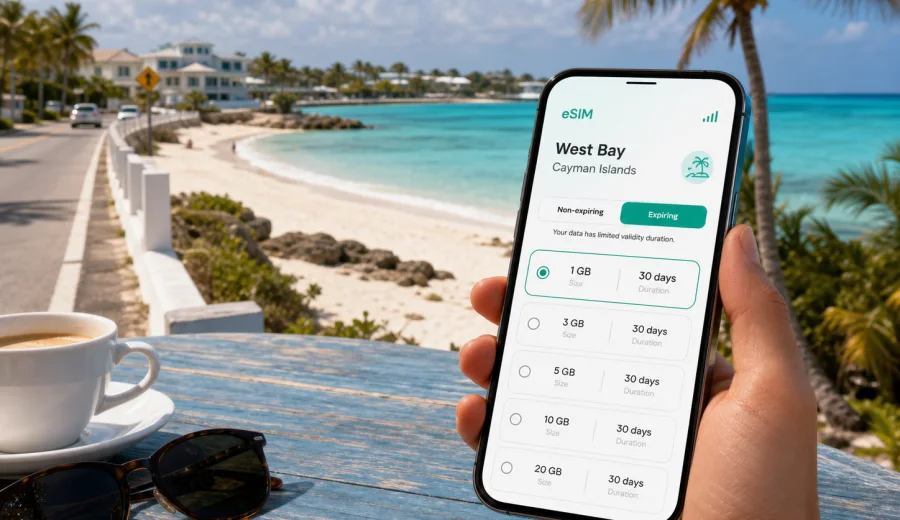
West Bay eSIM: mobile connection and internet for your Cayman Islands trip
West Bay is one of the most practical bases on Grand Cayman if you want the beach, quiet residential streets, dive operators, restaurants, and short trips to the island's busier areas without staying in the middle of George Town. For travelers, that also means your mobile connection matters from the first hour: you may be checking a transfer from Owen Roberts International Airport, confirming a hotel address near Seven Mile Beach, finding a dive shop, calling a ride, or sending arrival details to family while your bags are still in the car.
An eSIM helps you prepare mobile internet before you depend on airport Wi-Fi, hotel reception, or a local store. Instead of changing a physical SIM card, you install a digital SIM profile on a compatible phone and choose a data plan for the Cayman Islands. The result is simple: when you land, you already know which line should handle mobile data, how much traffic you have, and how long the plan is valid.
This guide focuses on West Bay itself: arrival, local movement, beach days, short business stays, family trips, dive plans, and day trips around Grand Cayman. The Cayman Islands context is important because the eSIM plan is selected for the country, but the daily value is local: maps, messages, reservations, and route checks while you move between West Bay, Seven Mile Beach, Camana Bay, George Town, and the north side of the island.
Why mobile internet is useful in West Bay
West Bay feels relaxed, but it is still a place where small timing details can affect the day. Many visitors move between a hotel or rental villa, beaches, waterfront restaurants, snorkeling points, supermarkets, dive centers, and boat departures. Distances are not huge, yet relying only on memory or offline screenshots can be inconvenient when plans change.
With mobile internet on your phone, you can:
- check the exact location of your villa, condo, or resort entrance;
- message a host, driver, or tour operator after arrival;
- use maps for short drives around West Bay Road and nearby residential lanes;
- confirm restaurant hours before you leave the beach;
- manage a mobile boarding pass, hotel app, or travel email;
- use messengers for calls if your eSIM data plan does not include a regular phone number;
- share your location with family during beach days or evening transfers;
- look up weather updates before boat, dive, or snorkeling plans.
Arrival in Grand Cayman: getting from the airport to West Bay
Most visitors arrive through Owen Roberts International Airport near George Town. West Bay is on the western end of Grand Cayman, beyond Seven Mile Beach. The transfer is usually straightforward, but your exact route and travel time can depend on traffic, the time of day, and where your accommodation is located.
Mobile data is useful during this first transfer for several reasons. You may need to open the booking confirmation with the full address, message a property manager, check whether a grocery stop makes sense before check-in, or send a live location to someone waiting at the hotel. If you are renting a car, online maps help with the first drive on unfamiliar roads and local roundabouts.
Before you leave the terminal, check three settings:
| Setting | Why it matters in West Bay travel |
|---|---|
| Mobile data line | Your phone should use the eSIM line for data, not your home SIM by mistake. |
| Data roaming for the eSIM | Some eSIM profiles require data roaming to be enabled for the eSIM line. |
| Messaging apps | If your plan is data-only, internet-based calls and messages may be your main communication method. |
It is also worth saving your accommodation address offline before departure. eSIM is helpful, but a saved address is a useful backup if you are tired after a flight, the phone battery is low, or you need to show the address to a driver quickly.
Where an eSIM helps most around West Bay
West Bay is not a city of subway lines and dense business districts. It is a coastal area where travelers often make many small moves: beach to cafe, hotel to dive shop, villa to supermarket, restaurant to sunset spot. Mobile internet helps because these movements are often improvised.
Common West Bay scenarios include:
1. You land in Grand Cayman and need to message your transfer driver.
2. You check into accommodation and need directions to a supermarket or pharmacy.
3. You meet a dive or boat operator and need to confirm the departure point.
4. You compare route times before going to Camana Bay or George Town.
5. You use translation, email, maps, and messaging while moving between beaches and restaurants.
6. You join a video meeting from a hotel lobby or rental property and need a mobile backup if Wi-Fi is weak.
The value of an eSIM is not only in being online. It is in having a predictable data option that you planned before the trip. Hotel Wi-Fi can be useful when you are in your room, but it does not help much on the road, on the beach, or while standing outside a closed restaurant looking for the next option.
Choosing the right data amount for West Bay
Your data needs depend on how you travel. West Bay can be a low-data destination if you mainly use maps and messaging, or a higher-data destination if you upload video, work remotely, or share a connection with a laptop. The safest approach is to estimate your normal travel behavior rather than choose only by price.
| Traveler type | Typical data use | Practical planning note |
|---|---|---|
| Short stopover or weekend visitor | Low | Maps, messages, ride coordination, and quick checks may be enough. |
| Beach vacation traveler | Medium | Add photo sharing, restaurant searches, weather checks, and family messaging. |
| Diver or activity-focused traveler | Medium | You may need maps, operator messages, booking emails, and weather updates. |
| Remote worker or business traveler | Higher | Video calls, tethering, cloud files, and backups can use data quickly. |
| Family trip organizer | Medium to higher | One person often handles maps, bookings, messages, and shared plans for everyone. |
If you plan to stream video or use your phone as a hotspot, check whether the selected tariff allows modem mode and whether the data volume fits that behavior. A data-only eSIM is usually best treated as a travel internet tool: navigation, booking management, messaging, and practical online tasks. For large downloads, system updates, and long video streaming, hotel or apartment Wi-Fi may still be the better option.
For the Cayman Islands, you can use Kaspersky eSIM Store to choose an eSIM data plan for your West Bay trip before you travel or while you are preparing your arrival. Review the data amount, validity period, destination, and conditions before payment so the plan matches your route and length of stay.
West Bay movement: local routes, beaches, and practical checks
West Bay is especially suited to travelers who want a quieter base with easy access to the western side of Grand Cayman. Mobile internet helps because many useful places are spread out rather than concentrated in one walkable center.
You may use data for:
- route checks between West Bay, Seven Mile Beach, and George Town;
- parking and entrance details for beaches and attractions;
- opening restaurant menus or reservation confirmations;
- checking whether a beach club, dive shop, or tour office has changed hours;
- messaging the accommodation host about arrival time or maintenance questions;
- comparing route options if you want to avoid a busy road at peak time.
If you rent a car, keep your navigation app ready before leaving the property. If you use taxis or private transfers, mobile data helps with live coordination, especially after dinner or when leaving a beach area with several similar pickup points.
Hotels, villas, and apartment stays
Accommodation around West Bay and the nearby Seven Mile Beach corridor can include resorts, condos, villas, and smaller guest properties. Property Wi-Fi may be enough in the room, but mobile data is useful before check-in and during local errands.
Before check-in, mobile internet helps you:
- open the booking confirmation and entry instructions;
- contact the host if your flight is delayed;
- find the exact building, gate, or reception point;
- coordinate grocery delivery or restaurant pickup;
- check local services after office hours.
During the stay, use mobile data for maps and messages, then switch heavier tasks to Wi-Fi in the room. If one person manages bookings and family messages, that phone should be the best-prepared device.
Business trips and work calls from West Bay
Some visitors combine meetings in George Town or Camana Bay with a quieter stay near the water. In that case, mobile internet becomes part of the work setup: calendar updates, route checks, messages between meetings, and a backup connection for urgent tasks.
For work travel, sync important files before leaving, save meeting addresses, check whether tethering is allowed, and monitor data balance during laptop sessions. If your eSIM tariff is data-only, regular voice calls and SMS may not be included unless the plan says otherwise.
Device compatibility before you buy
Not every phone supports eSIM, and some devices may be locked to a carrier. Before choosing a plan, check your device and confirm that the phone or tablet can install and use an eSIM profile.
Use this short checklist:
- Your device supports eSIM.
- The device is not locked in a way that prevents adding another mobile plan.
- You have a stable internet connection for installation.
- You know which SIM line should handle mobile data after activation.
- You understand that an eSIM may not be transferable to another device after activation, depending on the profile conditions.
It is better to check compatibility before departure, not at the airport.
How to install an eSIM for a West Bay trip
The installation process depends on your device and the specific eSIM profile, but the general idea is simple: choose the destination, select a suitable data plan, complete the order, install the eSIM profile, and activate it according to the instructions. If you need device-specific help, use the Android installation guide or the iOS installation guide.
For a smoother setup, follow these steps:
1. Install the eSIM while you still have reliable Wi-Fi.
2. Name the eSIM line clearly, for example "Cayman data" or "Travel data".
3. Keep your primary SIM available for calls or SMS if you need your regular number.
4. Set mobile data to the eSIM line when you want to use the travel plan.
5. Enable data roaming for the eSIM line if the instructions or device settings require it.
6. Turn off automatic app updates and cloud backups on mobile data.
7. Check the remaining data and validity period during the trip.
Do not delete the eSIM profile unless you are sure you no longer need it. Some profiles cannot be reinstalled after deletion.
Stopovers, day trips, and data-saving habits
Some travelers use West Bay for a short Cayman Islands itinerary: one or two nights before another Caribbean destination, a compact beach break, or a day built around diving and dining. A prepared eSIM helps with airport coordination, maps, activity confirmations, boarding passes, and accommodation messages.
For day trips from West Bay, check the route, meeting point, pickup instructions, weather updates, battery level, and remaining data before you leave. If you travel as a family or group, choose one primary organizer and one backup organizer.
To make the plan last longer, download offline map areas, disable automatic photo backup on mobile data, use Wi-Fi for app updates, send compressed media in messengers, and close hotspot sessions after laptop work.
West Bay eSIM FAQ
Is an eSIM useful if my hotel has Wi-Fi?
Yes. Hotel Wi-Fi helps mainly inside the property, while an eSIM supports transfers, maps, restaurant searches, activity coordination, and routes around West Bay.
Does an eSIM replace my regular phone number?
Usually not. Many travel eSIM plans focus on mobile data and may not include a regular phone number, voice calls, or SMS unless this is stated in the plan conditions.
Should I install the eSIM before flying to Grand Cayman?
Installing before departure is often more convenient because you can use reliable Wi-Fi and avoid setup pressure after landing. Activation timing can depend on the plan conditions.
Can I use an eSIM for navigation from the airport to West Bay?
Yes, if the eSIM is installed, active when needed, and your phone is configured to use it for mobile data. Save the address offline as a backup.
Final checklist before your West Bay trip
Before you travel, review these points:
- Your phone supports eSIM and is not restricted by a carrier lock.
- You selected a Cayman Islands data plan with enough traffic and validity for the trip.
- You saved your accommodation address and key booking confirmations.
- You know whether your plan includes only data or also other services.
- You installed the eSIM using reliable Wi-Fi.
- You checked which SIM line handles mobile data.
- You kept installation instructions and support access available.
West Bay is easiest to enjoy when the practical details are already handled. With an eSIM prepared through Kaspersky eSIM Store, you can focus on arrival, routes, reservations, beach plans, and messages instead of searching for a physical SIM card or depending on Wi-Fi at every stop. Before departure, choose a suitable eSIM data plan for the Cayman Islands and make sure your phone is ready for the way you plan to move around West Bay.