
Travel connectivity guide
West End eSIM Guide for Anguilla Travel
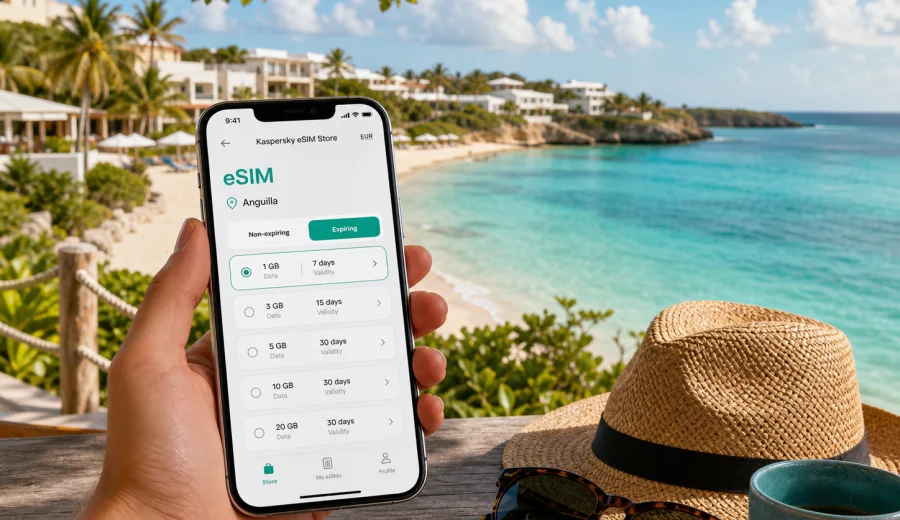
West End eSIM Guide: Mobile Connection and Internet in Anguilla
West End is one of the most practical bases for a trip to Anguilla if you want beaches, resort restaurants, quiet roads, and short hops between coves without the pace of a large city. It is close to Meads Bay, Maundays Bay, Barnes Bay, Cove Bay, and the western end of Rendezvous Bay, so a normal day can move from hotel breakfast to beach club booking, taxi pickup, dinner reservation, and a late check of the ferry schedule. For all of that, reliable mobile internet matters more than it may seem when you are still packing.
An eSIM can help you prepare mobile data before you arrive, without waiting to find a physical SIM card after a flight or ferry. In West End, that is useful because many decisions are small but time-sensitive: which beach entrance to use, whether your driver has changed pickup time, where a resort gate is located, how to share your location with friends, and when to leave for Blowing Point ferry terminal or Clayton J. Lloyd International Airport.
This guide focuses on using an eSIM for West End, Anguilla. It is not a general country overview. The goal is to help you think through arrival, local movement, hotel Wi-Fi gaps, beach days, short business trips, stopovers, and island routes that start or end in West End.
Quick summary for West End travelers
If you are staying in West End, prepare mobile internet before the first transfer. The area is relaxed, but the travel pattern is active: resort zones are spread across bays, taxis are often arranged by message or phone, and navigation can be easier when you can open maps, reservation details, and ride instructions at any time.
| Travel situation in West End | Why mobile data helps | Practical eSIM use |
|---|---|---|
| Arrival by ferry at Blowing Point | Confirm pickup, send location, check hotel route | Activate data before leaving the terminal area |
| Arrival by air through Clayton J. Lloyd International Airport | Coordinate transfer and check the drive west | Keep booking references and maps available |
| Beach days around Meads Bay and Maundays Bay | Move between restaurants, beach clubs, and villas | Use maps, messaging, and light browsing |
| Resort stay | Avoid depending only on room or lobby Wi-Fi | Keep mobile data for outdoor areas and transfers |
| Business trip or remote work | Join calls, receive codes, and use cloud tools | Choose a data amount that fits work tasks |
| Day trips from West End | Navigate to Shoal Bay, Sandy Ground, The Valley, or Island Harbour | Keep route checks and messaging online |
Why mobile connection matters in West End
West End is not difficult to navigate, but it is different from a dense city where you can step outside and immediately find many shops, taxi stands, and public transport options. A visitor often moves by rental car, arranged taxi, resort transfer, or private driver. Beaches and restaurants may be close on a map but separated by roads, gates, bays, or short drives. Mobile internet helps you keep those details under control.
The most common online tasks in West End are practical rather than heavy:
- messaging a taxi, hotel concierge, villa host, or travel companion;
- checking a restaurant booking or beach club opening time saved in email;
- using maps between Meads Bay, Barnes Bay, Maundays Bay, Cove Bay, and Rendezvous Bay;
- receiving banking, airline, ferry, or hotel verification codes through apps;
- translating short messages or menu notes if needed;
- checking weather before a boat trip or beach plan;
- sharing photos after returning to Wi-Fi instead of uploading constantly on mobile data.
This is exactly the kind of trip where a prepared eSIM can reduce friction. You do not need to treat mobile data as unlimited. You need enough data for navigation, messaging, reservations, and backup connectivity when Wi-Fi is weak, busy, or unavailable outside your room.
Arriving for a West End stay
Many travelers reach Anguilla through a regional connection, ferry, private boat transfer, or a short flight. Whatever route you choose, the final step into West End usually involves a transfer across the island. That is the moment when mobile data can be most valuable.
If you arrive by ferry at Blowing Point, you may want to message your driver as soon as you clear the terminal area. If you arrive by air at Clayton J. Lloyd International Airport, you may need to confirm whether the transfer is waiting outside, whether the villa manager has sent a gate code, or whether your hotel has adjusted check-in instructions. If your route includes a connection in another country before Anguilla, it is also useful to download documents and prepare your eSIM before the final leg.
Before departure, save these items offline as a backup:
- passport and travel document scans in a secure app;
- hotel or villa address in West End;
- ferry, boat, or flight confirmation;
- transfer contact name and phone number;
- map pins for your hotel, first dinner booking, and departure point;
- eSIM installation instructions and QR code if you use one.
Offline files are useful, but they do not replace mobile internet. If pickup time changes, if the driver asks for your exact location, or if you need to check whether a restaurant still has availability, you need a live connection.
Local movement: taxis, rental cars, and resort transfers
West End travel is usually calm, but it rewards planning. The area is built around beaches, resorts, villas, and restaurants rather than metro lines or dense bus routes. Visitors commonly use taxis, hotel transfers, rental cars, or arranged drivers. Mobile data helps with all of them.
With taxis, messaging is often the easiest way to confirm pickup times. A driver may ask whether you are at the lobby, beach entrance, restaurant, or villa gate. With a rental car, maps help you avoid missing turns on smaller roads after dark. With resort transfers, mobile data lets you check whether the next pickup is from the main entrance, beach side, or a partner property.
For a rental car, remember that Anguilla uses left-side driving. If you are used to right-side traffic, do not rely on last-second navigation. Set your destination before you leave the parking area, let a passenger handle the phone if possible, and keep the route simple at night.
Useful West End route checks
| Route from West End | Typical reason to go | Data you may need |
|---|---|---|
| West End to Meads Bay | Beach, lunch, sunset drinks, resort visits | Maps, reservation details, messaging |
| West End to Maundays Bay | Hotel stay, beach time, dinner | Driver coordination and route pin |
| West End to Rendezvous Bay | Long beach walk, restaurant, music venue | Weather, map pin, return pickup |
| West End to Blowing Point | Ferry departure or boat transfer | Departure time, transfer messages |
| West End to The Valley | Errands, business, airport route nearby | Navigation and opening times saved in email |
| West End to Shoal Bay | Full-day beach trip across the island | Maps, photo sharing later, pickup timing |
For many visitors, the best data habit is simple: use mobile data for navigation and messaging, then use hotel Wi-Fi for large uploads, long video calls, and app updates.
Choosing an eSIM data amount for West End
The right eSIM plan depends on your trip length and habits. A beach-focused weekend with hotel Wi-Fi needs less data than a work trip with video calls. A couple sharing a villa may use separate eSIMs if both people need independent navigation and messaging. Families should think about who coordinates transport, restaurant reservations, and children entertainment online.
Use this guide as a planning baseline, then adjust for your own behavior:
| Trip type | Typical length | Suggested mobile data planning |
|---|---|---|
| Short romantic stay | 2-4 days | Light data for maps, messages, bookings, and occasional browsing |
| Resort vacation | 5-7 days | Moderate data, especially if you move between beaches daily |
| Villa stay with rental car | 7-14 days | More data for navigation, food ordering, messaging, and route checks |
| Business or remote-work trip | 2-10 days | Higher data if you may tether or join calls outside Wi-Fi |
| Island-hopping route | Variable | Check whether a country or regional plan fits the whole route |
Avoid choosing only by the lowest data amount if you know you will navigate often, coordinate several people, or work from your phone. Also avoid assuming you need the largest plan if your hotel Wi-Fi is strong and your phone use is light. The practical middle ground is to estimate your daily needs, then leave a buffer for arrival, departure, and unexpected changes.
When you are ready to compare options, you can prepare an eSIM for your Anguilla trip through Kaspersky eSIM Store before you leave or while you are already planning your West End stay. Check the tariff details, data amount, validity period, and destination before payment, because conditions depend on the selected plan.
How eSIM fits a West End hotel or villa routine
Hotel Wi-Fi is useful, but it is not always where you need it. In West End, your day may move from a room to the beach, from beach to restaurant, from restaurant to taxi, and from taxi to another bay. The strongest Wi-Fi signal may be in the room, lobby, or restaurant, while the practical travel decisions happen outside those spaces.
An eSIM is especially helpful in these hotel and villa moments:
- the villa host sends check-in photos or gate instructions while you are in transfer;
- the resort app or booking email has your spa, dinner, or activity schedule;
- you need to message the front desk while away from the lobby;
- the group separates between beach, pool, and restaurant;
- you want a backup connection during a short power or router issue;
- you need to order a car without walking back to reception.
If you are staying in a large resort area, save the exact property name and meeting point. Some drivers will know the hotel but may still need clarification about the entrance, villa cluster, restaurant, or beach side. A live map pin and messaging app can prevent delays.
Installation and activation before the trip
An eSIM is a digital SIM profile for compatible devices. In the context of Kaspersky eSIM Store, it helps you choose, arrange, install, and activate a data plan for mobile internet during an overseas trip. It does not normally replace your main phone number, and voice calls or SMS are not included unless a selected tariff states that separately. Many travelers keep their regular SIM active for calls or banking messages while using the eSIM for data.
Before you buy, confirm that your phone supports eSIM and is not locked to a single carrier. You can use the internal compatibility checker here: check your device. Device support and carrier-lock status matter because an eSIM cannot work on a phone that cannot accept it.
For installation steps, follow the correct guide for your device: Android installation guide or iOS installation guide. Install the eSIM when you have a stable connection and enough time to read the prompts. Depending on the plan and device settings, you may need to enable data roaming for the eSIM line. Use the tariff instructions rather than guessing.
Pre-departure setup checklist
1. Check that your phone supports eSIM and is unlocked.
2. Choose Anguilla as the destination for a West End trip.
3. Review data amount, validity period, and activation rules.
4. Install the eSIM on a stable Wi-Fi connection.
5. Label the eSIM line clearly, for example "Anguilla data".
6. Keep your primary SIM settings unchanged unless you know what you are changing.
7. Download maps and booking confirmations as a backup.
8. On arrival, switch mobile data to the eSIM line when appropriate.
Do not delete an eSIM profile after installation unless you are sure you no longer need it and the plan conditions allow that action. Some eSIM profiles cannot simply be moved to another device after activation.
Beach days, work trips, and island routes
West End travel often means long periods away from a desk or hotel room. You may spend the morning on Meads Bay, move to another beach for sunset, and finish with dinner where the group decides the next day by message. Use mobile data for the travel tasks that need mobility, then save heavy uploads, app updates, and long video calls for Wi-Fi.
If you work during the trip, treat the eSIM as a continuity tool. It can help with login codes, urgent messages, document checks, and short calls when you are away from the room. For sustained video meetings, confirm your accommodation's Wi-Fi and keep mobile data as a backup.
For short stays or late departures, keep enough data for the final transfer. Departure day often needs maps, driver messages, ferry or flight details, and hotel checkout coordination. Do not spend the last part of your data package on photo uploads if you still need to get from West End to Blowing Point or the airport area.
Common routes from West End include Sandy Ground for marina restaurants, The Valley for errands and airport-side routes, Shoal Bay for a longer beach day, Island Harbour for a quieter coastal trip, and Blowing Point for ferry departures. Set the route before you leave, save a clear pickup point, and share a location pin when a driver asks where to meet you.
What to check before choosing a plan
Do not treat eSIM selection as a one-click formality. A few checks can prevent avoidable problems during a West End trip.
| Check | Why it matters |
|---|---|
| Destination | A city article uses the Anguilla country plan, not a separate West End plan |
| Data amount | Navigation, messaging, and work needs vary by traveler |
| Validity | The plan should cover arrival and departure days |
| Activation timing | Some plans start when installed, others when connected, depending on conditions |
| Device compatibility | Your phone must support eSIM and be unlocked |
| Data roaming setting | Some eSIMs require data roaming to be enabled for that line |
| Voice and SMS | Many travel eSIM plans are data-focused only |
Read the selected plan conditions in the store flow. If something is important for your trip, such as tethering, validity dates, or regional use, check it before payment.
FAQ: eSIM and mobile internet in West End
Is an eSIM useful if my West End hotel has Wi-Fi?
Yes. Hotel Wi-Fi is usually strongest in fixed areas. An eSIM helps when you are in transfer, on the beach, at a restaurant, in a taxi, or coordinating with people outside the property.
Can I use eSIM for normal phone calls and SMS?
Many travel eSIM plans focus on mobile data. Calls and SMS are not included unless the selected tariff says so. You can usually use internet-based messaging and calling apps over mobile data.
Is West End the same as an Anguilla country plan?
For this city trip, choose the country destination that includes Anguilla. West End does not need a separate city tariff in this workflow; it uses the Anguilla destination plan.
Final preparation for West End
Before you leave for West End, make mobile internet part of the same checklist as passport, hotel booking, ferry or flight details, and transfer contact. The area is easy to enjoy when the basics are ready: your route is saved, your driver can reach you, your hotel details are available, and your phone can open maps when you need them.
Kaspersky eSIM Store helps you choose, arrange, install, and activate an eSIM plan for mobile internet in an overseas trip. For West End, choose Anguilla as the destination, check your device compatibility, review the plan conditions, and keep enough data for arrival, beach movement, restaurant plans, island trips, and departure.
If West End is on your itinerary, choose an eSIM plan for your trip to Anguilla before you travel or while finalizing your route. A prepared eSIM will not replace good trip planning, but it can make the practical parts of your Anguilla stay much easier to manage.