Travel connectivity guide
Wiltz eSIM: Mobile Internet and Travel Tips
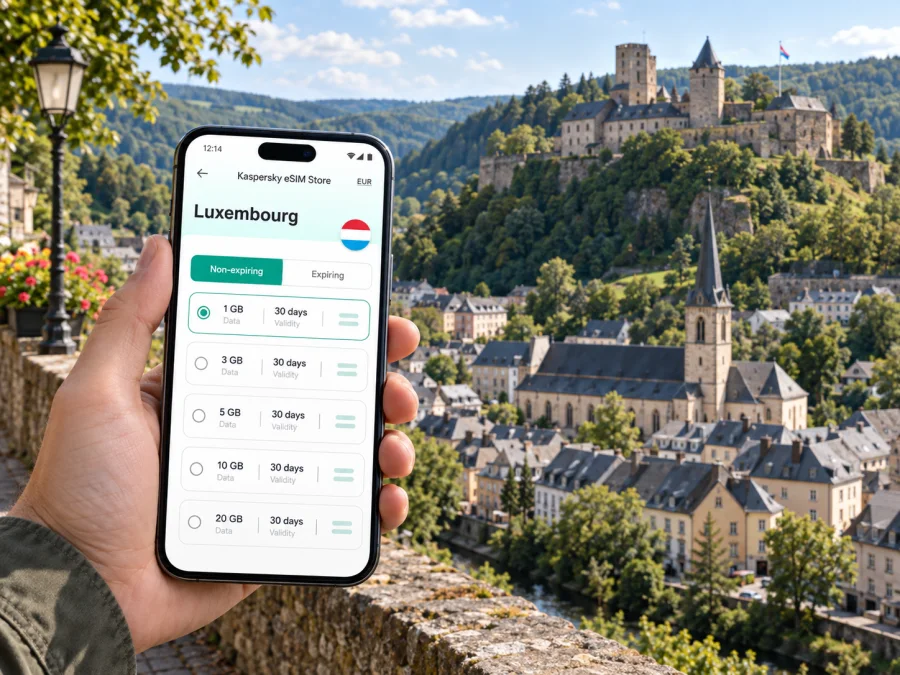
Wiltz eSIM: Mobile Connection and Internet for Your Visit
Wiltz is a compact town in northern Luxembourg, set among the green hills of the Éislek region. Its historic castle rises above the old town, while the railway station sits lower in the valley. That change in elevation shapes a stay here: you may arrive by train, walk uphill to the centre, and use your phone to keep track of a hotel address, a meeting point, or the route back down.
Mobile internet is useful in Wiltz for ordinary, practical reasons. You can check a train connection before leaving the castle area, follow a walking route through unfamiliar streets, message your host about arrival time, or look up what is open nearby. A little preparation helps because a small town visit often includes more than one kind of journey: the last stretch from the station, time in the centre, and possibly a train or road trip out into the surrounding countryside.
Getting to Wiltz and orienting yourself
Wiltz is connected to Luxembourg’s rail network on the line that runs via Kautenbach. Travellers coming from Luxembourg City generally change or connect at Kautenbach, depending on the departure and timetable. The station is on Avenue de la Gare, below the higher historic centre. Check the current connection before setting out, since times and service arrangements can change.
On arrival, give yourself a moment to match the map with the landscape. The railway, valley floor and upper town do not sit on one flat grid. A route that looks short on a screen may include a steep climb, so check both the distance and the elevation profile if you are carrying luggage or have limited mobility. If your hotel is near the station, the approach may be simpler than accommodation closer to the castle; if it is in the upper town, allow time for the ascent.
A useful first-arrival sequence is:
- Save the accommodation address and check-in details before travel.
- At Wiltz station, confirm whether you are walking uphill, taking a local connection, or meeting someone.
- Open the route while you have a clear view of the street names and the destination pin.
- Keep the map available as you move through the town; narrow streets and changes in level can make a quick glance more helpful than repeatedly reopening a search.
- Once checked in, download or bookmark anything you expect to need where mobile reception may be less convenient, such as a walking route or event ticket.
For driving arrivals, navigation is especially helpful around the final approach and when locating accommodation with a specific entrance or parking arrangement. Do not assume that a hotel’s postal address identifies its guest entrance or parking area. Confirm those details with the property and save them in advance.
The town centre, the castle and the walk between them
Wiltz Castle is the town’s most recognisable landmark and a useful orientation point. The upper town’s historic buildings, local services and visitor stops are clustered around this higher area; the station and valley routes lie below. Using the castle as a reference on a map makes it easier to understand whether a café, lodging or meeting place is uphill, downhill or on the same side of town.
The landscape is part of the visit. Streets rise and fall, and the green setting becomes more apparent as you move away from the built-up centre. A phone map can help with the route, but it cannot tell you how comfortable a particular climb will feel with a suitcase, in rain, or after a long day. Wear shoes suited to walking, leave extra time for the uphill section, and choose a taxi or other available transport if the slope is unsuitable for you.
Wiltz is not a sprawling city where every plan requires a long cross-town journey. Many visits combine a small number of destinations: the station, a hotel, the castle area, a meal, and perhaps a trail or cultural event. Rather than checking directions at every turn, consider pinning those places before the day begins. You will then be able to compare the route and decide when to walk and when to use transport.
A simple day plan
| Part of the day | What to plan | Why mobile internet helps |
|---|---|---|
| Arrival | Station, accommodation and check-in time | Confirm a connection or message your host if plans shift |
| First walk | Station to the upper town or hotel | Compare the route with the hill and your luggage |
| Town visit | Castle area, meal and any scheduled activity | Check opening details and find the next address |
| Late afternoon | Return to the station or continue into the region | Review the departure and leave a time buffer |
Opening times and event schedules are not fixed year-round. Check the details for the date of your visit rather than relying on an old screenshot, and keep a note of the venue name in case you need to ask for directions.
Keep your route flexible
Wiltz works well as a base for a slower visit to the Éislek area, but the best plan depends on the day’s connections and your interests. The nearby railway gives you a practical link through Kautenbach toward other stops in the north and toward Luxembourg City. The town is also a starting point for countryside walks and road trips. If you are travelling beyond the centre, check the return leg as carefully as the outward journey: a beautiful route is less convenient if you reach a station or bus stop after the service you planned to use.
This is a good point to prepare your mobile data for the whole itinerary. If Wiltz is one stop on a longer Luxembourg visit, compare eSIM options for your trip to Luxembourg before you leave. Review the data allowance, validity period and destination shown for the option you choose; your needs may differ if you mainly use maps and messaging or also plan to upload photos and join video calls.
An eSIM can be a convenient way to arrange mobile data without changing the physical SIM in your phone. With Kaspersky eSIM Store, you can use the app or website to choose, arrange and activate an eSIM with a suitable plan for an overseas trip. Check what a particular plan includes before purchase. Do not assume it provides a local phone number, standard calls or SMS unless those items are stated in its terms. Messaging and internet calls through apps use data.
Moving between Wiltz and nearby places
Wiltz’s northern location makes onward travel part of many stays. For trains, use the route through Kautenbach as your reference, check the current timetable and allow time for the connection. Plan the whole journey to Luxembourg City, including the final walk or bus ride.
If you choose a walk between railway stops, plan the return first. Check the route, terrain, daylight and current train times, and note the endpoint by name. Carry water and clothing suited to the weather.
A car can make rural stops more flexible. Save the destination and parking details, and set navigation before driving; a passenger should handle any changes. In the centre, walking may be easier than finding a place to park.
Pick the right way to get around
- For station-to-hotel transfers: compare the walking route with the slope and your bags. Ask the accommodation about its preferred arrival route if the address is unclear.
- For the castle and upper town: use the map to orient yourself, but leave time for gradients and pauses.
- For a regional day trip: check both directions and the last useful return connection before leaving Wiltz.
- For a rural walk: use a route suited to your ability, save it offline if possible, and confirm how you will get back.
- For a car journey: save parking details and set navigation before you start driving.
eSIM planning for a small-town stay
Planning data for Wiltz is much like planning for any destination where you will be moving between a station, lodging, local sights and the surrounding region. The useful question is not simply how many days you will be away, but how you use your phone. A traveller who checks maps and messages occasionally may need a different allowance from someone who uploads large files or joins frequent video meetings.
Use this quick estimate before choosing a plan:
| Phone activity | Typical data consideration |
|---|---|
| Messaging and checking confirmations | Usually light use, though media and attachments add up |
| Map searches and navigation | Repeated map loading uses more than a saved offline map |
| Photo sharing | Uploading many high-resolution images can use noticeable data |
| Video calls or streaming | Often the heaviest everyday uses; use Wi-Fi when appropriate |
| Work email and cloud documents | Usage depends on attachments, syncing and video meetings |
Actual consumption depends on your apps, settings and media quality. Check data-usage settings during the trip and pause automatic backups if needed.
Before departure, make sure the handset is not restricted to another carrier and that it supports eSIM. Check whether your device is compatible before selecting a plan. Also check whether the device is unlocked, update it while connected to a trusted network, and make sure you can access your account and email while travelling.
A sensible setup order is:
- Choose the destination and review the plan’s data allowance, validity and terms.
- Confirm that your phone supports eSIM and is not carrier-locked.
- Arrange the eSIM through the Kaspersky eSIM Store app or website while you have a reliable connection.
- Install it according to the device instructions. See the Android eSIM installation guide or the iOS eSIM installation guide.
- Follow the plan’s activation guidance and check the phone’s mobile-data settings.
- Keep your usual number available for calls or texts if you need it, and confirm which SIM is selected for data.
Screens and activation steps vary by phone and plan, so follow the instructions for your purchase. If you travel with a work phone, check company rules before changing its mobile settings.
Wiltz for work, events and short stopovers
For a business visit, keep hotel and meeting addresses together, check the correct entrance, and allow time for the climb from the station. Send a map pin if a colleague is meeting you.
For work, download essential documents and keep the organiser’s contact details available. A data-only eSIM can support online tools and messaging, but is not a replacement for a standard phone line; check the plan terms if voice calls are essential.
For a short stopover, choose one main visit near the castle or centre, check your onward departure and leave time to return to the station. Avoid adding a distant stop when the train window is tight.
Practical checklist before leaving for Wiltz
- Save your accommodation address, check-in time and entrance details.
- Look up the current train connection through Kautenbach and note the return journey.
- Check whether your route crosses the valley between the station and upper town.
- Confirm current opening times for any castle visit, museum, event or restaurant you have planned.
- Check eSIM compatibility, carrier-lock status and the plan terms before purchase.
- Install and activate the eSIM in line with its instructions; confirm which SIM provides mobile data.
- Download key maps, tickets and booking details for offline access.
- Carry a charger or power bank if you will use navigation for much of the day.
- Keep a little schedule flexibility for hills, weather and regional connections.
Common questions
Is Wiltz easy to explore on foot?
The town is compact, and walking is a natural way to see the centre and castle area. However, the railway station is lower than the upper town, and routes can include a climb. Check the terrain and consider your luggage, mobility and weather before deciding to walk every leg.
How do I reach Wiltz by train?
Wiltz is served by the Luxembourg railway network via Kautenbach. The journey and any connection depend on your origin and travel date, so check the current timetable before departure. Keep the return connection in mind if you plan a walk outside the centre.
Is mobile data useful if my hotel has Wi-Fi?
Wi-Fi can cover time at your accommodation, while mobile data is useful for maps, messages and schedule checks when you are away from it. A travel eSIM is one option for arranging data on a compatible, unlocked device; compare its terms with your itinerary and expected use.
Can I use a travel eSIM for ordinary calls?
Do not assume that a travel eSIM includes a phone number, standard voice calls or SMS. Check the conditions of the specific plan. Internet-based calls and messaging apps use data, and your usual SIM may remain available for ordinary calls depending on your settings and carrier.
Should I install the eSIM before arriving?
You can prepare it before travel if your device and plan instructions allow it. Read the activation guidance carefully and follow the timing specified for the plan. Having the necessary details ready before leaving can make the first map search or message easier after arrival.
A calmer way to stay connected in Wiltz
A few saved addresses, a checked train connection and an idea of the climb between the station and upper town cover much of the planning. Mobile internet can help with a connection check, local address or route into the Éislek countryside.
Before you travel, use the Kaspersky eSIM Store app or website to review and arrange an eSIM plan that fits your time in Luxembourg. Choose an eSIM plan for your Luxembourg trip, check its conditions and prepare the device before departure. Then leave room in your schedule to enjoy Wiltz at a walking pace.


