
Travel connectivity guide
Winnipeg eSIM for mobile internet in Canada
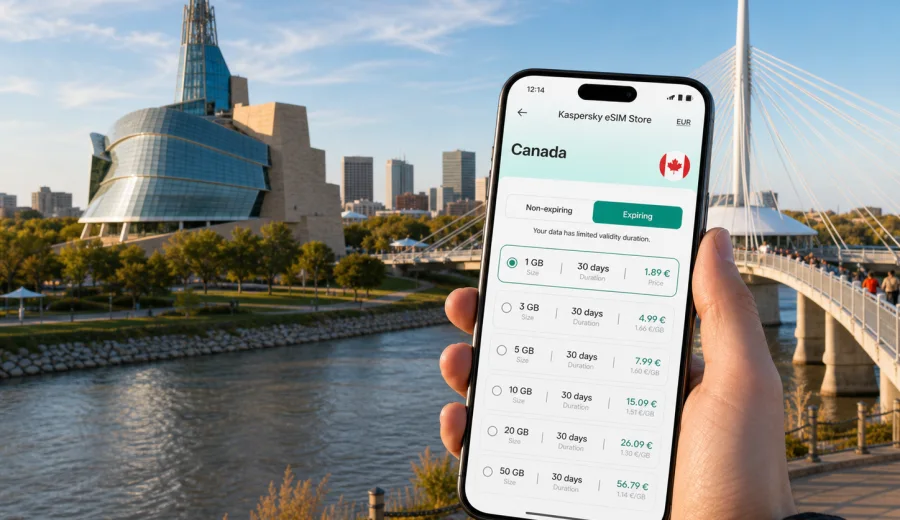
Winnipeg eSIM: mobile connection and internet for a trip to Manitoba's capital
Winnipeg is a city where mobile internet quickly becomes part of the travel plan. You may need maps as soon as you leave Winnipeg Richardson International Airport, a rideshare app for the transfer to downtown, a weather update before walking along the river, or a message thread open while meeting colleagues near Portage and Main. An eSIM helps you prepare that connection before the trip, without looking for a physical SIM card after arrival.
This guide is for travellers who are going to Winnipeg for a city break, family visit, business trip, university visit, event, stopover, or a wider route through Manitoba and Canada. It explains how to think about eSIM mobile data in local situations: the airport, hotels, downtown streets, The Forks, St. Boniface, Osborne Village, conference days, winter travel, and short trips out of the city.
An eSIM is a digital SIM profile installed on a compatible phone or tablet. In travel use, it is mainly a way to get mobile internet abroad with a prepaid data plan for the country or region you choose. It does not usually replace your main phone number, and voice calls or SMS are not included unless a specific tariff says so. For calls, many travellers use messaging apps over mobile data.
Why mobile internet matters in Winnipeg
Winnipeg is easy to navigate once you understand its layout, but it is spread across neighbourhoods, rivers, bridges, business areas, shopping streets, parks, and university campuses. You can often find Wi-Fi in hotels, cafes, libraries, and event venues, but it is not a complete substitute for mobile data while moving around.
Mobile internet is useful in Winnipeg when you need to:
- check the route from the airport to downtown or St. James;
- compare taxi, rideshare, and public transport options;
- use maps around The Forks, the Exchange District, St. Boniface, Osborne Village, or Corydon Avenue;
- confirm restaurant reservations, hotel check-in details, and event tickets;
- stay reachable during a conference, client visit, or university appointment;
- manage weather changes, especially in winter or during shoulder seasons;
- coordinate day trips to nearby towns, parks, or family addresses outside the core.
The local detail matters. A traveller who stays near the airport has different data needs from someone walking between museums, working from a hotel downtown, or driving to Assiniboine Park and then to a suburban home. An eSIM lets you choose a data amount and validity period that match the trip rather than relying only on hotel Wi-Fi or a roaming package from home.
First hours after arrival at Winnipeg airport
Most international and domestic arrivals use Winnipeg Richardson International Airport. It is close to the city compared with many major airports, but the first hour still involves decisions: where to meet a ride, which route is best, whether traffic is slow, and how to contact your hotel or host.
If your eSIM is installed before the flight, you can switch mobile data to the travel profile after landing and wait for the phone to register on a local network. Connection times can vary by device, network conditions, and settings, so it is better to leave yourself a few minutes rather than assuming everything will happen instantly.
Practical airport uses for mobile data include:
- opening your hotel address in maps before leaving the terminal;
- checking whether your room or apartment check-in requires an online code;
- messaging your driver or host if baggage takes longer than expected;
- finding the correct pickup point;
- downloading a receipt or travel document if airport Wi-Fi is slow;
- checking the weather before deciding whether to put on heavier clothing.
City movement: where data helps most
Winnipeg's visitor areas are connected, but not always compact in the way older European city centres are. You may move between downtown, The Forks, the Exchange District, St. Boniface, the airport area, Assiniboine Park, Polo Park, and residential neighbourhoods in the same day. Mobile internet helps you avoid planning every step in advance.
| Winnipeg situation | Why mobile data helps | What to check before you go |
|---|---|---|
| Airport to hotel | Maps, ride pickup, arrival messages | eSIM installed, data roaming setting for the eSIM if required |
| The Forks and riverfront | Walking routes, opening hours, group coordination | Battery level and offline map backup |
| Downtown meetings | Calendar changes, ride apps, email | Validity period covers all business days |
| Winter travel | Weather alerts, transport changes, indoor alternatives | Enough data for maps and messaging |
| Day trip from Winnipeg | Navigation outside the city core | Country or regional coverage in the selected tariff |
Downtown, The Forks, the Exchange District, St. Boniface, Osborne Village, Corydon Avenue, Assiniboine Park, and the airport area can all sit in the same itinerary. Mobile data is helpful because you are often moving between riverfront walks, restaurants, offices, hotels, museums, and residential addresses rather than staying in one compact visitor zone.
For most city trips, the heaviest data use does not come from maps. It comes from video, cloud photo backup, large app updates, social media uploads, and streaming. If you keep those activities for hotel Wi-Fi and use mobile data for navigation, messages, bookings, tickets, and light browsing, a smaller plan may be enough. If you work on the move or use hotspot mode, you may need more data.
Choosing data for different Winnipeg trips
The best eSIM tariff is not just the biggest data amount. It should match your actual route, length of stay, and how you use your phone. Before choosing, write down three details: how many days you will be in Canada, whether Winnipeg is the only city, and whether you expect to use mobile data for work or only travel tasks.
For a short Winnipeg stay of one to three days, mobile data is usually used for airport transfer, maps, messaging, tickets, and restaurant searches. For a week-long visit, you may also use it for daily planning, photo sharing, mobile payments, and remote check-ins. For a business trip, video calls and large email attachments can change the calculation quickly, especially if you use your phone as a hotspot.
Use this quick planning checklist:
- Trip length: choose a validity period that covers arrival and departure days, not only full days in the city.
- Route: if you leave Winnipeg for another province or continue to another Canadian city, check that the tariff fits the whole Canada route.
- Data style: separate essential use from heavy entertainment use.
- Device: confirm that your phone supports eSIM and is not locked to a single carrier.
- Activation timing: understand when the tariff starts according to its conditions.
- Backup: keep hotel address, booking number, and one offline map saved before travel.
It is also worth thinking about who is travelling with you. A solo traveller may only need data on one phone. A family may need one connected phone for navigation and messaging, plus hotel Wi-Fi for everyone else. A business traveller may want a larger allowance because connection gaps can interrupt meetings, calendar changes, or document access.
If you are comparing options before departure, you can choose an eSIM tariff for your Winnipeg trip through Kaspersky eSIM Store by selecting Canada and checking the available data amounts and validity periods for your travel dates. Kaspersky eSIM Store is an app and website that helps you choose, purchase, install, and activate an eSIM with a suitable mobile data tariff for an international trip.
Preparing eSIM before a Winnipeg trip
Before you buy any travel eSIM tariff, check the device first. Your phone or tablet must support eSIM, and it must not be restricted by a carrier lock that prevents adding another mobile profile. Some devices also need data roaming enabled for the eSIM profile, depending on the tariff and local network settings.
A simple preparation sequence looks like this:
1. Check that your device supports eSIM.
2. Make sure the device is unlocked for another mobile profile.
3. Choose Canada as the destination if Winnipeg is the main city or part of a wider Canadian route.
4. Compare data amount, validity period, price, and any important tariff conditions.
5. Install the eSIM while you still have a stable internet connection.
6. Keep your primary SIM active for calls or SMS if you still need your regular number.
7. After arrival, select the eSIM for mobile data and follow the activation conditions.
Installation and compatibility
Installation is easier when you do it calmly before travel, with Wi-Fi available and enough battery. After purchase, the eSIM profile is usually added through on-screen instructions or a QR code. Keep in mind that exact steps vary by device model and operating system version.
If you are installing on Android, use the Android eSIM installation instructions. If you are installing on iPhone, use the iOS eSIM installation instructions. Before buying, check your device to confirm that it supports eSIM.
Do not delete an installed eSIM profile unless you are sure it is no longer needed. In many cases, an activated eSIM cannot simply be moved to another device. If you change phones shortly before travelling to Winnipeg, check compatibility and installation steps again on the new device.
Winnipeg scenarios and suggested data habits
Different travellers use data differently. The examples below are not tariff promises; they are planning scenarios that help you estimate your own needs.
| Traveller type | Typical Winnipeg use | Data habit that helps |
|---|---|---|
| Weekend visitor | Maps, restaurants, tickets, messaging | Save large downloads for Wi-Fi |
| Business traveller | Email, calendar, ride apps, document access | Choose enough validity for all meeting days |
| Family visitor | Messaging, photo sharing, suburban navigation | Keep one phone as the main navigation device |
| Student or campus visitor | Maps, calls over apps, forms, schedules | Save campus details offline before arrival |
| Road-trip traveller | City navigation plus routes outside Winnipeg | Check Canada-wide coverage and validity |
Trips from Winnipeg
Many visitors use Winnipeg as a base for more than the city. You might visit family outside the perimeter, drive to small towns, continue to another Canadian city, or combine Winnipeg with a larger Manitoba itinerary. If you plan to leave the city, choose a tariff based on the full route rather than the hotel location.
Before a trip from Winnipeg, check:
- whether your selected tariff is for Canada and not only a narrower destination;
- whether the validity period covers travel days outside the city;
- whether you need navigation for rural roads or only city streets;
- whether you have offline backup for areas with weaker signal;
- whether your phone's eSIM profile is selected for mobile data.
No travel data option can guarantee perfect service in every location. Local coverage, network load, terrain, buildings, weather, and device settings can all affect the experience. The practical approach is to prepare mobile data for the route and keep key details saved offline.
Quick answers about eSIM in Winnipeg
Can I install an eSIM before flying to Winnipeg?
Yes. In many cases it is better to install it before departure while you have stable Wi-Fi. Check the activation rules of the selected tariff so you understand when validity and data usage begin.
Do I need a Canadian phone number for maps and messaging?
Usually no. A travel eSIM for mobile data can support maps, messaging apps, email, bookings, and browsing. It normally does not include a regular phone number unless the tariff specifically says so.
How much data should I choose for Winnipeg?
It depends on length of stay and habits. Light city use needs less data than hotspot work, video calls, streaming, or constant photo backup. Compare data amount and validity together, not separately.
Can I use one eSIM for Winnipeg and other Canadian cities?
If the selected tariff is for Canada and its conditions cover your route, it can be suitable for a trip that includes Winnipeg and other Canadian stops. Always check the tariff details before purchase.
Final checklist before you travel
Before you leave for Winnipeg, make sure the practical details are handled:
- your device supports eSIM and is not carrier-locked;
- the eSIM is installed while you still have reliable Wi-Fi;
- Canada is selected as the destination for a Winnipeg trip;
- the data amount fits your planned use;
- the validity period covers arrival, full stay, and departure;
- you know which SIM handles mobile data and which one handles your regular number;
- hotel address, booking details, and one offline map are saved.
Winnipeg is easier to enjoy when connection is not a separate errand after arrival. With an eSIM prepared in advance, you can land, open maps, message your host, find transport, check the weather, and move between districts with less dependence on public Wi-Fi.
For a practical start, prepare an eSIM tariff for Canada before your Winnipeg trip and choose the data amount and validity period that fit your route. Kaspersky eSIM Store helps you set up mobile internet for an international trip through a compatible device, a selected destination, and a clear prepaid data tariff.