Travel connectivity guide
Xiaomi 15T Pro 512GB 5G eSIM Guide
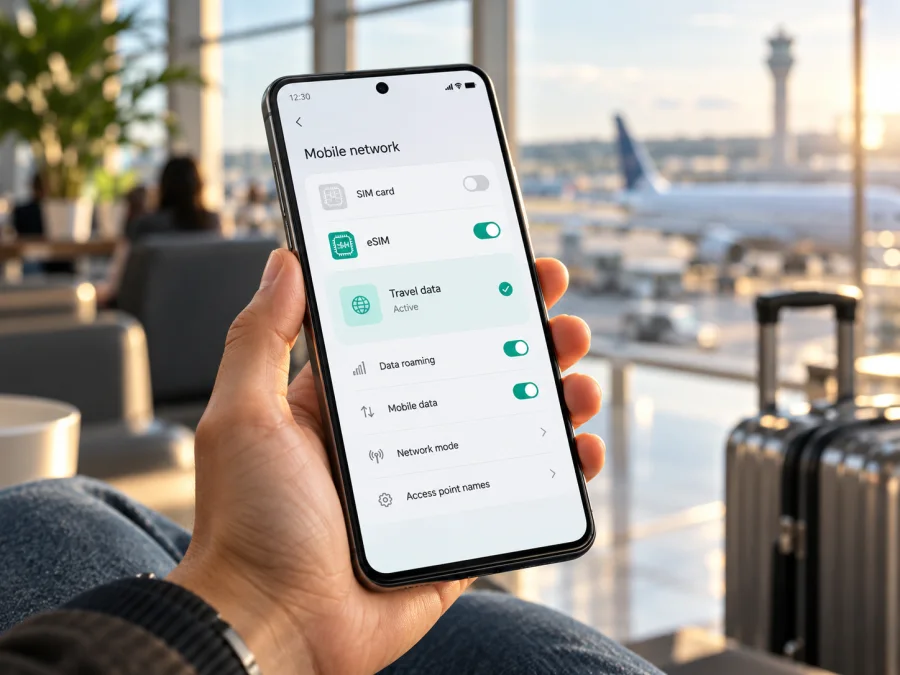
Xiaomi 15T Pro 512GB 5G eSIM: compatibility and setup guide
Short answer: Xiaomi’s current global specifications list the Xiaomi 15T Pro with eSIM support, including dual-SIM options of nano-SIM + eSIM and eSIM + eSIM. Xiaomi’s regional product information and support FAQ also identify eSIM and an EID for this model. That is strong confirmation for the officially listed Xiaomi 15T Pro family, but it does not prove that every retail unit labelled Xiaomi 15T Pro 512GB 5G has the same eSIM capability. Xiaomi says eSIM availability may vary by country or region and carrier. Before paying for a plan, check the phone itself, its sales region and its carrier-lock status.
The 512GB 5G wording is preserved as supplied. Storage and 5G do not establish eSIM support: check the EID and eSIM setup option on your phone, alongside its regional SKU and the plan’s rules.
Does Xiaomi 15T Pro 512GB 5G support eSIM?
The answer is yes for Xiaomi 15T Pro versions whose regional specification enables eSIM. Xiaomi lists three possible SIM arrangements for the model: two physical nano-SIMs, one nano-SIM and one eSIM, or two eSIMs. Its product notes say the eSIM feature depends on availability in the country or region and on carrier support. A Xiaomi support FAQ for the 15T Pro also says that the model supports eSIM and EID. This makes eSIM a documented capability of the model, not a feature inferred from its 5G badge.
“Xiaomi 15T Pro 512GB 5G” identifies storage and network variant, not the phone’s sales country, software build, exact product code or carrier-lock status. An import, carrier-branded or refurbished unit may have different availability. Confirm your exact phone before purchase.
| Check | What is documented or what to verify |
|---|---|
| Device named in this guide | Xiaomi 15T Pro 512GB 5G |
| eSIM on the Xiaomi 15T Pro model | Listed by Xiaomi; regional and carrier availability can vary |
| SIM arrangements listed by Xiaomi | Nano-SIM + nano-SIM, nano-SIM + eSIM, or eSIM + eSIM, where available |
| EID | Xiaomi’s 15T Pro support information says the model supports an EID; confirm that your handset displays one |
| 5G | The 5G label concerns supported mobile network technology; it is not proof that eSIM is enabled |
| Storage | 512GB does not determine eSIM compatibility |
| Plan type | A travel data eSIM needs an unlocked compatible phone and a plan that covers the destination |
Why the market and carrier matter
An eSIM-ready phone still needs compatible software and a provider that can issue its profile. Xiaomi says availability depends on country or region and carrier. Sellers may use the same consumer-facing name for different country SKUs, so request the exact product code and confirmation that EID and eSIM are present on that unit.
A carrier lock is separate from eSIM hardware. A phone can show an EID but reject another provider’s profile if restricted to its original carrier. Ask whether it is unlocked and check any contract restrictions on provider changes or roaming.
There are two geographic checks: whether eSIM can be provisioned for the phone’s market and whether the travel plan includes each destination. 5G support does not guarantee 5G service abroad. Review the package’s country list, network conditions, validity and data allowance.
Check your exact phone before buying
Do these checks while you still have time to contact the seller or provider:
- [ ] Open Settings and look for About phone, Status, or a search result for EID. Menu names vary by HyperOS version and region. An EID is a long identifier for the embedded SIM; you do not need to publish or share it in a public post.
- [ ] Look in Settings → Mobile networks or SIM cards & mobile networks for Use eSIM, Manage eSIM, Add eSIM, or Add mobile plan. The exact labels may differ after a system update.
- [ ] If you cannot find the option, search Settings for “eSIM” and “EID.” Restart the phone and install available stable system updates, then search again.
- [ ] Confirm that the device is not carrier-locked and that its sales region allows eSIM activation. Check with the seller or the carrier that supplied it.
- [ ] Confirm that the plan provider supports this Xiaomi model and your destination. Ask whether the profile can be installed before departure and when its validity begins.
- [ ] Make sure you have Wi-Fi or another working internet connection during installation, access to the QR code or in-app installation flow, and enough battery to complete setup.
- [ ] Keep your existing physical SIM active if you need its number for calls, SMS or account verification. A travel data eSIM generally does not replace those services.
An EID is a useful indicator, but a missing menu can reflect a regional, software or carrier limitation—or a different menu label. An “Add eSIM” screen does not guarantee every provider’s profile will work. Ask the seller to demonstrate the feature on the exact phone or confirm it against the full model code.
Separate the handset check from the plan check. The first establishes whether this phone can store and activate an eSIM profile; the second establishes whether the provider can issue a profile for it and whether the plan works in your destination. Keep the full device name and regional product code when asking either the seller or provider, since a generic “15T Pro” description may not identify a market-specific restriction.
Check whether your device is compatible before selecting or paying for a plan. Use the compatibility result for your exact device and verify the provider’s current rules; a similar Xiaomi model or a different 15T Pro market version is not a substitute for checking yours.
Install and activate an eSIM
The general flow may vary by software build and provider. Do not repeatedly scan a QR code or delete an installed profile before checking the provider’s instructions.
Before installation
- Connect to Wi-Fi, charge the phone and install an appropriate stable HyperOS update if available.
- Ask whether to install before departure or at the destination. Validity may begin at purchase, installation, activation or first connection; check the plan terms.
- Open the provider’s app or account. Install in-app, scan a QR code from another screen, or enter details manually as supported. A QR code shown on the Xiaomi cannot usually be scanned by its own camera.
- Keep the instructions available. Treat QR and activation codes as private, often one-use credentials.
Add the profile on Xiaomi
- Open Settings → Mobile networks or SIM cards & mobile networks; search Settings for “eSIM” if needed.
- Turn on Use eSIM if prompted, then choose Manage eSIM, Add eSIM or Add mobile plan.
- Scan the provider’s QR code or enter its activation details. Keep Wi-Fi connected while the profile downloads.
- Label the profile Travel data and confirm it appears in SIM settings.
- Keep your usual line as default for calls and messages if needed. Select the travel eSIM for Mobile data when ready.
- At your destination, enable the travel eSIM. Turn on data roaming for that profile only if the provider requires it; keep home-line roaming off if you want to avoid unintended charges.
- Wait several minutes for network registration. Turn Wi-Fi off briefly and load a page to confirm mobile data works through the selected profile.
Xiaomi’s general path is Settings → SIM card and mobile networks → Use eSIM → Manage eSIM → Add mobile plan, though labels vary. If told to disable SIM 2, check which physical SIM occupies that slot and follow the on-screen prompt.
See the Android eSIM installation instructions. The iOS eSIM installation instructions are for Apple devices; follow Xiaomi’s prompts on this phone.
Kaspersky eSIM Store is an app and website where travelers can choose, arrange and activate an eSIM with a mobile-data plan for an overseas trip. Confirm this handset’s compatibility first, then review current destinations, data allowance, duration and activation rules.
Use the eSIM for mobile data while travelling
Treat the travel eSIM as a second data line. Install it when permitted, keep your home line for calls or verification if needed, and select the eSIM for mobile data when you arrive.
Review the selected data SIM, eSIM status and roaming toggle in mobile-network settings. Disable automatic data switching if available. A travel eSIM does not cancel roaming on another active line, so check your home carrier’s terms.
A travel eSIM is commonly data-only, without a phone number, voice or SMS unless the plan says otherwise. Messaging and calls can use data, but SMS verification still goes to your mobile number.
Practical travel setups
One-country city break. Confirm destination, allowance and validity. Install over Wi-Fi if permitted, then select the eSIM for data on arrival and test a webpage.
Several countries. Check every stop in the package’s included destinations; a regional label does not guarantee every country. Read network restrictions and confirm the profile remains usable across borders.
Home number plus travel data. Keep the home SIM for calls or SMS if needed; check its roaming charges. Set the eSIM as the data line and disable switching. Turning off the home line stops it receiving service.
Connection problem. Confirm the eSIM is enabled and selected for data, and that the package covers your country and is valid. Toggle airplane mode once, wait, and enable roaming or change APN only as directed by the provider.
Common problems and checks
There is no EID or eSIM option. Search Settings for both terms, check for a stable software update, and restart. Then confirm the exact regional model and build with the seller or Xiaomi support. If the handset was imported or is carrier-branded, ask whether eSIM is available for that market and whether a lock applies. Do not buy a plan on the assumption that every Xiaomi 15T Pro SKU behaves the same.
The QR code will not scan. Raise the brightness on the screen displaying the code, clean the camera lens and keep the code fully in frame. Use a second screen or printout if the code is open on the Xiaomi. Check whether the provider offers a manual code or in-app installation path. If the provider says the code is single-use, do not keep retrying after a profile has been added; contact support to check its status.
The profile downloads but does not connect. Check that the phone has mobile coverage, the travel profile is switched on, and it is selected as the mobile-data SIM. Verify the package’s country list and validity dates. Follow the provider’s instructions on data roaming and APN. If automatic network selection fails, consult the provider before choosing a network manually, since not every visible network may be included in the plan.
The phone says the plan is already in use or cannot be added. The activation code may have been used, the profile may already be installed, or the device may have reached a profile limit. Open Manage eSIM and check the list before trying again. Do not delete an active profile as a first troubleshooting step: some eSIMs cannot be reinstalled with the original code. Contact the plan provider if the status is unclear.
The eSIM is present but data is not being used. Confirm that the travel eSIM—not the home SIM—is selected under Mobile data. Check that mobile data is enabled, roaming is set as instructed for that eSIM, and the data package has remaining allowance. Turn Wi-Fi off for a brief test. If the counter stays unchanged, compare it with the provider account and verify that the connected country is covered.
The eSIM works but the speed is lower than expected. eSIM identifies the digital SIM profile; it does not determine radio coverage or speed. Actual service depends on the plan’s supported local networks, signal, congestion, handset bands and local conditions. Move to an area with better signal, switch off any VPN temporarily for a basic test, and check the network mode. Xiaomi’s listed 5G capability does not mean 5G is available on every travel package or partner network.
Calls or text messages do not work on the travel line. Check the plan description. Many travel eSIMs are data-only and do not provide a telephone number, voice calls or SMS. Keep the home line for those services if needed, or use internet-based calling and messaging over data.
If these checks do not resolve the issue, contact the provider shown in your purchase confirmation with the model and software version, destination, time of the problem, and a description of the settings you checked. Share an EID or activation information only through a verified private support channel when requested; never publish a QR code or full activation code.
FAQ
Is Xiaomi 15T Pro 512GB 5G definitely eSIM-compatible?
Xiaomi’s published specifications list eSIM for the Xiaomi 15T Pro model and describe nano-SIM + eSIM and eSIM + eSIM configurations. Xiaomi also states that eSIM and carrier availability can vary by country or region. Check the EID and eSIM menu on your own 512GB 5G handset and confirm its lock status before buying a plan.
Does having 512GB storage affect eSIM?
No. Storage capacity is not an eSIM indicator. The key checks are whether the exact unit has an EID, whether the eSIM setup option is available, and whether the phone can accept the intended provider’s profile.
Can I use a physical SIM and eSIM together?
Xiaomi lists nano-SIM + eSIM as one supported arrangement for the model where available. The exact active combination and whether SIM 2 must be disabled depend on the regional build and device configuration. Follow the settings shown on your handset.
Do I need to remove my home SIM to install a travel eSIM?
Not necessarily. The listed model configurations include one nano-SIM plus one eSIM. The phone may ask you to free a slot or switch off a SIM depending on its region and configuration. Keep your existing SIM in place unless the phone or provider’s instructions require another arrangement.
Should I install before the flight or after landing?
Follow the plan’s activation terms. Installing before departure over Wi-Fi can be convenient, but validity may begin at purchase, installation, activation or first network connection depending on that specific package. Check the wording before installing if the start time matters.
Is roaming safe to turn on?
Travel eSIMs may require data roaming on their own profile. Enable it only as directed by the provider, and make sure the travel eSIM is the selected data line. Review your home carrier’s roaming rules separately; roaming settings and charges for one line do not automatically apply to another in the same way.
Does the 5G marking guarantee 5G while travelling?
No. The phone’s 5G capability is only one part of the connection. The travel plan, partner network, destination, local spectrum and coverage determine what is available. LTE may be used even where the handset supports 5G.
Final check before your trip
For Xiaomi 15T Pro 512GB 5G, Xiaomi’s current product information supports a positive model-level answer: eSIM is a documented option, and the 15T Pro FAQ identifies EID support. The remaining question is whether your specific retail unit and its carrier status enable that feature in the market where it was sold. Check for the EID and eSIM menu, confirm the phone is unlocked, and verify the intended provider supports the model and travel destination.
Once compatibility is confirmed, choose a data package by checking each country on your itinerary, the included data, validity period and activation timing. Kaspersky eSIM Store is an app and website for choosing, arranging and activating an eSIM data plan for an overseas trip. Review its current destination and package details, then install and select the profile according to the provider’s instructions. A few checks at home can make setup abroad much simpler.


