Travel connectivity guide
Xiaomi Redmi Note 13 Pro+ 8GB RAM eSIM Guide
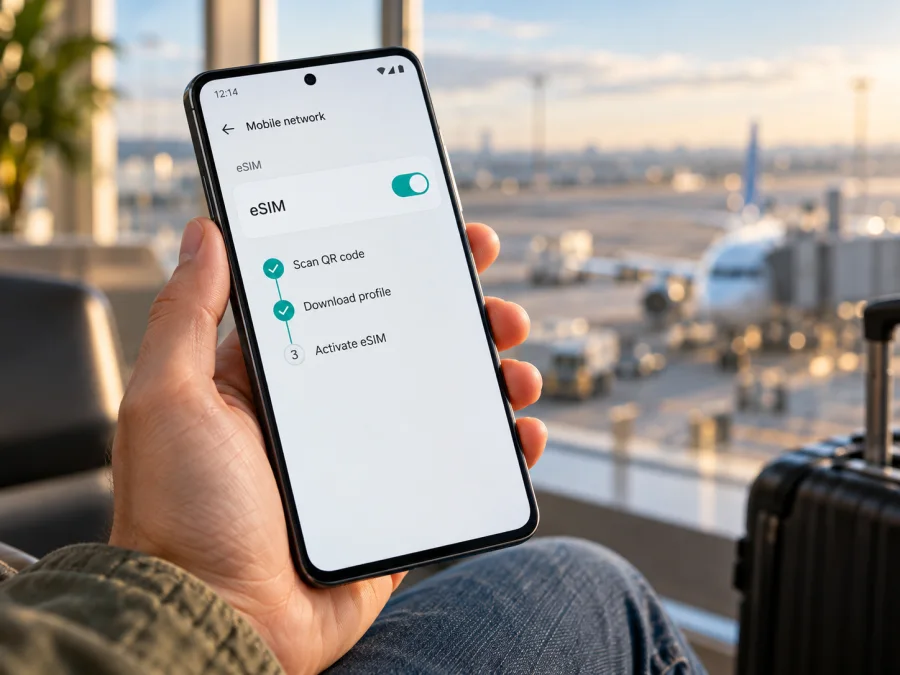
Xiaomi Redmi Note 13 Pro+ 8GB RAM eSIM compatibility and setup guide
The short answer is: some regional versions of Xiaomi Redmi Note 13 Pro+ 8GB RAM support eSIM, but the model name and RAM amount alone are not enough to confirm that your individual phone does. Xiaomi’s global support information describes an eSIM option for the REDMI Note 13 Pro+ 5G, and Xiaomi’s Spain and Japan specification pages list a nano-SIM plus eSIM configuration. Xiaomi markets regional hardware separately, though, and a regional spec page may list dual SIM without describing eSIM. Check the actual handset before buying or installing a travel plan.
This guide explains what the official information establishes, how to check the phone itself, and how to install and use a travel eSIM if the option is present. “8GB RAM” identifies a memory configuration; it does not identify a country variant, firmware build, storage capacity, or carrier configuration. Do not infer eSIM availability from the 5G label, the appearance of the SIM tray, or another owner’s report about a different market.
Quick specifications
| Item | What to know |
|---|---|
| Device in this guide | Xiaomi Redmi Note 13 Pro+ 8GB RAM |
| Manufacturer’s product family name in support pages | REDMI Note 13 Pro+ 5G |
| eSIM status | Available on documented regional variants; verify the individual phone |
| Physical SIM support | Dual-SIM configurations are listed; the exact physical/eSIM combination varies by regional specification |
| eSIM control in Xiaomi’s global help | Settings → Mobile networks; eSIM is shown as SIM card 2 |
| Main compatibility checks | EID, an eSIM option in settings, regional model information, unlocked status, and plan requirements |
| Intended travel use | Mobile data through a compatible eSIM plan; voice and SMS are not included unless the plan explicitly says so |
The table is a starting point, not a substitute for the phone’s own menus. Xiaomi’s global support article specifically names the REDMI Note 13 Pro+ 5G and says to find eSIM under Settings → Mobile networks, where it appears as SIM card 2. The menu wording on other Xiaomi builds may read SIM cards & mobile networks. Xiaomi’s global and several country specification pages also list dual SIM as nano-SIM plus nano-SIM or nano-SIM plus eSIM. These are strong indications that eSIM is supported by the versions covered by those materials.
A regional specification page can differ. For example, Xiaomi’s India product information describes dual SIM and India-specific 5G support, while its published connectivity details do not state the same nano-SIM plus eSIM combination. An omission is not proof that every unit sold in India lacks eSIM, but it is a reason not to promise support based on a product-family name alone. A retailer’s “8GB RAM” listing does not resolve this question either.
Does this specific 8GB RAM configuration support eSIM?
There is no separate eSIM feature created by choosing 8GB of RAM. The important details are the phone’s regional hardware and software, and sometimes its carrier configuration. Xiaomi’s public documentation does not define a universal “8GB RAM” SKU with one eSIM status worldwide. For the unqualified input Xiaomi Redmi Note 13 Pro+ 8GB RAM, the accurate answer is conditionally compatible: eSIM is documented for some versions of this product family, but you must confirm that your handset exposes the feature.
An EID and an eSIM management or add-eSIM option are useful evidence that the embedded SIM hardware and current software are available. If neither is present, do not assume a QR code, network setting, or software update will enable eSIM. Confirm the exact model and region with Xiaomi or the seller before buying a plan. Keep three questions separate: whether the phone has regional eSIM capability, whether the operator issues eSIMs for it, and whether the travel plan works at your destination.
Regional and operator differences
The same product family can have different supported bands, SIM arrangements, firmware, and regulatory configurations. Xiaomi’s global, Spain, and Japan information explicitly lists eSIM for the REDMI Note 13 Pro+ 5G; its global FAQ gives a settings path. Other market pages may use different wording or list only “Dual SIM.” For example, Xiaomi’s India product information describes dual SIM and India-specific 5G but does not specify the same SIM formats on its published connectivity details. That omission is not proof that every India unit lacks eSIM, but it means the product-family name cannot settle compatibility. Check the detailed specification for the handset’s original sales market and then inspect the handset itself.
Carrier behavior is another layer. An eSIM-capable phone can still be restricted by a carrier lock, carrier profile, or a provider that does not issue eSIMs for that device. Support in one country does not establish support for every prepaid service. Xiaomi also notes that 5G depends on regional availability and local operator support. eSIM capability does not guarantee 5G, coverage, or a particular speed.
<a id="kesim-device-compatibility"></a>
Compatibility checklist
Before selecting a plan, check the actual phone:
- [ ] Open Settings → Mobile networks and look for eSIM or a SIM 2 eSIM control; labels vary by software and region.
- [ ] Find the EID in device or SIM status information. It is not the IMEI, phone number, or SIM PIN.
- [ ] Check Xiaomi’s detailed specification for the country where the handset was sold. Look for explicit “nano SIM + eSIM” wording, not only “Dual SIM.”
- [ ] Confirm the phone is carrier-unlocked and the plan supports its installation method and your destination.
- [ ] Make sure Wi-Fi or another internet connection is available during setup; review the plan’s activation and validity rules.
If details are unclear, pause and verify before purchasing. Check your device before choosing a plan. No online model list replaces checking the regional handset in your hand.
How to check EID and eSIM settings
Start with the menu Xiaomi identifies for this model. Connect to Wi-Fi, unlock the phone, and open Settings. Tap Mobile networks. On a supported software build, look for an eSIM entry; Xiaomi’s global help says the eSIM is under this menu and assigned to SIM card 2. The exact labels and layout may differ by HyperOS/MIUI version, language, and region. A physical SIM manager screen alone is not proof that an eSIM profile can be added.
To view the EID on a supported Xiaomi build, open Settings → SIM cards & mobile networks, enable Use eSIM, then open Manage eSIM → menu → View device EID. On the REDMI Note 13 Pro+ 5G, Xiaomi’s product-specific FAQ places the eSIM control under Settings → Mobile networks and identifies it as SIM card 2; labels can vary by software version. If no eSIM control is available, ask Xiaomi or the seller to confirm support for your regional unit. Do not install unofficial firmware or activation tools to reveal a missing option.
Before contacting support, note the model code, country of purchase, software version, and whether an eSIM menu or EID is visible. Avoid posting the full EID or IMEI publicly. Xiaomi can clarify regional support; the plan provider can answer questions about its QR code, activation, and destination conditions.
Before installing a travel eSIM
An eSIM profile downloads to the phone; it is not a physical card that you can move freely between devices. Check the plan’s supported destination, data allowance, validity period, start conditions, and rules for reinstallation or transfer. Some profiles are single-install or difficult to move after activation, so keep the installation details until setup is complete.
Profile downloads generally require a stable Wi-Fi connection. You can leave your existing SIM in place if you need its number for calls or account verification. Decide which line should handle data and which should remain available for calls or SMS. A data-only travel eSIM does not automatically replace your normal number or include voice and SMS; messaging apps can work over its internet connection.
Kaspersky eSIM Store is an app and website where you can choose, arrange, and activate an eSIM with a mobile-data plan for an international trip. Review the destination and plan details before choosing. Coverage depends on the plan and local network; Kaspersky eSIM Store is not the mobile operator or network owner.
Install and activate the eSIM
Use the plan’s instructions for its QR code, activation timing, and APN details. The general Android process is:
- Prepare the phone. Connect to reliable Wi-Fi and confirm that the eSIM option appears in Settings. Keep existing working profiles unless you know they are no longer needed.
- Open eSIM controls. Go to Settings → Mobile networks and choose eSIM or SIM 2. Select Add eSIM, Download a SIM, or Add mobile plan if offered; wording varies by firmware.
- Add the profile. Scan the plan’s QR code or use its official app/manual flow. Keep the QR private. Use manual details only if supplied by the provider.
- Wait for installation. Stay online until the profile finishes downloading. Avoid repeatedly scanning a code after an error because some codes are single-use.
- Label the line. Use a name such as “Travel data.” Follow the plan’s timing rules; a profile may be installed before it should connect.
- Choose data settings. When ready, enable the eSIM and select it for mobile data. Enable data roaming for that eSIM only if the plan instructions require it.
- Test at destination. Turn off Wi-Fi briefly and load a webpage. If it fails, check the active data line, coverage, APN instructions, and required roaming setting before reinstalling or deleting the profile.
For more screenshots and menu variations, see Android eSIM installation instructions and iOS eSIM installation instructions. The iOS guide may help a companion; this device guide is for Android. Plan-specific instructions take precedence.
Installation and activation are different
Installing downloads the profile; enabling it makes the line available. The plan’s validity can start at a separate point, such as first connection in the destination. Check whether validity begins at purchase, installation, or first connection, and whether an activation deadline applies. If the provider says to install before travel but enable on arrival, follow that sequence. Once connected, keep the travel eSIM selected for mobile data and check your home carrier’s roaming charges if you retain the home line.
Using the Redmi Note 13 Pro+ on a trip
For a short trip, you may keep the home SIM available for calls or verification texts and use the travel eSIM for data, provided the chosen dual-SIM combination supports it. Dual-SIM standby does not mean both lines supply mobile data simultaneously. Check which line is selected and review the home SIM’s roaming settings to avoid unexpected charges.
For a multi-country route, confirm that every country is covered by the plan; regional coverage and partner networks are plan-specific. At a border the phone may need time to register. If service does not return, check the eSIM is enabled and covered, briefly toggle airplane mode, and follow the provider’s network-selection advice. Hotspot use, cloud sync, and app updates can consume data quickly; download maps over Wi-Fi and use Android’s data warning/limit if useful.
A travel data plan usually provides internet rather than a conventional phone number. Messaging and calling apps can work over data, while ordinary calls and SMS depend on your home line or a plan that explicitly includes them. Keep another way to reach local emergency services; availability and emergency-calling rules vary by country.
Troubleshooting common issues
There is no eSIM menu
Restart and recheck Settings → Mobile networks. Confirm the regional model code and official firmware, then check for an EID. If both the menu and EID are missing, ask Xiaomi or the seller whether that market version supports eSIM. Do not buy a plan assuming every regional handset matches Xiaomi’s global page.
The QR code will not scan or the profile will not download
Use a second screen or printout, increase brightness, and connect to stable Wi-Fi. Confirm the code is for this plan and has not been used. Do not guess manual activation details; ask the provider if the code is invalid, expired, or already installed.
The profile is installed but data does not work
Confirm the profile is enabled and selected for mobile data. Check destination coverage and plan status; enable data roaming or enter an APN only if the plan instructions require it. Restart or briefly toggle airplane mode, then wait for network registration.
The wrong line is using data
Select the travel profile in SIM or Mobile networks settings. Disable automatic data switching if you need traffic to stay on that line, and check the home SIM’s roaming state. Labels vary; use the names you assigned to the lines.
Apps do not load despite a signal
Check balance, validity, APN, and roaming requirements. A signal icon does not prove data service. If needed, temporarily test with VPN or private DNS disabled and restore your settings afterward. Note the location, time, displayed network, and error before contacting support.
The profile stops working after a reset or phone change
Profiles may be device-bound or limited to one installation. Check the provider’s recovery procedure before erasing the profile or resetting network settings. Share EID/IMEI only through private manufacturer or provider support channels.
5G is unavailable or data is slow
Check whether the destination network and plan support 5G and the phone variant’s bands. Xiaomi says 5G availability depends on regional availability and local operator support. 4G in a weak-5G area does not necessarily mean the eSIM is faulty; start with automatic network selection.
Frequently asked questions
Does every Xiaomi Redmi Note 13 Pro+ 8GB RAM have eSIM?
No universal guarantee follows from the 8GB RAM label. Xiaomi documents eSIM for REDMI Note 13 Pro+ 5G on global support and on some country specification pages, but regional SIM configurations differ or may be described less specifically. Check the EID and eSIM option on your exact phone and confirm its sales region.
Is “Dual SIM” the same as eSIM support?
No. “Dual SIM” describes the ability to use two SIM lines but does not, by itself, tell you whether both are physical cards or whether one can be an eSIM. Look for the explicit nano-SIM plus eSIM wording and confirm the eSIM menu on the handset.
Can I add an eSIM just by scanning a QR code?
Only if the phone’s regional version supports eSIM and the profile is valid for that device and plan. A QR code contains installation information; it cannot add missing eSIM hardware or remove a carrier lock. Use the provider’s setup process over Wi-Fi.
Will a travel eSIM replace my normal SIM?
It can provide mobile data for a trip while a compatible physical SIM remains installed, but your regular calls and SMS still depend on the home line and its settings. A data-only plan does not provide a standard phone number unless its terms say otherwise.
Does enabling eSIM guarantee 5G abroad?
No. eSIM support and 5G availability are different. 5G depends on the destination, partner network, phone variant and supported bands, plan terms, and local coverage. A compatible eSIM can work on 4G where 5G is unavailable.
Should I install the profile before departure?
That depends on the plan’s instructions. Installation usually needs internet access, so Wi-Fi before travel can be useful, but some plans should only be enabled or allowed to connect after arrival. Check when validity starts and any activation deadline before installing.
Final check before choosing a travel plan
For Xiaomi Redmi Note 13 Pro+ 8GB RAM, treat eSIM as a feature that is documented for certain regional versions, not as a promise attached to every 8GB configuration. Check for an EID, open Settings → Mobile networks, verify the exact market specification, and make sure the phone is unlocked. Then compare the destination and activation conditions of the plan you intend to use. If the menu is missing or the regional details are unclear, resolve that with Xiaomi or the seller before purchase.
Once compatibility is confirmed, Kaspersky eSIM Store’s app and website let you choose, arrange, and activate an eSIM with a mobile-data plan for an international trip. Review what the plan covers, when it starts, and how to set the eSIM as the data line. A few checks at home can make setup at the destination more straightforward and help you know which SIM is using mobile data.


