
Travel connectivity guide
Yaounde eSIM for Mobile Internet
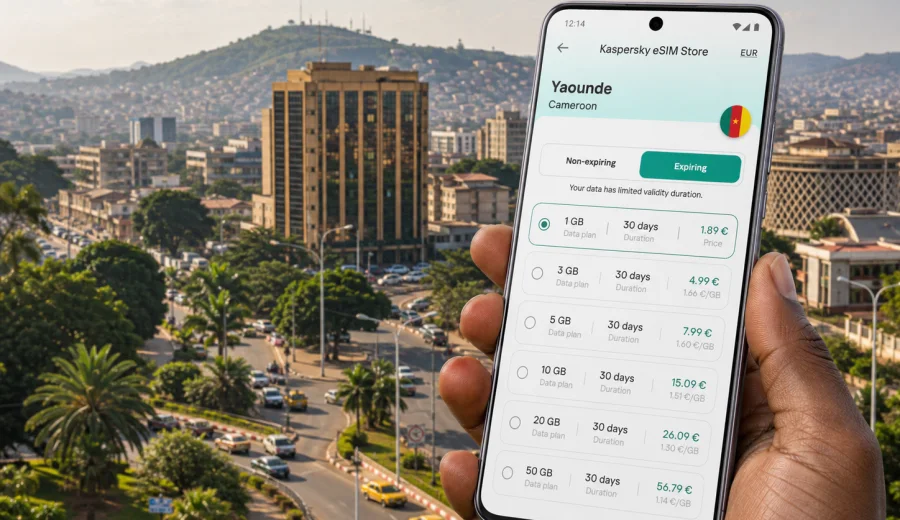
Yaounde eSIM: mobile connection and internet for a practical city trip
Yaounde is a city where mobile internet quickly becomes part of the trip itself. You may need a map before leaving Yaounde Nsimalen International Airport, a ride-hailing or taxi contact for the transfer into town, a messaging app to coordinate with a hotel in Bastos, or email access before a meeting near the administrative quarter. An eSIM helps you prepare that connection before the trip, without depending only on airport Wi-Fi, hotel reception, or a physical SIM card counter after arrival.
This guide focuses on Yaounde, not on Cameroon in general. It explains how to think about mobile data for airport arrival, city movement, business travel, hotel stays, short stopovers, and routes from Yaounde to other parts of the country. The goal is simple: choose a suitable eSIM tariff for Cameroon, install it on a compatible device, and know how to use your data during the moments when being offline would slow you down.
Why mobile internet matters in Yaounde
Yaounde is spread across hills and neighborhoods, so even short movements can involve a mix of car transfers, walking, local directions, and timing checks. A working data connection is useful before the trip becomes complicated. It helps when you need to:
- confirm the address of a hotel, office, embassy, clinic, or apartment;
- share your live location with a driver or colleague;
- check traffic before crossing the city;
- translate messages or signs when French or English is not enough for the situation;
- keep boarding passes, booking confirmations, and meeting details available;
- contact a host if the exact entrance, gate, or landmark is hard to identify;
- use maps between areas such as Bastos, Melen, Etoudi, Ngoa-Ekelle, Nlongkak, Mvan, Odza, Mokolo, and Tsinga.
Public Wi-Fi can still be useful, especially in hotels and offices, but it is not something you should depend on for every step. It may require a password, work only inside the building, or be too unstable for navigation. An eSIM gives you a mobile data option on your own phone, which is more practical when you are moving between airport, hotel, meetings, restaurants, and local stops.
Arrival at Yaounde Nsimalen International Airport
The first hour after landing is often when mobile data is most valuable. You may be tired, carrying luggage, and trying to confirm the right transfer into the city. Yaounde Nsimalen International Airport is outside the central districts, so a connection can help you handle the transfer before you are settled.
Useful arrival tasks include:
| Moment | Why data helps |
|---|---|
| Before passport control or baggage claim | Check messages from your hotel, driver, or host if airport Wi-Fi is available before you switch to mobile data. |
| Outside arrivals | Confirm the driver name, vehicle details, meeting point, or taxi arrangement. |
| On the road to the city | Follow the route, estimate arrival time, and tell someone if traffic changes the schedule. |
| At the hotel or apartment | Open booking details, contact reception, or share your location if the entrance is not obvious. |
If you install the eSIM before departure, you can usually complete most setup steps while still on a stable home connection. Then, after arrival, you only need to select the eSIM for mobile data and follow the activation conditions of your chosen tariff. Some tariffs start counting validity after activation or first network connection, so check the terms before your flight.
City scenarios where an eSIM is useful
Yaounde is not a city where every plan stays fixed. Meetings move, traffic changes, and directions are often easier when you can send a pin instead of explaining every turn by phone. A data-focused eSIM can support several everyday travel scenarios.
Business trips and official appointments
Many business travelers come to Yaounde for government, NGO, education, diplomatic, or regional office work. Mobile internet helps with calendar updates, secure access to work email, document sharing, and quick route checks between meetings. If your day includes stops around Bastos, Etoudi, the administrative center, or embassy areas, you will likely move between places where Wi-Fi availability varies.
For business travel, choose a tariff with enough data for maps, email, messaging, and occasional document downloads. If you use video calls, cloud folders, or hotspot sharing for a laptop, pick a larger data allowance and confirm whether tethering is allowed under the selected tariff.
Hotels, serviced apartments, and guesthouses
Hotel Wi-Fi is convenient, but it does not help on the road, at a meeting venue, or while checking in at a place where the password is not yet available. An eSIM gives you a backup for arrival, late-night messaging, and small urgent tasks when the hotel connection is weak.
Keep the hotel Wi-Fi for heavy downloads, cloud backups, and app updates. Use your eSIM data for movement, communication, maps, and travel services. This split helps preserve the mobile data package for the parts of the trip where it matters most.
Local movement and navigation
In Yaounde, landmarks, neighborhoods, and local references often matter as much as formal street addresses. Mobile maps are useful, but messaging apps are just as important because a host, receptionist, or driver may send a pin, a photo of the entrance, or a short voice note. A data connection keeps those details available while you move.
Before leaving your hotel, save the destination name, phone number, and a screenshot of the address. Mobile data is helpful, but a small offline backup gives you control if the signal is temporarily weak in a building, basement, or crowded area.
Short stopovers
If Yaounde is a stopover before another city, the data calculation is different. You may not need a large package, but you still need reliable access for airport transfer, overnight hotel check-in, and the next segment of the trip. A smaller short-validity tariff may be enough if your main use is messaging, maps, and transport coordination.
For a stopover, check three details: when the tariff validity begins, whether the data amount is enough for the whole stop, and whether you can top up or select another package if plans change.
How much data to plan for Yaounde
Data use depends on behavior, not only trip length. A careful traveler can use very little data; a traveler who streams video, uploads large files, or uses hotspot mode can consume several gigabytes quickly.
Use this planning table as a practical estimate:
| Trip style in Yaounde | Typical mobile data needs | What to watch |
|---|---|---|
| One-day stopover | Low | Maps, messaging, airport transfer, booking checks. |
| 2-3 day business trip | Low to medium | Email, documents, ride coordination, occasional calls over internet apps. |
| 4-7 day city stay | Medium | Daily navigation, restaurant searches, translation, photos, work messages. |
| Remote work or laptop hotspot | High | Video calls, file sync, cloud apps, tethering rules. |
| Yaounde plus trips to Douala, Kribi, Mbalmayo, or Ebolowa | Medium to high | More navigation time, more messaging, longer travel days. |
To reduce unnecessary data use, download offline map areas before departure, disable automatic video playback, pause cloud photo backup on mobile data, and keep system updates for Wi-Fi. These small settings can make a modest data package last much longer.
Choosing an eSIM tariff for Yaounde
For a city article, the right tariff is usually selected by country coverage. Yaounde is in Cameroon, so the relevant destination is Cameroon unless your route also needs a regional or global option. In Kaspersky eSIM Store, you can review available tariff details such as data volume, validity period, destination, and price before you decide.
When comparing options, work from your trip plan rather than from the lowest number on the screen:
1. Confirm the destination: for Yaounde, choose Cameroon coverage unless your itinerary needs a wider regional route.
2. Match validity to your dates: include arrival and departure days, not only full days in the city.
3. Estimate data use: maps and messaging use less than video calls, cloud storage, and hotspot mode.
4. Check the activation rules: know when the validity period starts and whether activation requires arrival in the destination.
5. Check device compatibility: the phone or tablet must support eSIM and must not be locked in a way that prevents using another mobile profile.
6. Keep your primary SIM plan in mind: many travelers keep their regular number for calls or SMS while using the eSIM for mobile data.
If your itinerary is centered on Yaounde, you can prepare an eSIM tariff for Cameroon before the trip and keep the setup ready before you land. This is especially useful if you arrive late, have a driver waiting, or need to go directly from the airport to a meeting or hotel.
Installation before departure or after arrival
The most comfortable setup is usually before departure, while you still have stable Wi-Fi and time to read the instructions carefully. After selecting a tariff, follow the installation flow for your device. If you need a step-by-step guide, use the Android installation instructions or the iOS installation instructions.
A simple preparation flow looks like this:
1. Check that your phone supports eSIM and is not carrier-locked.
2. Select Cameroon as the destination for a Yaounde trip.
3. Choose a tariff by data volume and validity period.
4. Install the eSIM using the on-screen instructions or QR code.
5. Keep your regular SIM active if you still need your usual number for calls or SMS.
6. On arrival, select the eSIM for mobile data and enable data roaming for that eSIM if the instructions or device settings require it.
7. Test mobile data with a light task, such as opening a map or sending a message.
Before paying for a tariff, check your device for eSIM support. Compatibility is not only about the model name. Some phones are region-specific, some are carrier-locked, and some tablets or laptops have different mobile connectivity versions. Checking this early avoids a rushed setup at the airport.
What to check before using eSIM data in Yaounde
The technical details are not complicated, but they matter. Review these points before you rely on the eSIM for your first transfer or meeting day.
- Your phone supports eSIM and allows adding a new mobile plan.
- The device is not locked to a single carrier.
- You know which SIM is used for mobile data, calls, and SMS.
- Data roaming is configured as required for the eSIM profile.
- The tariff destination and validity match your trip.
- You understand whether voice calls and SMS are included. Many travel eSIM tariffs are data-only unless the tariff conditions say otherwise.
- You have saved installation details or QR information in a place you can access.
- You have another internet connection available during installation if the setup is not completed before departure.
Do not delete an installed eSIM profile unless the instructions tell you to do so. In many cases, deleting a profile can make it difficult or impossible to reinstall the same eSIM on another device. If something does not work, check the settings first and contact support if needed.
Practical Yaounde data checklist
Use this checklist the day before travel:
- Save your hotel address in Yaounde in both text and map form.
- Download offline map areas for central Yaounde and the airport route.
- Confirm your airport transfer or taxi plan.
- Store meeting addresses and phone numbers outside email, such as in notes or calendar entries.
- Install the eSIM while connected to stable Wi-Fi if possible.
- Take screenshots of the eSIM setup confirmation and tariff details.
- Turn off automatic app updates on mobile data.
- Decide whether your regular SIM or eSIM will handle mobile data after arrival.
For the first day in Yaounde, keep data use light until you know your pace. Maps, messaging, translation, and booking confirmations are usually worth prioritizing. Video streaming, large uploads, and background backups can wait for trusted Wi-Fi.
Using eSIM with your regular SIM
Most travelers do not need to replace their regular phone number for a city trip. A common setup is to keep the physical SIM or primary eSIM active for calls and SMS, while the travel eSIM handles mobile data. This can be useful if your bank, airline, employer, or family may still contact your usual number.
Check your phone settings carefully. On iOS and Android, dual-SIM controls usually let you choose the default line for mobile data and the default line for calls. Labels help: name the travel profile "Cameroon data" or "Yaounde trip" so you do not confuse it with your home line.
If your regular carrier charges high roaming fees, turn off data roaming for that line and use mobile data only on the travel eSIM. Keep the home line available for essential SMS only if you need it, and review your carrier conditions before departure.
Routes from Yaounde
Even if the article focus is Yaounde, many trips continue beyond the city. The same Cameroon eSIM tariff may support mobile data while you travel to other places in the country, subject to the selected tariff conditions and local network availability. This is useful for:
- a business route between Yaounde and Douala;
- a weekend trip toward Kribi;
- visits to Mbalmayo, Ebolowa, or other nearby destinations;
- field work outside the central districts;
- a return route from Yaounde back to the airport.
Longer travel days often consume more data because maps stay open, messaging increases, and you may use the phone as a coordination tool for several hours. If your Yaounde trip includes road travel, choose a data allowance with some margin instead of planning for only the city center.
Common mistakes to avoid
The most common eSIM problems are usually preparation problems, not city problems. Avoid these mistakes:
| Mistake | Better approach |
|---|---|
| Waiting until the airport exit to start installation | Install before departure when you have stable Wi-Fi. |
| Choosing a tariff only by price | Match data volume and validity to your real itinerary. |
| Forgetting device compatibility | Check eSIM support and carrier lock status before selecting a tariff. |
| Leaving cloud backup on mobile data | Use Wi-Fi for heavy syncing and updates. |
| Deleting the eSIM profile during troubleshooting | Review settings first and ask support if you are unsure. |
| Assuming eSIM includes a local phone number | Check tariff conditions; many travel eSIM options are data-only. |
FAQ about eSIM, mobile connection, and internet in Yaounde
Can I use an eSIM as soon as I arrive in Yaounde?
You can use it after the eSIM is installed, configured for mobile data, and activated according to the selected tariff conditions. Installing before departure is usually easier because you can complete setup on stable Wi-Fi.
Is a city-specific eSIM needed for Yaounde?
Usually no. For Yaounde, you normally choose a Cameroon destination tariff, because city trips are covered through the country destination rather than a separate city product. Check the exact destination and conditions before selecting.
Will eSIM replace my regular phone number?
Not necessarily. Many travelers keep their regular SIM for calls or SMS and use the eSIM for mobile data. Travel eSIM tariffs often focus on internet access; voice calls and SMS are included only if the tariff conditions say so.
How much data should I choose for a few days in Yaounde?
For maps, messaging, bookings, and light email, a modest package may be enough. If you use video calls, hotspot mode, cloud storage, or long navigation sessions, choose more data. Your own habits matter more than the city name.
Can I install the eSIM after landing?
Yes, but you will need an internet connection to complete setup if it has not already been installed. Airport or hotel Wi-Fi may help, but installing before departure gives you more control.
Is public Wi-Fi enough in Yaounde?
It can help in hotels, offices, and cafes, but it is less reliable for transfers, walking routes, address checks, and messaging while moving. An eSIM gives you a mobile data option when Wi-Fi is not available or not convenient.
Prepare mobile internet for Yaounde before you travel
A good Yaounde connection plan is not complicated: check your device, choose a Cameroon tariff with the right data volume and validity, install the eSIM before departure if possible, and keep your phone settings clear. That gives you mobile internet for the practical parts of the trip: airport arrival, transport, maps, hotel coordination, business meetings, and routes beyond the city.
Kaspersky eSIM Store helps you choose, set up, and activate an eSIM tariff for mobile internet in a foreign trip through its site or app. Before you fly, review the available options and choose an eSIM tariff for your Yaounde trip so your mobile data plan is ready when you need it.