
Travel connectivity guide
Yerevan eSIM: mobile internet for your trip
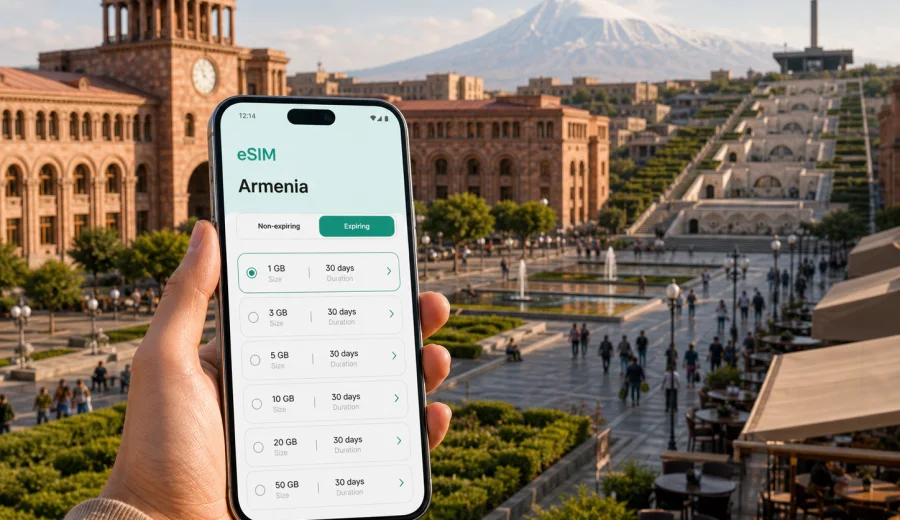
Yerevan eSIM: mobile connection and internet for a trip to Armenia's capital
Yerevan is an easy city to enjoy when your phone is already ready for the trip. You may need maps as soon as you leave Zvartnots International Airport, a messenger to meet your driver, mobile internet to check a hotel address near Republic Square, or a stable connection for a business call before your first meeting. An eSIM helps you prepare mobile data for Armenia without looking for a physical SIM card after landing.
This guide focuses on Yerevan, not on Armenia in general. The country matters because the eSIM tariff must match the destination, but the real travel tasks happen in the city: airport transfer, navigation through Kentron, taxi apps, hotel check-in, cafe work sessions, payments, translation, and short trips to places such as Garni, Geghard, Echmiadzin, Lake Sevan, or Khor Virap.
Why mobile internet matters in Yerevan
Yerevan is compact compared with many capitals, but it is not a city where you want to rely only on memory or hotel Wi-Fi. Streets can be hilly, landmarks may be easier to find by map than by address, and a short ride can become confusing if you cannot check the exact entrance, pickup point, or route.
Mobile data is useful in Yerevan for:
- checking the route from Zvartnots International Airport to your hotel;
- confirming a taxi pickup near the terminal, Republic Square, Cascade, or Northern Avenue;
- using maps for walking between cafes, museums, parks, and metro stations;
- messaging a host, guide, colleague, or family member;
- translating menus, signs, or short conversations;
- checking opening hours before visiting a museum, restaurant, or viewpoint;
- joining a video call from a hotel lobby or coworking space;
- sharing your location during evening plans or day trips outside the city.
Public Wi-Fi may be available in some hotels, cafes, malls, and business spaces, but it is not a complete travel connectivity plan. It may require registration, work only inside one venue, or become slow during busy hours. With an eSIM, you can prepare a mobile data option before the trip and use it when Wi-Fi is unavailable, inconvenient, or not the right choice for what you are doing.
Arrival at Zvartnots International Airport
For many visitors, the first Yerevan connectivity test happens before they have even seen the city center. Zvartnots International Airport is west of Yerevan, and the first hour often includes several phone-based tasks: passport control updates from your group, baggage messages, a ride to the hotel, and the exact address for check-in.
If your eSIM is installed before departure, the arrival sequence can be simple:
1. Land in Yerevan and disable airplane mode when allowed.
2. Turn on the eSIM line for mobile data.
3. Check that data roaming is enabled for the eSIM profile if the tariff instructions require it.
4. Open your map, taxi app, or messenger.
5. Keep your primary SIM active for calls or SMS if you need it, while using the eSIM for mobile data.
This is especially helpful when you arrive late at night, travel with luggage, or need to coordinate with someone waiting outside the terminal. Even if airport Wi-Fi works, having mobile data ready gives you a fallback for the route from the airport to Kentron, Arabkir, Ajapnyak, or another district.
Where eSIM is useful inside the city
Yerevan rewards walking, but walking in the city often depends on fast decisions. You may move from Republic Square to Vernissage, continue to the Cascade Complex, take a taxi to a restaurant in Arabkir, and then return to your hotel through streets that look different at night. Mobile internet keeps those small decisions from becoming friction.
| City moment | Why mobile data helps |
|---|---|
| Airport transfer | You can message the driver, check the route, and confirm the hotel address. |
| Republic Square and Kentron | Maps help with museums, cafes, metro entrances, and walking routes. |
| Cascade and Monument area | Elevation changes make route choice more important than it looks on a flat map. |
| Vernissage market | Messaging, currency conversion, and location sharing are useful while browsing. |
| Business districts and hotels | Mobile data helps when venue Wi-Fi is crowded, gated, or not available yet. |
| Day trips from Yerevan | Navigation, guide coordination, and translation are easier with data outside the hotel. |
The main advantage is continuity. You do not need a different connectivity habit for every place: one for the airport, another for the hotel, another for cafes, and another for the street. You prepare a data tariff for Armenia and use it through the parts of the trip where mobile internet is available under the selected tariff conditions.
Choosing an eSIM tariff for Yerevan
For a city trip, the right eSIM tariff depends less on the city name and more on your behavior. A traveler using maps and messengers for a long weekend needs less data than someone uploading videos, using a laptop hotspot, or joining work calls every day.
Before choosing, define five things:
- how many days you will stay in Yerevan;
- whether you will take trips outside the city;
- how often you use video calls, cloud files, or streaming;
- whether your hotel and office Wi-Fi are reliable enough for heavy use;
- whether you need the eSIM only for mobile data or also expect voice and SMS, which may not be included unless stated in the tariff terms.
For many Yerevan trips, the most practical approach is to choose a prepaid data package with a validity period that covers the full stay, including arrival and departure days. If you land on Friday night and leave on Monday morning, count both travel days because mobile internet is often most useful during transfers.
How much data to plan for Yerevan
Data use varies, but you can estimate it by activity. Maps and messengers are usually light. Video calls, streaming, cloud backups, and hotspot use consume much more. If you are trying to avoid unexpected usage, disable automatic media downloads, pause cloud photo backup, and save offline maps before you leave.
| Travel style | Typical city usage | Planning tip |
|---|---|---|
| Short stopover | Maps, taxi, messaging, hotel check-in | Choose enough data for arrival, route checks, and unexpected delays. |
| Weekend in Yerevan | Navigation, restaurants, bookings, photos, messengers | A moderate package is usually more comfortable than the smallest option. |
| Business trip | Email, calendar, maps, messengers, occasional calls | Add a buffer for tethering or calls from places with weak Wi-Fi. |
| Remote work week | Video meetings, cloud documents, hotspot use | Treat hotel Wi-Fi as helpful, but do not make it your only plan. |
| City plus day trips | Yerevan data use plus maps and messages on the road | Check that the tariff covers Armenia and the validity period covers all travel days. |
The goal is not to buy the largest package by default. The goal is to choose a tariff that fits how you actually travel, with a margin for the moments when mobile internet matters most.
A practical Yerevan setup before you fly
You can prepare most of your mobile connection before you reach Armenia. That is useful because the first hour after landing is usually the worst time to compare options, read instructions, and solve device settings.
Use this checklist a day or two before departure:
- make sure your phone supports eSIM;
- check that your device is not locked to one mobile operator;
- update your operating system if you have postponed important updates;
- save your hotel address in English and Armenian if available;
- download offline maps for Yerevan as a backup;
- install the eSIM while you still have stable home Wi-Fi;
- keep the activation instructions available in your email or account;
- decide which SIM line will handle mobile data, calls, and messages.
Kaspersky eSIM Store is an app and website where you can quickly choose, arrange, and activate an eSIM with a suitable mobile data tariff for an international trip. For Yerevan, use the Armenia destination page to review available options and prepare an eSIM tariff for your trip to Yerevan when the package, validity period, and conditions match your plans.
Installation and activation steps
The exact path depends on your phone model and operating system, but the logic is usually consistent: choose a tariff, install the eSIM profile, select it for mobile data, and activate it according to the tariff instructions. If you need device-specific steps, use the Android installation guide or the iOS installation guide.
Typical steps look like this:
1. Choose Armenia as the destination and select a tariff by data volume and validity.
2. Complete the order and open the eSIM details in your account or app.
3. Install the eSIM profile using the on-screen instructions or QR code.
4. Keep your main SIM for calls and SMS if you need your usual number.
5. Set the eSIM as the mobile data line when you are ready to use it.
6. Enable data roaming for the eSIM if the tariff instructions require it.
7. Test a low-data app such as maps or messenger after arrival.
Do not delete the eSIM profile after installation unless the instructions or support team specifically tell you to do so. Some eSIM profiles cannot simply be moved to another device after activation, and reinstalling may not work the same way as reinstalling a regular app.
Check device compatibility before you pay
eSIM is convenient only if your device supports it and is ready to use it. Before buying a tariff, check the phone model, regional version, and operator lock status. A recent phone may still have restrictions depending on where it was purchased or how it was configured.
Use the compatibility check before you choose a package: Check your device.
Also review these points:
- your phone must support eSIM, not only a physical SIM card;
- your device should not be locked to a mobile operator that prevents another mobile profile;
- you need internet access during installation, usually through Wi-Fi or an existing mobile connection;
- the eSIM may be for mobile data only, so ordinary calls and SMS may remain on your primary SIM;
- data roaming may need to be enabled for the eSIM profile, depending on the tariff instructions.
This check is worth doing before you leave, especially if the phone is new, second-hand, company-managed, or bought in a region with model-specific eSIM limitations.
Yerevan travel scenarios where eSIM helps
Different trips use mobile data in different ways. For a first visit based in Kentron, eSIM is mostly about maps, taxis, restaurant bookings, and moving between Republic Square, Northern Avenue, the Opera area, Cascade, and Saryan Street without asking every venue for Wi-Fi. For a business trip, it is more about calendar updates, email, messaging, ride coordination, and backup data when hotel or office Wi-Fi is not reliable enough.
If Yerevan is a stopover, install the eSIM before the flight so you can manage taxi pickup, hotel messages, boarding updates, and the route back to the airport without setting up a new profile while tired. If your plan includes day trips to Garni, Geghard, Echmiadzin, Khor Virap, or Lake Sevan, check that the tariff covers Armenia and has enough data for navigation, guide messages, and schedule changes outside the hotel.
Transport, hotels, and work sessions
Yerevan has metro, buses, minibuses, taxis, and walkable central areas. Visitors often use a mix: walking in the center, taxi rides after dinner, and transfers to districts outside the main sightseeing zone. Mobile internet helps you choose a route, find the correct side of a square or avenue for pickup, follow a taxi ride to your hotel, share your live location, and translate address details when a building has several entrances.
Hotel Wi-Fi in Yerevan may be enough for streaming or large updates, but quality can vary by room, floor, occupancy, or building type. Apartments and guesthouses can be even more variable. If you have a work call, a file deadline, or a time-sensitive booking, mobile data gives you another option. If hotspot use is important, check the selected tariff terms and monitor consumption because laptop tethering can use data quickly.
Before you leave for Yerevan: quick checklist
- Confirm that Armenia is the destination for your eSIM tariff.
- Choose a validity period that includes arrival and departure days.
- Estimate data use by activity, not only by trip length.
- Install the eSIM profile while you have stable Wi-Fi.
- Keep installation instructions available offline or in email.
- Check whether data roaming must be enabled for the eSIM.
- Save hotel, airport, and meeting addresses before the flight.
- Keep your primary SIM available if you need calls or SMS on your usual number.
Common questions about eSIM in Yerevan
Can I use an eSIM for mobile internet in Yerevan?
Yes, if your device supports eSIM, is not restricted by an operator lock, and you choose a tariff that includes Armenia under its conditions. Always review the package details before purchase.
Should I install the eSIM before arriving in Armenia?
Installing before departure is usually more comfortable because you can use stable Wi-Fi and read the instructions calmly. Activation and data use depend on the tariff terms, so check when the validity period starts.
Does an eSIM include a local phone number in Armenia?
Not necessarily. Many travel eSIM tariffs are for mobile data. Voice calls and SMS are not included unless the specific tariff says so. You can still use internet-based calling and messaging apps over mobile data.
Is eSIM enough for a business trip or a day tour from Yerevan?
It can be a useful part of your connectivity plan for maps, messages, email, taxis, backup data, guide coordination, and translation. If you expect long video calls, hotspot use, or heavy cloud work, choose a tariff with a larger data allowance and check tethering conditions.
Choose an eSIM tariff for your Yerevan trip
Yerevan is easier to navigate when your mobile internet is prepared before the first taxi ride, hotel message, or map search. With Kaspersky eSIM Store, you can choose an Armenia data tariff, review the data volume and validity period, install the eSIM on a compatible device, and use it for the parts of your trip where mobile data is needed.
Before you fly, check compatibility, choose a package that fits your itinerary, and keep the setup instructions close. If your plans include airport transfer, city walks, business meetings, cafe work, and day trips from Yerevan, prepare enough data for the full route rather than only the first day.
You can choose an eSIM tariff for a trip to Yerevan and set up mobile internet for Armenia before departure or when you have a stable connection after arrival.