
Travel connectivity guide
Yogyakarta eSIM Guide for Mobile Internet
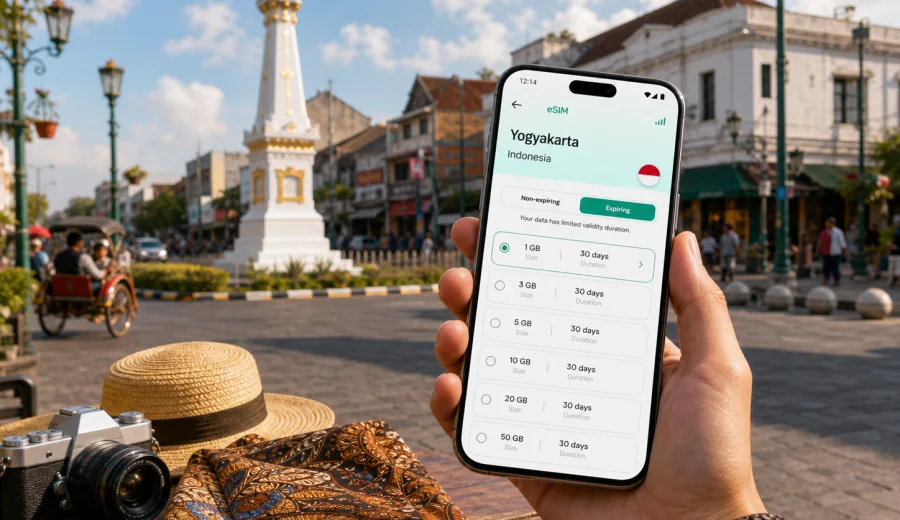
Yogyakarta eSIM guide: mobile connection and internet for your trip
Yogyakarta is one of Indonesia's easiest cities to explore slowly, but it is also a place where mobile internet quickly becomes part of the trip. You may need maps as soon as you leave Yogyakarta International Airport, a ride-hailing app for the transfer into town, chat access to confirm a hotel check-in, and a browser to check opening times before going to Malioboro, Kraton, Taman Sari, Prambanan, or Borobudur.
An eSIM can make that first day simpler. Instead of looking for a physical SIM card after a long flight or depending on public Wi-Fi in the terminal, you can prepare a digital SIM profile for mobile data before the trip and activate it on a compatible phone. For many visitors, that means fewer small decisions on arrival and more control over data use during the stay.
Why mobile internet matters in Yogyakarta
Yogyakarta is compact compared with Jakarta or Surabaya, but the travel pattern is varied. You may land outside the city, take a train or car transfer, move between heritage areas and university districts, then leave early for a temple trip or business visit.
Mobile data is useful in these common moments:
- checking the route from the airport, train station, or bus terminal to your hotel;
- using ride-hailing and taxi apps when street names or pickup points are unfamiliar;
- navigating between Malioboro, Kraton, Taman Sari, Prawirotaman, Kotagede, and university areas;
- messaging a guide, driver, host, colleague, or hotel reception;
- translating short signs, menus, and local instructions;
- confirming tickets, reservations, boarding passes, and meeting details;
- checking weather and traffic before a trip to Prambanan, Borobudur, or the coast.
Yogyakarta also rewards early starts. Many travelers leave before sunrise for temple visits or photography routes. If you already have mobile data set up, you can confirm pickup points, check a route change, or contact a driver without first asking the hotel for Wi-Fi access.
The first hour after arrival
Your first connection need usually appears before you reach the city center. Yogyakarta International Airport is outside the central urban area, so the transfer can take time depending on traffic, transport choice, and where you stay. Some travelers continue by airport train, some use a car transfer, and others arrange pickup through the hotel.
During this first hour, mobile internet can help you:
| Situation | Why data helps |
|---|---|
| Airport arrival | Open the hotel address, message the driver, and check the next transfer option. |
| Ride-hailing pickup | Confirm the right pickup zone and follow the vehicle location. |
| Late arrival | Find food, an ATM, or a route without depending on public Wi-Fi. |
If you install an eSIM before departure, keep your main SIM active for calls or SMS if you still need it, and select the eSIM profile for mobile data after arrival. On some devices, you may also need to enable data roaming for the eSIM profile because it is a device setting required by some travel eSIM profiles.
eSIM, roaming, or a local SIM in Yogyakarta
There is no single option that fits every traveler. The right choice depends on trip length, device support, data use, and how much time you want to spend arranging connectivity.
| Option | Good for | Points to check |
|---|---|---|
| Travel eSIM | Visitors who want mobile data ready before or soon after arrival. | Your phone must support eSIM and be unlocked for use with another mobile profile. |
| Home roaming | Short trips where convenience matters and your operator's roaming terms are acceptable. | Price, data allowance, speed policy, and what happens after the allowance is used. |
| Physical local SIM | Longer stays or users who need a local number. | Store visit, registration rules, language barriers, and setup time. |
| Public Wi-Fi | Occasional low-risk browsing at a hotel, cafe, or airport. | Availability, login steps, stability, and whether you want to use it for sensitive accounts. |
For many city trips, eSIM is attractive because it separates mobile data from the physical SIM slot. You can keep your usual SIM in the phone and add a second mobile profile for travel data.
How much data to plan for Yogyakarta
Yogyakarta is not a city where every task requires heavy data use. Maps, chat, ride-hailing, email, boarding passes, and translation are usually moderate. Video streaming, cloud backups, hotspot use, and long video calls are the activities that change the calculation.
Use this practical estimate before choosing a data plan:
- Light use: maps, messaging, email, tickets, and occasional browsing.
- Moderate use: the above plus social media, photo sharing, restaurant searches, and work chats.
- Heavy use: video calls, laptop tethering, cloud files, streaming, and frequent uploads.
For a weekend in Yogyakarta, a smaller data allowance may be enough if you use hotel Wi-Fi for large downloads. For a week with temple trips, remote work, and ride-hailing every day, choose more data and a validity period that covers the full stay.
Where an eSIM helps most in the city
Yogyakarta's travel zones are different in how you use your phone. In the heritage center, you may rely on walking routes and short rides. Around Prawirotaman or university areas, you may need hotel chats, cafe maps, coworking details, and traffic-aware routes.
| Area or route | Typical mobile internet task |
|---|---|
| Malioboro and Tugu area | Walking navigation, ride pickup points, restaurant searches, hotel messages. |
| Kraton and Taman Sari | Map pins, museum or palace timing checks, translation, route changes. |
| Prawirotaman | Hotel communication, cafe searches, remote work, evening transport. |
| Prambanan route | Driver messages, ticket confirmation, route timing, weather checks. |
| Borobudur day trip | Early pickup coordination, map access, guide communication, return planning. |
| Yogyakarta International Airport route | Train or car transfer checks, pickup coordination, flight updates. |
The main benefit is not just being online. It is being able to make small city decisions without waiting for the next hotel lobby, cafe network, or information desk.
Choosing an eSIM data plan for Yogyakarta
When choosing a data plan, start with the country. A city article can mention Yogyakarta, but the mobile data plan usually applies to Indonesia rather than a single city. That matters if your route includes another Indonesian stop before or after Yogyakarta.
Check five details before you pay:
1. Destination coverage: choose Indonesia if your trip is limited to Yogyakarta and other Indonesian cities.
2. Data allowance: match the package to your expected use, not only the number of days.
3. Validity period: make sure it covers your arrival day, stay, and departure day.
4. Activation conditions: read when validity starts and what steps are required on your device.
5. Device compatibility: confirm that your phone supports eSIM and is not locked to one operator.
Kaspersky eSIM Store helps you choose, arrange, and activate an eSIM with a suitable data plan for mobile internet in a foreign trip. If you are preparing a Yogyakarta itinerary, you can choose a data plan for travel in Indonesia before departure and keep the setup ready for arrival.
This link points to the Indonesia plan page because Yogyakarta is in Indonesia and the plan should match the country of travel.
Before you buy: device and account checks
Not every phone can use eSIM. Before buying, confirm that your model supports eSIM, that the feature is enabled for your market version, and that the device is not locked to a single operator. If you are not sure, use the compatibility check before purchase: check your device.
Also check these practical points:
- Do not delete an installed eSIM profile unless you are sure you no longer need it; some profiles cannot be reinstalled after removal.
- Review whether the selected plan includes data only. Many travel eSIM data plans do not include a local phone number, voice calls, or SMS unless the terms say so.
For calls and messages in Yogyakarta, many travelers use internet-based messengers over mobile data. If you need ordinary calls or SMS, check a suitable option before the trip.
How to install and activate eSIM for a Yogyakarta trip
The installation flow depends on your phone, but the planning logic is straightforward. Install the eSIM when you have stable internet access, then activate mobile data for that profile when you are ready to use it. Some travelers do the installation at home and switch data on after landing. Others install at the hotel before going out.
Basic steps:
1. Check that your device supports eSIM and is unlocked.
2. Choose Indonesia as the destination if Yogyakarta is your city of travel.
3. Select a data allowance and validity period that match your itinerary.
4. Add the eSIM profile to your phone and follow the activation notes.
5. On arrival, select the eSIM for mobile data.
For device-specific guidance, use the Android installation instructions or the iOS installation instructions. Follow the steps shown for your phone model and operating system, because menu names can differ between versions.
Yogyakarta scenarios and what to prepare
Different travelers need mobile data in different ways. Use the scenarios below to decide whether a small, moderate, or larger plan is sensible.
| Scenario | What you will likely use data for | Preparation tip |
|---|---|---|
| Cultural weekend | Walking maps, ticket confirmations, ride-hailing, chat, photo sharing. | Download key maps offline, then use mobile data for live decisions. |
| Temple day trips | Early driver contact, route checks, weather, messaging, tickets. | Confirm pickup points the night before and keep battery power available. |
| Business visit | Email, calendar, ride-hailing, work chat, document access. | Choose more data if you expect video calls or laptop hotspot use. |
| Longer Indonesia route | Data in Yogyakarta plus another city or island. | Check whether one Indonesia plan covers the full route and validity period. |
The most common mistake is choosing by price alone and forgetting validity. A plan that expires before the last transfer can be less convenient than a slightly larger plan that covers the full trip.
Local movement: maps and pickup points
Yogyakarta is walkable in some central areas, but most visitors still combine walking, ride-hailing, taxis, trains, and arranged transfers. Mobile internet helps because pickup points are often more precise than street names. Around stations, hotels, malls, campuses, and heritage sites, you may need to message the driver or adjust the pin.
Good habits for smoother movement:
- Save your hotel address in English and Indonesian if the booking provides both.
- Download an offline map of Yogyakarta before departure.
- Keep ride-hailing apps updated before you travel.
- Screenshot your accommodation address, booking reference, and arrival details.
- Carry a power bank for full sightseeing days.
Offline maps are useful, but they do not replace live data for traffic, ride location, chat, payment confirmation, and last-minute changes.
Hotels, cafes, and remote work
Hotel and cafe Wi-Fi can be convenient for large downloads, streaming, or laptop work. A travel eSIM gives you a backup when the network is slow, the login page fails, or you need to work before check-in. For business visits, keep video calls on Wi-Fi where possible, disable automatic cloud backup over mobile data, and track data use during the first day.
Day trips from Yogyakarta
Many Yogyakarta itineraries extend beyond the city. Prambanan, Borobudur, villages, viewpoints, and coastal routes often depend on coordination: pickup times, route changes, weather, ticket confirmations, and messages with a driver or guide.
Before leaving the city for a day trip:
1. Save the key addresses and meeting points.
2. Check whether your plan has enough data for navigation and chat outside the city center.
3. Charge your phone and power bank.
4. Keep your hotel address available for the return trip.
5. Confirm whether you need mobile hotspot for a companion's device.
Frequently asked questions
Is eSIM useful for Yogyakarta if my hotel has Wi-Fi?
Yes, it can still be useful. Hotel Wi-Fi helps when you are in the room or lobby, while eSIM mobile data helps during airport transfer, sightseeing, ride-hailing, day trips, and unexpected route changes.
Should I choose a Yogyakarta eSIM or an Indonesia eSIM?
Choose the destination that matches the available plan structure. For a city trip to Yogyakarta, the relevant destination is Indonesia. That is also helpful if you travel from Yogyakarta to another Indonesian city during the same validity period.
Does a travel eSIM include a local phone number?
Many travel eSIM data plans are data-only. They may not include ordinary voice calls, SMS, or a local number unless the specific plan terms say so. You can usually use internet-based calling and messaging apps over mobile data.
Prepare mobile internet for Yogyakarta
Yogyakarta is easier when your phone is ready from the first transfer: maps open, messages arrive, ride apps work, and day trips are easier to coordinate. Before you travel, check device compatibility, choose a data allowance that fits your itinerary, and install the eSIM while you still have stable internet access.
Kaspersky eSIM Store helps you prepare an eSIM for mobile internet in a foreign trip through its app and website. For a Yogyakarta visit, you can prepare an eSIM data plan for Indonesia and arrive with one less practical task to solve after landing.