Travel connectivity guide
York eSIM: Mobile Data for Your City Trip
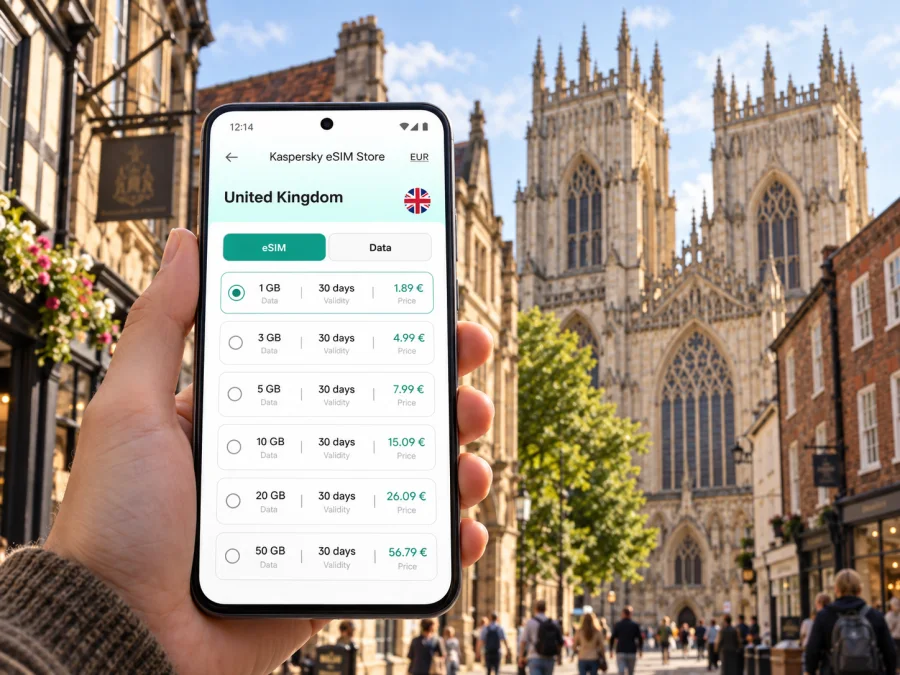
York eSIM: mobile connection and internet for your city trip
York rewards a visitor who can change plans without losing time. You may arrive by train, check in near the station, walk through the historic centre, then head to a museum, a meeting or a quieter stretch beside the River Ouse. A mobile connection helps with the practical transitions: checking a route, confirming a hotel address, messaging your host and finding your way back after dark. An eSIM can make mobile data easier to plan before you travel, so your first useful map does not depend on finding a public Wi-Fi network.
This guide focuses on using mobile internet around York: what to think about on arrival, how to move between the station and central areas, and how to prepare for a short visit or a longer stay. York is compact enough for many central journeys on foot, but the exact route and pace depend on your accommodation, luggage, weather and plans. Save a little time for orientation, and let your phone support the visit rather than dictate it.
Before you set off for York
Start with the shape of your trip. A weekend based inside the city walls has different data needs from a work visit with video calls, or a stay that includes day trips by train. Think about the tasks you will use your phone for: maps, rail information, hotel messages, online tickets, translation, email, ride arrangements or sharing photos. This simple list is more useful than choosing a data allowance by guesswork.
Before travel, make sure you can access your travel details without a live connection. Keep the hotel address, check-in instructions, ticket references and a map of the central area available offline or in screenshots. These backups are helpful if a train is delayed, a station is crowded or your phone battery is low. Mobile data then becomes a convenient layer for changes and updates, rather than the only place where essential information exists.
A practical pre-trip checklist:
- Check whether your phone supports eSIM and is not locked to a mobile operator. Check your device before choosing a plan.
- Review the destination, data allowance, validity period and activation conditions shown for the tariff.
- Install or prepare the eSIM while you have a reliable internet connection, following the instructions supplied with it.
- Keep your usual number available if you need calls or messages through your home SIM; an eSIM data plan may not include a regular phone number, voice calls or SMS unless its terms say otherwise.
- Download maps and save your first destination before leaving home.
- Carry a charging cable or power bank if you expect to navigate for much of the day.
Kaspersky eSIM Store is an app and website where you can choose, arrange and activate an eSIM with a suitable mobile data tariff for an international trip. The service is designed to help you prepare the eSIM journey; the mobile service itself depends on the selected tariff and its network conditions. Read the plan details carefully, especially if your route extends beyond York or you expect to use data intensively.
Arriving in York and getting oriented
Many visitors reach York by rail. York railway station sits just outside the historic centre, and the walk toward the city walls and central streets is straightforward to plan on a map. With a suitcase, a hotel on the far side of the centre or poor weather, you may prefer a local bus or another available transport option. Check the current stop, route and service information at the station rather than relying on an old screenshot: platforms, stops and schedules can change.
At arrival, it helps to separate three destinations in your navigation app: the station exit, your accommodation entrance and the first place you plan to visit. A hotel’s postal address may point to a street rather than the correct doorway, particularly in a dense historic area. Save the property’s arrival instructions and use its message contact if the final turn is unclear. If you are meeting someone, agree on a recognisable point outside the station instead of trying to find each other while moving through a crowd.
The centre’s medieval street pattern can feel less linear than a modern grid. A route that looks short on the screen may include narrow lanes, steps, busy crossings or a detour around the river. Check the full route before you start, then use turn-by-turn guidance as a prompt rather than walking with your eyes fixed on the phone. Pull over somewhere safe to read a message or adjust your destination.
For the first hour, keep the essentials simple:
- Confirm your accommodation address and check-in time.
- Find the walking or transport route from the station.
- Send a short arrival update if someone is expecting you.
- Note the nearest convenient place to buy water or pick up essentials.
- Put the phone away for a few minutes and get your bearings from the streets around you.
If you are arriving late, tired or with children, plan less for that first evening. A direct route to the hotel and a saved map are more useful than trying to fit in a sightseeing loop. York’s central sights are close enough to revisit the next day, while a little battery and data kept in reserve can help with a late change of plan.
Moving around the historic centre
Walking is often a practical way to connect central York’s main sights, shops, cafés and accommodation. The city walls, river crossings and historic lanes give the centre a distinctive layout, so navigation is most useful at the beginning and end of a walk: when leaving the station, finding a specific entrance, or returning to a hotel after exploring. You can then look up from the map and enjoy the details around you.
The Shambles and neighbouring streets are narrow and can be busy. If you have a timed booking, add a margin for slower movement and avoid assuming that a short map distance means a quick walk. Step aside before checking directions, and keep in mind that GPS positioning can be less precise between tall or closely spaced buildings. When a location pin seems to place you on the wrong side of a lane, compare it with the street name and nearby landmarks.
York Minster is a useful orientation point in the centre, but it is not a substitute for checking the entrance and opening information for your visit. A map can help you approach from the right side of the surrounding streets; the venue’s own current details are the place to confirm admission, access arrangements and any changes to visiting hours. The same habit applies to museums, performances and restaurants: save the booking information and check it close to the day.
The River Ouse divides parts of the city and has several bridges and riverside paths. A pleasant-looking waterside route may not be the quickest way to a destination, and conditions can affect how enjoyable a walk feels. If you are walking in the evening, choose a route that is clear and comfortable for you, and check the return direction before leaving a riverside area. Do not use a phone while crossing a road or navigating a crowded bridge.
| Your plan | Useful phone task | A practical backup |
|---|---|---|
| Station to hotel | Open the saved route and confirm the entrance | Keep the hotel address and arrival message offline |
| Historic centre walk | Check turns between landmarks | Remember a nearby main street as a reference point |
| Timed attraction | Confirm booking details and route | Save the ticket or confirmation in advance |
| Evening return | Check your route before setting off | Note the hotel name and street, not just its map pin |
| Day trip | Review rail updates and departure details | Save the return journey information before leaving |
Choosing a base: centre, station or beyond
Where you stay changes how often you need directions and how much you use mobile data. Accommodation near the station can simplify arrival and departure, especially if you have luggage or an early train. A central address may put you closer to historic sights and dining, although narrow streets and pedestrian areas can make the last part of the journey easier on foot than by car. A quieter location farther out may suit a longer stay, but add the route back into town to your daily planning.
Use a map to compare the walk from accommodation to the places that matter to you, rather than choosing by a single distance figure. Check for the entrance location, nearby crossings and whether your route follows a busy road or a pedestrian street. If you have limited mobility, bulky luggage or an early meeting, contact the accommodation in advance about the most convenient arrival approach. A navigation app can guide you toward a location, but it cannot know every access detail of a particular building.
For a multi-night stay, group plans by area. One day might focus on the Minster and central lanes; another could follow the river or include a museum and a longer café stop. This reduces backtracking and means you can check directions less often. Download or save the route to your first stop, but leave room for detours: independent shops, a quiet churchyard or an unexpected change in weather may make the best part of the day.
If you want to prepare before departure, explore eSIM options for the United Kingdom and compare the terms with your itinerary. Kaspersky eSIM Store provides a place to choose, arrange and activate an eSIM for mobile data during an international trip; the tariff’s stated conditions determine its scope and use. This is especially useful when your York visit is part of a larger stay in the United Kingdom and you want to understand the destination details before travelling.
Choosing mobile data for a York visit
The right tariff depends on the length and style of your visit, not simply the city name. A traveller who mainly checks maps and messages will use data differently from someone who uploads video, joins work calls or streams entertainment on mobile networks. Wi-Fi may be available at accommodation or other venues, but access and quality vary. Plan for the tasks you expect to do while out, and keep large downloads and automatic backups for a trusted Wi-Fi connection when practical.
To compare options, look at the destination coverage stated for the tariff, the amount of data, validity period, price and any activation or usage conditions. If your visit includes a train journey onward from York, a stop in another part of the United Kingdom or a longer route across borders, make sure the plan terms match the complete itinerary. Do not assume a city name alone tells you where a plan works; use the country and destination details provided with the tariff.
A rough planning framework:
- Light use: maps, messages, email and occasional searches while out. Save maps and tickets in advance to reduce repeated loading.
- Regular use: frequent navigation, photo sharing, social apps and online bookings. Check how much mobile data your apps typically use and turn off background activity you do not need.
- High use: remote work, video calls, cloud uploads or streaming. Confirm that the allowance and conditions fit those activities, and use a reliable Wi-Fi connection for data-heavy tasks when available.
These are usage patterns, not fixed data amounts. Actual consumption varies with app settings, image quality, call duration and whether content is downloaded or streamed. Your device may show mobile data usage for a chosen period; reviewing it can help you make a more informed choice for a future trip.
Set up the eSIM before relying on it
Install an eSIM when you have reliable internet access and time to follow the steps. Keep the QR code or profile details available as instructed, and do not delete an installed profile unless you understand the effect on your plan.
- Check that your phone supports eSIM and is not operator-locked. Check your device if you are unsure.
- Review the destination, validity and activation conditions shown for the tariff.
- Connect to Wi-Fi and follow the instructions for Android or iOS.
- Add and label the eSIM profile, then select the correct line for mobile data.
- Enable data roaming only if the plan instructions require it, and allow a few minutes for registration when you first connect.
You can often install a profile before travelling, but validity may begin at purchase, installation, first connection or another event. Follow the specific tariff terms so you know when to activate it. If you want to use the eSIM later, leave it unused or inactive only as allowed by those terms.
York for work, events and short stopovers
For a business visit, save meeting addresses, hotel details and calendar invitations before leaving. Check the entrance and allow time for the route from the station; a map pin may not identify a building’s reception. If a meeting moves, stop somewhere safe before messaging your contact or changing directions. A mobile data tariff can help with email and calls, subject to its terms and local network conditions.
For a short stopover, choose one compact walk and one or two priorities. Account for luggage, check-in and the return journey, and keep your ticket and station location accessible offline. This leaves time to explore without risking a rushed return.
Day trips from York
York is a rail hub for exploring other places in the region, and some visitors use the city as a base for a wider United Kingdom itinerary. Before a day trip, check the current departure details, the station you need and the return options. Keep the return information accessible without relying on a live search at the last moment. Service changes and individual travel arrangements can vary, so use up-to-date journey information for the date you travel.
A route beyond York changes your mobile-data planning in two ways. First, you may be away from familiar landmarks for longer, making maps and rail updates more useful. Second, your chosen tariff must cover the places on the route, as described in its terms. If your trip crosses into another country, check that destination separately rather than assuming a United Kingdom plan applies there.
A light day-trip routine:
- Save the outward and return journey details.
- Pin the station or meeting point you will need at the destination.
- Download a local map if your route includes countryside or a place where you expect limited connectivity.
- Carry a charger and keep your phone accessible but secure.
- Check the last practical return option before committing to an extended stop.
This preparation helps whether you are travelling for a museum, a family visit, a countryside walk or a meeting. It also keeps York at the centre of the plan: you can return to a known base, collect luggage and continue your journey with less last-minute searching.
If mobile data is not working as expected
Check that the eSIM is installed and switched on, and that your phone has selected it for mobile data. Review whether the plan requires data roaming, then move to an open area and wait briefly for registration. Reception can vary inside older buildings or crowded locations. If the problem continues, follow the plan guidance and use the support route provided with your order. Keep a saved map and key addresses available in case you need them while troubleshooting.
Frequently asked questions
Is an eSIM useful for a weekend in York?
It can be useful for maps, messages, bookings and journey updates. Suitability depends on your device, expected usage and the tariff terms.
Do I need mobile data to explore the centre?
No. A saved route or offline map can be enough. Mobile data is helpful for live changes, but should not be your only copy of essential information.
Does a travel eSIM include calls and SMS?
Not necessarily. A data tariff may not include a standard phone number, voice calls or SMS unless its terms say so. Your regular SIM can remain available for those services.
Can I use one eSIM outside York?
Check the destination coverage and conditions stated for your tariff, especially if your itinerary includes another country.
When should I install it?
You can often prepare an eSIM over Wi-Fi before departure. Check when the plan’s validity begins and follow its activation instructions.
A simple plan for staying connected in York
Before leaving, save your accommodation and arrival details, check device compatibility and compare the eSIM tariff conditions with the whole itinerary. On arrival, use a map to move from York station to your first destination, then keep the phone available for changes rather than checking it constantly. Around the centre, combine navigation with real-world landmarks, allow extra time in busy lanes and keep a return route in mind.
For a longer visit, group places by area and plan data use around what you will actually do: messages and maps, work calls, or heavier media use. For a day trip, confirm the coverage terms and save the return journey. These small steps make it easier to focus on York’s streets, riverside and historic sights while still having practical information close at hand.
When you are ready, choose an eSIM tariff for your United Kingdom trip through Kaspersky eSIM Store. Review the destination, data allowance, validity and activation details, then follow the instructions for your device. A little preparation before departure can make the first station-to-hotel journey, and the rest of your time in York, simpler to manage.


