
Travel connectivity guide
Zadar eSIM: mobile internet and connection guide
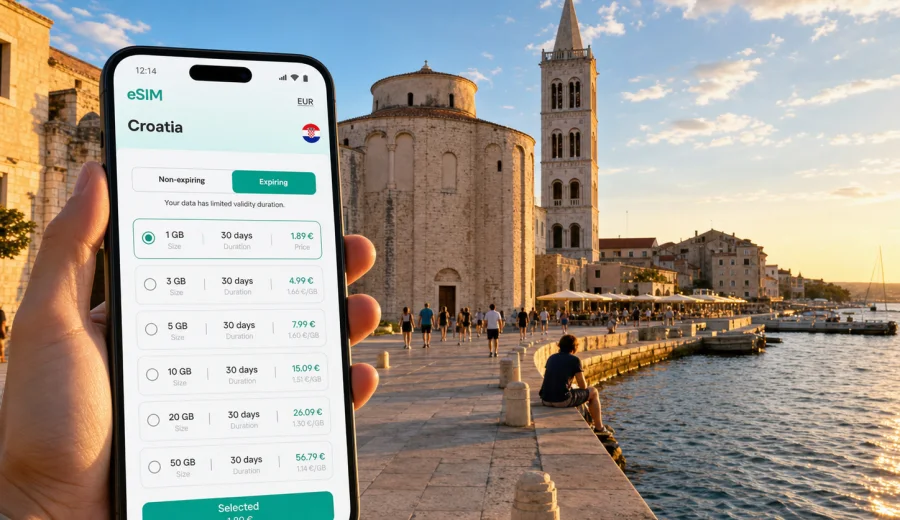
Zadar eSIM: mobile connection and internet for your trip
Zadar is a compact coastal city, but a trip here can involve many small online moments: checking your transfer from the airport, finding your apartment on a narrow Old Town street, opening a ferry timetable, messaging a host, scanning a restaurant menu, or navigating back from a beach after sunset. An eSIM can make those moments easier because it lets you prepare mobile internet for Croatia without looking for a physical SIM card after arrival.
This guide is focused on Zadar rather than Croatia in general. It covers the practical situations where mobile data matters most: arrival at Zadar Airport, movement between the Old Town and seaside districts, hotel check-in, marina and ferry plans, business travel, short stopovers, and day trips from the city. The goal is simple: help you choose an eSIM setup that fits the way you will actually move through Zadar.
Why mobile internet matters in Zadar
Zadar is easy to enjoy on foot, but it is not a place where every trip stays inside one predictable square. The historic center sits on a peninsula, beaches and hotels stretch north and south along the coast, the ferry port connects the city with nearby islands, and many visitors use Zadar as a base for national parks or other Dalmatian towns.
Mobile internet is useful in Zadar for:
- navigation from the airport or bus station to your accommodation;
- messaging apartment hosts when reception is not open all day;
- checking ferry, taxi, bus, and rental-car details while moving;
- opening maps around the Old Town, Kolovare, Borik, Puntamika, and the marina areas;
- sharing live location with friends or colleagues;
- using translation, banking, booking, and airline apps;
- staying online when hotel Wi-Fi is weak, crowded, or only available in the lobby.
An eSIM is especially convenient when you want to arrive with a plan already prepared. You can choose a tariff before you travel, install the eSIM on a compatible device, and use mobile data for the practical parts of the trip once the plan is active.
Arrival scenarios: airport, bus station, and the first hour
The first hour in Zadar often decides whether your trip starts calmly or with too many small problems. You may need to confirm a transfer, find the right bus stop, pay for parking, contact a host, or check whether your hotel is inside the pedestrian zone.
For many travelers, the most useful eSIM moment comes before sightseeing begins:
| Arrival point | What you may need online | Why eSIM helps |
|---|---|---|
| Zadar Airport | transfer details, taxi app, hotel address, flight updates | You can avoid searching for Wi-Fi before leaving the terminal. |
| Main bus station | maps, local bus routes, messages to your host | You can plan the last part of the route without buying a SIM card nearby. |
| Gaženica ferry port | ferry confirmations, onward transport, island plans | You can stay online while moving between ferry, taxi, and city transport. |
| Old Town accommodation | door codes, check-in messages, map pins | Many apartments use remote or scheduled check-in. |
If you arrive late, mobile data is even more important. Reception desks may be closed, streets can be quiet, and you may need to follow a precise map pin instead of relying on a visible hotel sign. A prepared eSIM reduces the number of things you need to solve at the airport or on the pavement with luggage.
Zadar areas where eSIM is useful
Zadar is not a huge city, but the tourist map is wider than the Old Town. Your data needs can change depending on where you stay and how often you move.
Old Town peninsula. This is where many first-time visitors spend most of their time: Roman Forum, St. Donatus, the cathedral area, Kalelarga, the waterfront, the Sea Organ, and Greeting to the Sun. Mobile internet helps with walking routes, restaurant reservations, translation, digital tickets, and meeting points in narrow lanes.
Kolovare and the southern side. If you stay near Kolovare beach or arrive by bus, you may use maps frequently for short walks between the station, beach, hotel, and Old Town. Data is helpful when the route looks simple but the fastest pedestrian path is not obvious.
Borik, Diklo, and Puntamika. These northern seaside areas are popular for hotels, beaches, and longer stays. You may depend more on buses, taxis, cycling routes, or car navigation, especially in the evening.
Marina and ferry areas. If Zadar is part of an island route, eSIM helps with confirmations, weather checks, and coordination with boat operators or travel companions.
Business and conference trips. Zadar can be a short professional stop as well as a holiday base. Mobile data helps with video calls, email, document access, calendar changes, and hotspot use when venue Wi-Fi is not enough.
How to estimate your data needs in Zadar
The right eSIM tariff depends less on the city name and more on your daily habits. A short Old Town weekend and a two-week coast-and-islands route can require very different data volumes.
Use this simple estimate before you choose:
| Travel style | Typical online behavior | Practical data approach |
|---|---|---|
| Short stopover | maps, messages, ride or transfer, boarding pass | A small data package may be enough. |
| Weekend city break | maps, restaurant search, messaging, photo sharing | Choose enough data for daily navigation and casual app use. |
| Beach and hotel stay | messaging, streaming music, maps, bookings | Use hotel Wi-Fi for heavy updates and keep eSIM data for movement. |
| Island or national park route | maps, ferries, weather, tickets, backup communication | Consider a larger package or longer validity. |
| Business trip | email, calendar, calls through apps, hotspot backup | Prioritize reliability, validity, and enough data for work apps. |
Video streaming, cloud backups, system updates, and large file transfers can consume data quickly. If your phone automatically backs up photos or updates apps over mobile data, turn those settings off before you travel. Use the eSIM for the moments where mobility matters: maps, messaging, transport, and essential travel services.
Choosing an eSIM tariff for Zadar
For a city trip to Zadar, choose the tariff by destination, validity period, and expected data use. Since Zadar is in Croatia, the country page is the right place to start for a city article. In Kaspersky eSIM Store, you can choose an eSIM tariff for your trip to Zadar in Croatia and review the available data volume, validity, destination, and price before you decide.
When comparing tariffs, check these points:
1. Destination coverage. For Zadar, the relevant destination is Croatia. If your trip continues through several European countries, check whether a regional option better matches the full route.
2. Validity. A three-day stopover, a week in Dalmatia, and a month of remote work require different validity periods.
3. Data volume. Navigation and messaging use far less data than video, cloud uploads, and hotspot sessions.
4. Activation conditions. Read when the validity period starts and what action activates the plan.
5. Top-up options. If your plans are flexible, check whether you can add more data from your profile or app.
6. Device compatibility. Your phone or tablet must support eSIM and must not be locked in a way that prevents the eSIM profile from working.
Kaspersky eSIM Store should be understood as an app and website that helps you choose, arrange, and activate an eSIM with a suitable mobile internet tariff for international travel. It is not a mobile network operator and does not replace the local network conditions of the destination. The conditions you see before purchase are the important source for data volume, price, validity, and any tariff-specific limits.
Before you buy: device and account checklist
An eSIM is convenient only if your device is ready for it. Do this before you leave, not at the airport queue.
- Check that your device supports eSIM.
- Confirm that your device is not locked to one mobile operator.
- Make sure you know which SIM or eSIM profile will be used for mobile data.
- Keep your main SIM available for calls or SMS if you need it for bank confirmations.
- Check that you can receive email and sign in to the account where your eSIM details will appear.
- Update your phone before travel if an update is already pending, but avoid starting a major update on mobile data abroad.
- Save your hotel address and first transfer details offline as a backup.
Most travel eSIM tariffs are built for mobile data. They usually do not include a local phone number, standard voice calls, or SMS unless the tariff conditions say otherwise. For calls and messages, you can use internet-based apps while the eSIM data connection is active.
Installing and activating eSIM for Zadar
Install the eSIM when you have a stable internet connection, ideally before departure or at your hotel. Activation behavior can depend on the tariff, the device, and the local network, so read the instructions shown for your selected plan.
A practical setup flow:
1. Choose Croatia or the route that matches your trip.
2. Select a data volume and validity period that fit your Zadar plans.
3. Complete the order and open the eSIM details in your profile, app, or email.
4. Install the eSIM using the on-screen steps or QR code.
5. Name the eSIM profile clearly, for example “Croatia data”.
6. Set that profile for mobile data when you are ready to use it.
7. If required by the plan or device, enable data roaming for the eSIM profile.
8. Test mobile data after arrival before you rely on it for transport or check-in.
For detailed setup steps, use the Android eSIM installation instructions or the iOS eSIM installation instructions. Follow the guide for your device and keep your original SIM settings clear so you do not accidentally use expensive roaming for mobile data.
Practical Zadar use cases
Walking the Old Town
The Old Town is walkable, but small streets, one-way lanes, and pedestrian areas can make the last few minutes of a route confusing. Mobile data helps you open maps, check whether a restaurant is still open, find the nearest entrance to a museum or church area, and message your group when you split up around the waterfront.
Staying outside the center
Many visitors stay outside the peninsula because they want beaches, parking, quieter hotels, or family apartments. If you stay in Borik, Diklo, Puntamika, or near Kolovare, you may use maps several times a day. eSIM data is useful for checking walking time, bus routes, taxi pickup points, and the safest route back at night.
Working from Zadar
If Zadar is part of a work trip, do not depend on one Wi-Fi connection. Hotel or cafe Wi-Fi may be fine for light browsing but weak for a meeting. An eSIM can act as a mobile data backup for email, calendars, messaging, and occasional hotspot use. Keep video calls short on mobile data unless your package is large enough.
Ferry and island plans
Zadar is a natural base for island movement. Ferry plans can involve changing weather, pier details, parking, and coordination with accommodation on an island. Mobile data helps you check confirmations and stay reachable while moving between the city, port, and the next stop. Download important documents offline as well, because any mobile connection can vary by location and local conditions.
Road trips from the city
Many travelers use Zadar for day trips across northern Dalmatia and inland Croatia. If you rent a car, eSIM data can support maps, parking apps, route changes, and messaging. Before leaving the city, download offline maps for the main route so navigation remains available if coverage changes in rural or mountainous areas.
eSIM versus roaming, Wi-Fi, and physical SIM cards in Zadar
There is no single best choice for every traveler. The right option depends on your device, trip length, and current mobile contract.
| Option | Good for | Limits to consider |
|---|---|---|
| Travel eSIM | Prepared mobile data, no physical SIM swap, quick setup on compatible devices | Requires eSIM support and correct activation settings. |
| Standard roaming | Keeping your usual number and carrier relationship | Costs and data limits depend on your home operator. |
| Public Wi-Fi | Hotel use, large downloads, casual browsing in one place | Availability, speed, and security vary by venue. |
| Physical local SIM | Longer stays or users who need a physical card | Requires a shop visit, device compatibility, and possible language or setup steps. |
For a Zadar city trip, an eSIM is often attractive because it reduces arrival friction. You can prepare it before the flight and avoid spending the first hour comparing SIM options. Still, it is wise to keep hotel Wi-Fi for large downloads and keep essential travel details available offline.
Data-saving tips for Zadar
Small settings can make a modest data package last longer:
- download offline maps for Zadar and your main day-trip areas;
- save hotel, airport, ferry, and parking locations before departure;
- disable automatic cloud photo backup on mobile data;
- turn off automatic app updates over mobile data;
- use lower-quality media settings in messaging apps;
- connect to trusted hotel Wi-Fi for large uploads;
- close navigation when you no longer need turn-by-turn guidance;
- check data usage in your phone settings during the trip.
If you plan to use your phone as a hotspot for a laptop, estimate generously. Laptop browsing, file sync, and video meetings can use more data than phone-only travel tasks.
Quick planning guide by trip type
One night in Zadar. Prioritize airport transfer, check-in, maps, and messaging. A small package may work if you use Wi-Fi for downloads and streaming.
Three-day city break. Choose enough data for daily walking routes, restaurant search, photo sharing, and transport. Keep offline maps as a backup.
Family beach stay. Decide whether each adult needs data or one phone can handle navigation and messaging. For children’s tablets, use hotel Wi-Fi for entertainment rather than mobile data.
Sailing or island route. Choose a tariff that fits the full time away from the city, and save essential details offline before boarding.
Business trip. Choose more data than you expect to use if you may need hotspot backup. Test the eSIM before a meeting day.
Common mistakes to avoid
- Buying a tariff for the wrong destination or route.
- Installing the eSIM but leaving mobile data assigned to the home SIM.
- Forgetting to enable data roaming for the eSIM profile when the instructions require it.
- Starting a large photo backup over mobile data.
- Assuming an eSIM includes voice calls or SMS without checking the tariff conditions.
- Waiting until a late-night arrival to check device compatibility.
- Deleting an eSIM profile before the trip is over.
These mistakes are easy to prevent. Check the destination, install calmly on a stable connection, label the profile, and confirm which line is used for data.
FAQ: eSIM, internet, and mobile connection in Zadar
Do I need a Croatia eSIM specifically for Zadar?
Zadar is in Croatia, so a Croatia destination tariff is the normal starting point. If your route includes several countries, compare it with a regional option before you choose.
Can I install the eSIM before I fly?
In many cases, yes. Installation and activation rules depend on the selected tariff, so read the plan details. Installing before departure can be easier because you have a stable home internet connection.
Will an eSIM give me a Croatian phone number?
Most travel eSIM tariffs are for mobile data and do not include a standard phone number, voice calls, or SMS unless this is stated in the tariff conditions.
Can I keep my usual SIM active?
On many compatible phones, yes. You can often keep your usual SIM for calls or SMS and set the travel eSIM for mobile data. Check your device settings carefully.
Is public Wi-Fi enough in Zadar?
Wi-Fi can be useful in hotels, apartments, and cafes, but it may not help when you are moving between the airport, port, beach, and Old Town. Mobile data is the more flexible backup.
Can I use eSIM data for a laptop hotspot?
That depends on your device, selected tariff, and settings. If hotspot use is important, check the tariff conditions and choose a data volume that can handle laptop activity.
What should I do if mobile data does not work after arrival?
Check that the eSIM profile is installed, selected for mobile data, and allowed to use data roaming if required. Restarting the phone and rechecking APN or profile instructions may help. If the issue continues, contact support through the available channel.
Final preparation before you travel
Before your Zadar trip, make mobile internet part of your packing list. Check device compatibility, choose a tariff for Croatia or your wider route, install the eSIM while you have stable internet, and save your first-day essentials offline. That gives you a calmer start when you step out of the airport, bus station, ferry port, or taxi.
To prepare mobile data for the city and the rest of your Croatian route, choose an eSIM tariff for Croatia in Kaspersky eSIM Store, review the conditions, and activate it on a compatible device when you are ready for the trip.