
Travel connectivity guide
Zagreb eSIM for mobile internet
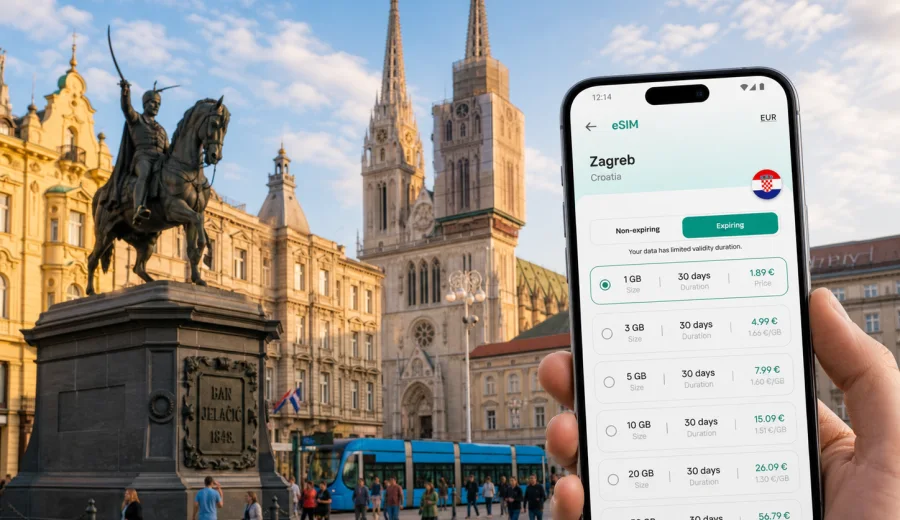
Zagreb eSIM: mobile connection and internet for a city trip
Zagreb is an easy city to underestimate on arrival. The airport is compact, the historic center is walkable, trams cover many everyday routes, and the main railway and bus stations sit close to central districts. But the practical side of a trip still depends on mobile internet: checking the airport transfer, finding your hotel entrance, ordering a ride, opening a restaurant menu, confirming meeting details, or planning a day trip.
An eSIM can make this part of the journey simpler because you can prepare mobile data before you start moving through the city. Instead of looking for a physical SIM card after landing or depending on hotel Wi-Fi, you can choose a data package for Croatia, install the eSIM on a compatible device, and activate it according to the selected tariff conditions. Kaspersky eSIM Store helps you choose, arrange, and activate an eSIM tariff for mobile internet in an international trip through its app or website.
This guide focuses on Zagreb, not Croatia in general: arrival, transport, districts, hotels, business travel, stopovers, and routes out of the capital.
Why mobile internet matters in Zagreb
Zagreb rewards flexible plans. A typical day can move from Ban Jelacic Square to the Upper Town, from a cafe in Tkalciceva Street to a tram stop near the main square, then to Maksimir Park or a meeting in a business district. Many routes are simple, but live information still matters when weather, traffic, ticket rules, or meeting times change.
Mobile internet is useful in Zagreb for:
- navigation between the airport, bus station, railway station, hotels, and apartments;
- checking tram and bus routes while walking between stops;
- using ride-hailing or taxi apps when public transport is less convenient;
- translating menus, signs, ticket machines, and hotel messages;
- receiving banking, booking, and airline notifications;
- joining video calls or messaging work contacts during a business trip;
- planning day trips from Zagreb without waiting for Wi-Fi.
Zagreb does not require constant high-speed data, but a reliable data plan reduces small delays and helps you decide while moving.
Arrival in Zagreb: where an eSIM helps first
Most international visitors arrive through Zagreb Airport, also known as Franjo Tudman Airport. The transfer into the city is straightforward, but the first hour is full of small digital tasks. You may need to check a shuttle departure, message your hotel, open your booking confirmation, see whether a train connection is realistic, or compare a taxi route with a public transport route.
Common arrival scenarios:
| Arrival moment | What you may need internet for | Why preparing eSIM helps |
|---|---|---|
| Before passport control or baggage claim | Reading arrival messages and checking onward plans | You do not need to search for Wi-Fi first |
| At the airport exit | Comparing shuttle, taxi, and ride options | You can make the decision before leaving the terminal |
| On the way to the center | Following the route and telling the hotel your arrival time | You stay reachable during the transfer |
| Near the hotel or apartment | Finding the correct entrance or self-check-in instructions | You avoid standing outside while looking for a connection |
The same logic applies if you arrive by train at Zagreb Glavni Kolodvor or by bus at Autobusni Kolodvor: both are central, but maps still help with the final stretch.
Zagreb districts and connection needs
Zagreb has a compact core, yet travel patterns differ by area. In the Lower Town, mobile internet is useful for hotels, museums, restaurants, and tram access. In the Upper Town, it helps with walking routes, viewpoints, and finding the way back to the main square. Around Tkalciceva Street, it supports evening plans, restaurant searches, and ride options. In Maksimir or Novi Zagreb, expect more route checks because distances are longer and tram connections matter more.
If you stay in the center, you may use less data because many places are close together. If you are based outside the center, allow more data for maps, transport checks, and messaging. For a work trip, the key factor may be not volume, but having mobile data ready when you leave the hotel Wi-Fi zone.
How much data to consider for a Zagreb trip
The right data volume depends on your habits. A traveler who mostly uses maps and messaging can manage with a smaller package. A visitor who uses video calls, cloud files, frequent uploads, or hotspot mode should choose more data.
Practical planning guide:
| Trip style | Typical use | Data approach |
|---|---|---|
| 1-2 day stopover | Maps, messages, airport transfer, restaurant search | A small short-validity package may be enough |
| 3-4 day city break | Maps, messaging, bookings, local research | Choose room for daily navigation and browsing |
| 5-7 day stay or business visit | City exploration, email, calendar, taxis, day trips | Choose more validity and extra data margin |
Streaming video, large app updates, cloud photo backup, and hotspot use can consume data quickly. If your hotel has reliable Wi-Fi, save heavy downloads for the room and keep eSIM data for movement, navigation, and communication.
Before you buy: device checks
Before choosing an eSIM tariff, confirm that your phone or tablet supports eSIM and is not locked to a carrier in a way that prevents adding another mobile plan. This is especially important if you bought the device through a carrier, use an older phone, or have not installed an eSIM before.
Use this quick checklist:
- your device supports eSIM;
- your device is not carrier-locked for the trip;
- you have a stable internet connection for installation;
- you can access the email or account where installation details will arrive;
- you understand when the selected tariff starts and how long it remains valid;
- you know whether calls and SMS are included, if that matters to you.
You can also check your device before choosing a tariff. A few minutes spent on compatibility can prevent a larger problem at the airport or hotel.
When to install and activate your eSIM
For Zagreb, the most convenient approach is usually to install the eSIM before departure and activate it according to the tariff instructions. Installation and activation are not always the same step. Installation adds the eSIM profile to your compatible device; activation and data use depend on the selected tariff conditions.
Recommended sequence:
1. Choose Croatia as your destination and compare tariff conditions.
2. Check data volume and validity against your travel dates.
3. Confirm that your device supports eSIM.
4. Install the eSIM while you still have stable Wi-Fi.
5. Keep your primary SIM active if you need calls or SMS.
6. Turn on mobile data for the eSIM when you are ready.
7. Monitor data use, especially if you share a hotspot.
If you need installation guidance, use the Android eSIM installation guide or the iOS eSIM installation guide. Follow the steps for your device and read the selected tariff conditions before you travel.
Public transport, walking, and local movement
Zagreb is a good city for combining walking and public transport. Many central sights are close together, but trams are useful for moving between the station area, the main square, Maksimir, business locations, and residential districts.
Use mobile internet to find the closest tram or bus stop, compare walking time with public transport, order a ride after an evening in the center, confirm a meeting point, and coordinate with other travelers. Offline maps are useful, but live data gives you updates and easier rerouting.
Choosing a Croatia eSIM tariff for a Zagreb stay
Once you know your travel style, choose a tariff that matches the whole Zagreb itinerary, not only the first day. Think about arrival, city movement, hotel check-in, work needs, and possible day trips. If you want to prepare before departure, you can choose an eSIM tariff for your Zagreb trip in Croatia through Kaspersky eSIM Store and review the available data volumes, validity periods, and conditions.
Use these questions to make the choice practical:
- How many full days will you spend in Zagreb?
- Will you leave the city for Plitvice Lakes, Samobor, Varazdin, or another destination?
- Will you use mobile data for video calls or only for maps and messages?
- Do you need hotspot mode for a laptop or a second device?
- Will your regular SIM stay active for calls and SMS?
Hotels, apartments, and self-check-in
Many Zagreb stays involve apartments, boutique hotels, or self-check-in instructions. A building entrance may be on a side street, the key box code may arrive shortly before check-in, or the host may send a message while you are already in a taxi.
Before leaving the airport or station, save the hotel address, building access details, host contact method, booking confirmation, nearby tram stop, and taxi drop-off point. Even if the hotel has Wi-Fi, you need to get there first. An eSIM gives you a data option for the gap between arrival and check-in.
Business travel in Zagreb
Business travelers often follow a simple route: airport, hotel, meeting, dinner, airport. The risk is that the important messages arrive while you are in transit. A prepared eSIM can help keep email, calendar, chat, taxi apps, and document access available outside the hotel or office.
Plan for calendar changes between meetings, internet-based calls, brief hotspot use, and enough data buffer for documents. If your company has strict security rules, check whether mobile hotspot, corporate apps, and roaming settings are allowed on your device.
Stopovers and short stays
Zagreb can be a short stop on a longer route through Croatia or Central Europe. For a 12- to 36-hour stay, focus on the airport or station transfer, one central walking route, luggage storage or hotel details, meal search, onward tickets, and the route back to the airport, bus station, or railway station.
A short stopover is not the moment to spend time comparing local SIM card options at a shop. If your device is compatible, preparing an eSIM before arrival can keep the short stay focused on the city, not setup.
Trips from Zagreb
Zagreb is often used as a base for day trips. Popular routes include Samobor, Varazdin, and Plitvice Lakes. Travelers also continue toward the coast, Slovenia, Hungary, or other parts of Croatia. Mobile data becomes more important once you leave the familiar city center.
Before a day trip, check route duration, return options, ticket confirmations, station location, weather, battery level, and whether your tariff covers the destination if you cross a border. For travel inside Croatia, a Croatia tariff is the relevant direction. If your route crosses into another country, review destination coverage before relying on the same setup.
Data-saving tips for Zagreb
You can keep data use predictable without making the trip inconvenient:
- download offline maps of central Zagreb before departure;
- disable automatic app updates on mobile data;
- pause cloud photo backup until Wi-Fi is available;
- use lower-resolution media uploads when you are away from the hotel;
- save restaurant, museum, and meeting locations in advance;
- monitor hotspot use because laptops can consume data quickly;
- keep the eSIM selected for mobile data and your regular SIM selected for calls if needed.
Spend mobile data on the moments that matter: navigation, confirmations, messages, bookings, and route changes.
Quick Zagreb connectivity checklist
Before departure, choose the Croatia tariff that fits your Zagreb itinerary, check device compatibility, install the eSIM with stable Wi-Fi, save hotel and transfer details, and download offline maps as a backup.
At arrival, turn on the correct mobile data line when you are ready to use it, confirm the transfer route to the center, message your hotel if plans change, and avoid large downloads until Wi-Fi is available.
During the stay, monitor data use, keep important addresses saved, check day-trip routes before leaving the center, and review tariff validity if your plans extend.
FAQ: eSIM and mobile internet in Zagreb
Is an eSIM useful for a short Zagreb city break?
Yes, if your device supports eSIM and you want mobile data ready for arrival, navigation, bookings, and messaging. A smaller package may be enough if you avoid streaming and large uploads.
Do I need a separate Zagreb eSIM?
The tariff is usually selected for the country. For Zagreb, choose a Croatia direction and check the exact tariff conditions before purchase.
Can I use an eSIM for normal phone calls and SMS?
Many travel eSIM tariffs focus on mobile data. They may not include a regular phone number, voice calls, or SMS unless those features are stated in the tariff conditions.
What if I am visiting Zagreb and then the coast?
If the trip stays within Croatia, choose a tariff that fits the full itinerary and validity period. If you cross into another country, review coverage before relying on the same plan.
Prepare mobile internet for Zagreb
Zagreb is easiest when you can move without stopping to solve connectivity problems. Prepare mobile internet before the trip, check eSIM support, choose data volume and validity for your route, and keep heavy downloads for Wi-Fi.
With Kaspersky eSIM Store, you can prepare an eSIM tariff for Croatia before your Zagreb trip, install it on a compatible device, and use mobile data for navigation, transport, hotel check-in, business messages, and day trips according to the selected tariff conditions.