Travel connectivity guide
Zakopane eSIM: Mobile Internet for Your Trip
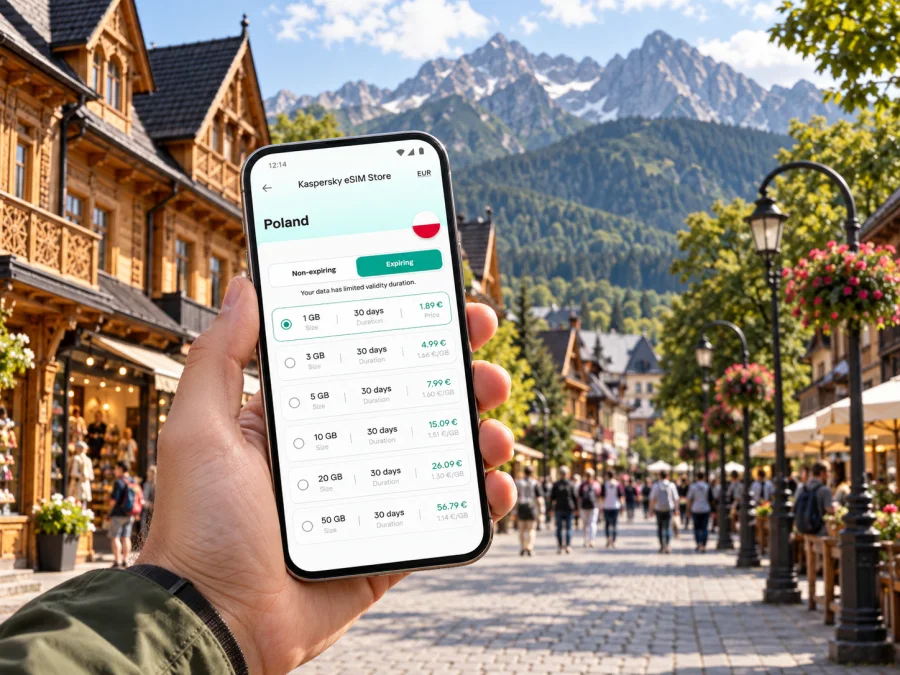
Zakopane eSIM: mobile connection and internet for your trip
Zakopane is a mountain town where a little preparation can make the first day much easier. You may arrive with luggage, look for your accommodation, check a trail or lift update, and coordinate plans with other people—all while moving between the station, the town centre and the foothills of the Tatras. Having mobile internet ready helps you handle those practical steps without relying on a public Wi-Fi connection each time you need a map or message.
An eSIM is a digital SIM profile that can be installed on a compatible device. Kaspersky eSIM Store is an app and website where you can choose, purchase and activate an eSIM with a suitable data plan for an international trip. It is useful to plan the connection around your itinerary: time in Zakopane, local journeys, and any onward travel elsewhere in Poland.
What mobile internet helps with in Zakopane
Zakopane is walkable around the centre, but many visits include places beyond it and outings towards the Tatras. Mobile data helps with practical tasks as you move between the station, accommodation and attractions:
- Find your hotel, restaurant, meeting point or local stop.
- Check directions from the railway or bus station.
- Message your host if arrival or check-in plans change.
- Review current access information before a mountain attraction.
- Keep tickets, bookings and translation tools within reach.
Save important details when you have a reliable connection. For hikes, a phone map is only one part of preparation: check conditions, carry suitable equipment and do not depend on a live signal.
Plan the arrival before you leave
Visitors reach Zakopane by road or rail from other Polish cities. The final leg may involve a train, coach, car or a combination of transport, depending on route and date. Check your ticket and arrival point in advance; services and journey times can change. Save your accommodation address, check-in instructions and nearest stop before boarding.
At the station, use a map to orient yourself and compare walking with local transport or a pickup. A short route may be less convenient with heavy bags, poor weather or unfamiliar streets. For a late arrival, confirm check-in arrangements with your accommodation instead of assuming reception will be available.
Before you set out, keep your ticket and address accessible offline, save your host's contact details, check the route, and decide how to manage luggage for the final leg. If travelling from Kraków or another hub, allow room for connections and local traffic. Mobile data can help you review details, but cannot guarantee a service or connection.
Getting around town
The town centre, including the well-known Krupówki pedestrian street, is a natural reference point for many visitors. Shops, cafés and restaurants cluster around central areas, while accommodation and attractions can be spread farther out. Pin your lodging and the places you want to visit before setting off. This makes it easier to compare a walking route with local transport or a taxi when the weather, luggage or distance makes walking less appealing.
Zakopane's streets can be busy during popular travel periods. Allow extra time if you are crossing town for a booked activity, meeting or departure. A route planner is useful for orientation, but check the route on the ground: construction, crowds, snow or other conditions may affect the easiest path. For a group, sharing a clear meeting point—such as a named street or a place everyone can recognise—is often more reliable than saying “near the centre.”
| Trip around Zakopane | What to prepare on your phone |
|---|---|
| Station to accommodation | Saved address, route options and check-in message |
| Accommodation to Krupówki | Walking directions and a meeting point |
| Town centre to a mountain attraction | Current access information and return plan |
| Restaurant or shop search | Map pin, opening details and a backup option |
| Departure from Zakopane | Ticket, departure point and onward connection |
Treat this as a planning aid rather than a timetable. Verify transport details with the service you plan to use, and keep your ticket or booking confirmation available even if you also use a map app.
Choose a connection for the shape of your trip
The right data allowance depends on how you use your phone and how long you are away. A short town break with occasional maps and messaging is different from a longer stay with frequent photo uploads, video calls or remote work. Think through your likely use before selecting a plan.
| Your travel pattern | Consider when choosing a plan |
|---|---|
| A weekend in town | Number of travel days, maps, messages and booking checks |
| Several days with day trips | How often you will navigate and check arrangements while away from Wi-Fi |
| A work visit | Video meetings, file access and whether your accommodation has dependable Wi-Fi |
| A longer route through Poland | Whether one plan covers the full itinerary and its validity period |
Check the plan's country or regional coverage, data allowance, validity period and price before purchase. A plan for Poland may suit a route that includes Zakopane and other places in the country, but confirm the exact terms for the option you select. If your itinerary crosses borders, review coverage for every destination rather than assuming one plan applies throughout.
Kaspersky eSIM Store lets you review available options for the destination and choose a suitable plan for your journey. You can explore eSIM data plans for Poland while considering the time you will spend in Zakopane and any additional stops.
Keep navigation useful, including near the mountains
Zakopane is a base for outings in the Tatras, where mobile coverage and conditions can vary. In town, data helps you find a café or meeting point; beyond built-up areas, do not assume a signal will be available on every trail.
Before leaving town, check current information from the relevant attraction or park authority, save the route and return plan for offline access, tell someone where you are going, and carry a charged phone. Follow marked routes and local safety guidance. The Gubałówka funicular and the cableway towards Kasprowy Wierch are familiar visitor options, but opening arrangements, access and weather can change, so check current details before setting out.
Prepare maps and essential details before a longer hike. Keep enough battery for calls or messages, and do not let photography or streaming use the charge you may need later.
Neighbourhoods, accommodation and everyday errands
Where you stay affects how you move around Zakopane. A central address can make it easier to reach Krupówki and nearby services on foot. A place farther from the centre may offer a different setting, but you may need to plan local transport or allow more time to reach a restaurant, station or activity. Look at the location in relation to the places you actually intend to visit, rather than choosing solely by the name of a district or a distance shown in a listing.
Before booking, save the property address and check how the host describes arrival, parking and access. If the address is outside the central grid, confirm which entrance or road to use. A map pin can be approximate, so compare it with written instructions. When you arrive, keep the host's number or message thread available in case you need to ask for clarification.
Mobile data can also make ordinary errands simpler: finding a grocery shop, checking a restaurant location, translating a short message or sharing your position with a companion. Download useful apps and travel documents before the trip, and keep a copy of essential information somewhere you can reach without an internet connection.
Zakopane for a work trip
A business visit can combine a meeting in town with travel before or after the appointment. Save the address, contact person, meeting time and any entry instructions in advance. If you are travelling from another city on the same day, build a buffer for the transfer and for getting from your arrival point to the venue.
For work that depends on a stable connection, check what your accommodation or meeting venue provides and decide which tasks can be done over mobile data. Video calls and large file transfers can use more data than messages or email. A personal hotspot may be useful if your plan and device support it, but check the plan terms and battery impact first. Keep a backup way to access essential meeting details if a signal is unavailable.
A simple business-day setup is to save the day's schedule, venue pin and contact details before leaving your hotel. Use mobile internet for changes and coordination, and keep a charger available if navigation and calls will run throughout the day.
Short stopover: make the time count
If Zakopane is one stop on a longer Polish itinerary, keep plans light enough to adapt. A short visit might focus on a walk through the centre, a meal and one planned activity. Avoid placing a distant attraction and a tight onward departure into the same narrow window without checking travel time and access arrangements.
For a stopover, keep these items together on your phone:
- Arrival and onward ticket details.
- Accommodation or luggage storage information, if relevant.
- The address of your first destination.
- A backup plan if weather or transport changes your schedule.
If you are continuing to another city, review the departure location and connection details before leaving your accommodation. Mobile internet is most useful when it helps you make a clear next decision, not when the day is overloaded with map checks.
Set up an eSIM before travel
An eSIM can be installed before departure so you can prepare the profile while you have a reliable internet connection. The exact steps depend on your device and the instructions supplied with the plan. Check that your phone supports eSIM and is not restricted by a carrier before purchase. Check whether your device supports eSIM.
A practical setup sequence:
- Review the plan's destination, data allowance, validity and activation terms.
- Purchase the option that fits your trip.
- Follow the device-specific installation steps: instructions for Android or instructions for iOS.
- Label the new profile clearly, for example “Poland trip,” if your device offers that setting.
- Before using mobile data, check which SIM is selected for data and review the eSIM's roaming setting as instructed for your plan.
- Keep your primary SIM settings available if you still need your usual number for calls or messages.
Installing a profile and using it are separate steps on many devices. Read the plan's activation details so you know when its validity begins. If you prefer to wait until arrival to use the plan, check how to keep the profile installed without selecting it for mobile data before your trip. Avoid deleting an eSIM profile unless the relevant instructions tell you to do so; reinstalling may not be possible in every case.
Manage data and phone settings
Maps, messaging and web searches usually use less data than video streaming or repeated photo backups. To stay within an allowance, download offline maps, pause large updates or cloud uploads over mobile data, and check your device's data-use screen. Menu names vary by model.
Review remaining data and validity in the app or account information provided with your plan. Keep your phone charged before a longer outing. An eSIM data plan is generally for mobile internet; it does not automatically include a regular phone number, voice calls or SMS unless its terms say otherwise. Internet-based calls and messages depend on data access and the relevant app.
Questions travellers ask
Is an eSIM useful for a short Zakopane visit?
It can help with directions, messages and changing plans without depending on Wi-Fi. Match the allowance and validity to your trip and phone use.
Will mobile data work on every mountain trail?
Do not assume so. Access varies by location and conditions. Prepare offline details, follow local guidance and do not base safety decisions only on a phone signal.
Can I use the same eSIM elsewhere in Poland?
That depends on the selected plan's coverage and terms. Check its destinations and validity before using it for the rest of your itinerary.
Should I install the eSIM before travelling?
Advance installation can make setup easier while you have dependable internet access. Follow the plan instructions and check when validity begins.
A simple connection plan for Zakopane
Before the trip, decide how you will reach your accommodation, save the addresses and tickets you need, and choose a data allowance that reflects your time in Zakopane and the rest of your route. Set up the eSIM on a compatible, unlocked device and understand the activation steps. In town, use mobile internet for navigation and coordination; before heading towards the mountains, prepare offline details and check current local information.
When you are ready, choose an eSIM data plan for your trip to Poland through Kaspersky eSIM Store. Review its coverage, data allowance, validity and activation terms, then set up your device before departure so your arrival in Zakopane is easier to manage.


