
Travel connectivity guide
eSIM for Zambia: mobile internet guide
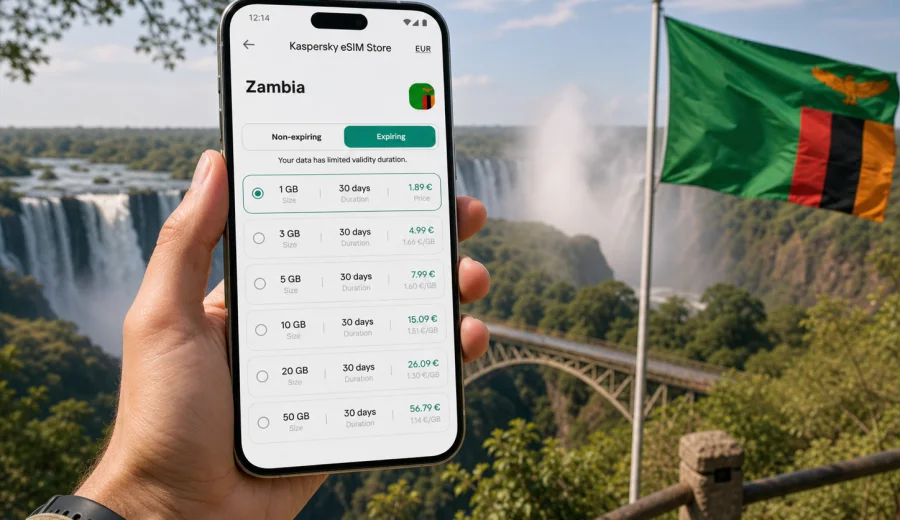
eSIM for Zambia: mobile connection and internet for a smoother trip
Zambia is a country where mobile internet can make the difference between a well-planned trip and a series of small delays. You may need maps in Lusaka, ride-hailing and hotel messages after landing, a weather check before visiting Victoria Falls, or a way to share updates when moving between national parks. An eSIM helps you prepare mobile data before your trip, so you are not forced to look for a physical SIM card as soon as you arrive.
This guide explains how to use eSIM for Zambia, what to check before buying a data plan, how much data different travel scenarios may need, and how Kaspersky eSIM Store can help you choose, set up, and activate a suitable eSIM tariff for mobile internet abroad. The focus is practical: clear steps, realistic use cases, and careful preparation before you travel.
Why mobile internet matters in Zambia
Travel in Zambia often combines city time, outdoor routes, and long-distance transfers. A single itinerary can include business meetings in Lusaka, a flight or road trip to Livingstone, a lodge transfer near the Zambezi River, and a safari plan that depends on messages from drivers or accommodation staff. Mobile data is useful at every stage, even if you also use hotel Wi-Fi.
Common online tasks during a trip include:
- opening maps and saved locations;
- checking flight changes and airport transfers;
- messaging guides, hotels, colleagues, and family;
- using translation, currency, weather, and banking apps;
- ordering transport in larger cities where supported;
- receiving booking confirmations and one-time codes;
- managing photos, cloud backups, and travel documents.
Public Wi-Fi can help in hotels, restaurants, airports, and some offices, but it is not a full travel plan. It may be slow, require registration, or be unavailable exactly when you need directions. A prepared eSIM gives you an additional mobile data option on a compatible device without replacing your main SIM card.
What an eSIM does for a trip to Zambia
An eSIM is a digital SIM profile installed on a compatible phone or tablet. Instead of inserting a plastic SIM card, you install the profile from a QR code or through the app flow, then use the selected data plan when you need mobile internet.
For travel to Zambia, eSIM is most useful when you want to:
- keep your home SIM in the phone for calls, banking messages, or two-factor authentication;
- avoid searching for a SIM card counter after a long flight;
- prepare mobile data before departure;
- compare data volume and validity period before checkout;
- use one phone for maps, messages, email, and travel apps.
Most travel eSIM tariffs are focused on data. They usually do not include a local phone number, standard voice calls, or SMS unless the terms of a specific plan say otherwise. For calls and messages, you can use internet-based apps when you have data access.
Zambia travel scenarios where eSIM is useful
Zambia is not just one travel pattern. Your data needs will depend on how long you stay, where you go, and how often you rely on mobile apps outside Wi-Fi zones.
| Scenario | Typical route | Useful mobile data tasks |
|---|---|---|
| Business trip | Lusaka, offices, hotels, airport transfers | Email, messaging, maps, calendar updates, document access |
| Victoria Falls visit | Livingstone, border area, hotels, guided activities | Tickets, maps, photos, weather, transport messages |
| Safari itinerary | Lower Zambezi, South Luangwa, Kafue, lodge transfers | Offline maps, coordination with guides, emergency contacts, limited app use |
| Family travel | Lusaka plus regional sightseeing | Shared locations, messenger calls, booking apps, route checks |
| Longer regional trip | Zambia with nearby countries | Plan comparison, data control, border-day communication |
An eSIM is especially convenient when you move between places and do not want every connectivity task to depend on the next Wi-Fi password.
Before you choose an eSIM plan
Preparation matters. The right plan is not only about price. It is about your device, your itinerary, the expected data load, and the validity period.
Check these points before buying:
1. Your phone or tablet supports eSIM.
2. The device is not locked to one mobile operator.
3. Zambia is included in the plan destination.
4. The data volume fits your travel style.
5. The validity period covers the full time you need mobile data.
6. You understand when the plan starts being used.
7. You know whether data roaming must be enabled for the eSIM profile.
If you are not sure about the first point, use the compatibility check before purchase: check your device. It is better to confirm this at home than after arrival, when you may already need mobile data for directions or transport.
How much data you may need in Zambia
There is no universal number, because a short business trip and a two-week safari use mobile internet differently. The safest approach is to estimate your daily habits and add a small buffer.
| Data use | Light trip | Standard trip | Heavy trip |
|---|---|---|---|
| Maps and navigation | Low to medium | Medium | Medium |
| Messaging | Low | Low to medium | Medium |
| Email and documents | Low | Medium | High |
| Social media | Low if limited | Medium | High |
| Video calls | Avoid or occasional | Occasional | High |
| Cloud photo backup | Usually off | Limited on Wi-Fi | High if enabled |
A light user may only need data for maps, chat, and booking apps. A standard traveler may want more room for email, social media, and occasional calls over the internet. A heavy user should be careful with video, automatic backups, and streaming, because these can consume a large package quickly.
Practical ways to control data:
- download offline maps before departure;
- pause cloud photo and video backup on mobile data;
- use Wi-Fi for app updates and large files;
- reduce video quality in streaming and social apps;
- turn off mobile data for apps you do not need during the trip;
- monitor your remaining data in your device settings and account area.
eSIM, roaming, local SIM: which option fits?
International roaming from your home operator can be convenient because it uses your existing SIM. It may also be expensive or limited, depending on your contract. A local physical SIM can be useful for longer stays, but buying one can require time, documents, a store visit, and a phone with an available SIM slot.
An eSIM is useful when you want to prepare mobile internet before or during the trip and keep the process digital. It is not automatically the best option for every traveler, but it often fits short and medium trips where predictable data access matters.
| Option | Strength | What to watch |
|---|---|---|
| Home roaming | Simple if already enabled | Daily fees, data caps, contract conditions |
| Local physical SIM | Can suit longer stays | Store visit, registration, language barriers, SIM slot |
| Travel eSIM | Digital setup, keeps home SIM in place | Requires compatible unlocked device and correct setup |
The most practical choice depends on your itinerary. For a few days in Lusaka or Livingstone, an eSIM can reduce arrival friction. For extended work or residence, compare all available options and check the conditions carefully.
When to install and activate your eSIM
You can usually prepare the eSIM before departure, but the exact timing depends on the plan terms. Some plans start when installed; others start when the device connects to a supported network at the destination. Read the plan details before you scan the QR code or complete in-app installation.
A reliable sequence is:
1. Choose the plan while you still have stable Wi-Fi.
2. Confirm that your device supports eSIM and is unlocked.
3. Install the eSIM profile before travel if the plan terms allow it.
4. Keep your main SIM active if you need your usual number.
5. On arrival, select the eSIM for mobile data.
6. Enable data roaming for the eSIM if the instructions require it.
7. Test maps and messaging before leaving the airport or hotel.
For setup details, follow the relevant installation guide: Android installation guide or iOS installation guide. Keep the guide open on Wi-Fi before you start, especially if this is your first time using eSIM.
Choosing a Zambia eSIM tariff in Kaspersky eSIM Store
After you have checked compatibility and estimated your data needs, choose a tariff that matches the trip rather than the largest package by default. Kaspersky eSIM Store helps you select a destination, review available data volumes and validity periods, complete checkout, and activate an eSIM on a compatible device.
For Zambia, focus on three questions:
- How many days will you need mobile data?
- Will you mostly use maps and messages, or also video calls and large files?
- Do you need a single-country plan for Zambia or a wider regional plan for a multi-country route?
If your itinerary is mainly within Zambia, you can choose an eSIM tariff for your trip to Zambia and prepare the mobile internet setup before you travel. If your route includes nearby countries, compare whether a regional option better matches your schedule and border crossings.
Zambia arrival checklist
Use this checklist before leaving the airport, hotel, or any place with stable Wi-Fi:
- The eSIM profile is installed on the correct device.
- Mobile data is assigned to the travel eSIM.
- Your primary SIM remains available if you need calls or SMS.
- Data roaming is enabled for the eSIM if required by the plan instructions.
- Maps, messenger, email, and banking apps open correctly.
- Offline copies of booking confirmations are saved.
- Cloud backup and automatic app updates are limited on mobile data.
- You know where to view remaining data and validity.
This small check can prevent confusion later, especially if you are heading to a lodge, a long road transfer, or a place where Wi-Fi is less predictable.
Practical route examples
Lusaka business trip
For a short business trip, you may use mobile data mainly for email, maps, transport coordination, calendar changes, and messenger calls. A moderate plan can be enough if you avoid video meetings on mobile data and use hotel or office Wi-Fi for large files.
Livingstone and Victoria Falls
For a leisure trip around Livingstone, mobile internet is useful for maps, activity confirmations, weather, restaurant searches, and photo sharing. If you take many photos and videos, keep automatic cloud backup for Wi-Fi only. The waterfall area can be busy, and having mobile data ready helps with meeting points and transport updates.
Safari travel
For safari routes, treat mobile internet as a planning and coordination tool, not as a guaranteed constant connection in every remote area. Download offline maps, save lodge contacts, and keep essential documents available without internet. Use data for messages, route checks, and urgent updates when a connection is available.
Longer Zambia itinerary
If you stay longer or move between several regions, choose validity with care. A plan that expires before the final transfer day can create unnecessary stress. Also consider whether you will need top-ups or a different package if your usage grows.
Common mistakes to avoid
Several eSIM problems are preventable. Most come from rushing through setup or buying a plan before checking the device.
Avoid these mistakes:
- buying before confirming eSIM support;
- installing the eSIM on the wrong phone;
- deleting the eSIM profile after activation without checking whether it can be reinstalled;
- assuming the plan includes calls and SMS;
- leaving video backup active on mobile data;
- choosing a validity period shorter than the full trip;
- waiting until you have no Wi-Fi to read installation steps;
- switching off the eSIM line and forgetting to turn it back on after arrival.
If you travel with a second device, remember that an eSIM profile is usually tied to the device where it is installed. Do not assume you can move it freely between phones after activation.
Data planning by trip length
The table below is a planning tool, not a promise about exact consumption. Your apps, settings, and habits determine real usage.
| Trip length | Sensible approach | Data-saving habit |
|---|---|---|
| 1-3 days | Choose enough for maps, chat, email, bookings | Keep video and backup on Wi-Fi |
| 4-7 days | Add room for social apps and extra navigation | Download maps for Lusaka and Livingstone |
| 8-14 days | Consider a larger package or top-up plan | Review usage every few days |
| 15+ days | Compare validity carefully | Separate work data from leisure streaming |
If you are unsure, choose based on your most data-heavy day rather than your quietest day. A transfer day with maps, messaging, ride coordination, and photo sharing can use more data than a relaxed hotel day.
Tips for families and groups
Families and small groups often underestimate data because several people use maps, chats, and photos at the same time. Decide in advance who needs their own mobile data and who can rely mostly on Wi-Fi.
Useful rules:
- The person handling bookings and transport should have dependable mobile data.
- Do not rely on one phone for everyone if the group splits up.
- Share hotel addresses and meeting points offline.
- Turn on location sharing only when needed.
- Check whether hotspot use is allowed by the selected plan before depending on it.
If a parent, colleague, or guide is the main coordinator, that device should be prepared first and tested early.
FAQ about eSIM for Zambia
Can I use eSIM and my normal SIM at the same time?
On many compatible phones, yes. You can often keep your usual SIM for calls or messages and use the travel eSIM for mobile data. The exact behavior depends on your device model and settings.
Does an eSIM for Zambia include a phone number?
Many travel eSIM plans are data-only. That means standard calls and SMS may not be included unless the specific tariff says otherwise. You can use messaging and calling apps over mobile data.
Should I install the eSIM before flying?
Install it before departure if the plan terms allow and you have stable Wi-Fi. Check when validity begins, because activation rules can differ by plan.
What if mobile data does not start immediately?
Check that the eSIM is enabled, selected for mobile data, and allowed to use data roaming if required. Restarting the phone can also help after changing mobile network settings. If the issue continues, use the support path available in the app or website.
Is eSIM suitable for remote safari areas?
It can be useful for preparation, transfers, and communication where mobile coverage is available, but no travel connectivity option should be treated as guaranteed in every remote location. Save essential information offline.
Final preparation before your trip
Before you leave for Zambia, confirm your device compatibility, choose a plan with enough data and validity, read the installation steps, and save key travel information offline. This gives you a clearer mobile internet plan before the first airport transfer, meeting, hotel check-in, or guided activity.
Kaspersky eSIM Store can help you prepare the setup through its app or website: select the destination, review the available tariff details, install the eSIM on a compatible device, and manage the plan during your trip. If you want to arrange mobile data before departure, prepare an eSIM tariff for Zambia and travel with one less connectivity task to solve on arrival.