
Travel connectivity guide
Zermatt eSIM for Mobile Internet
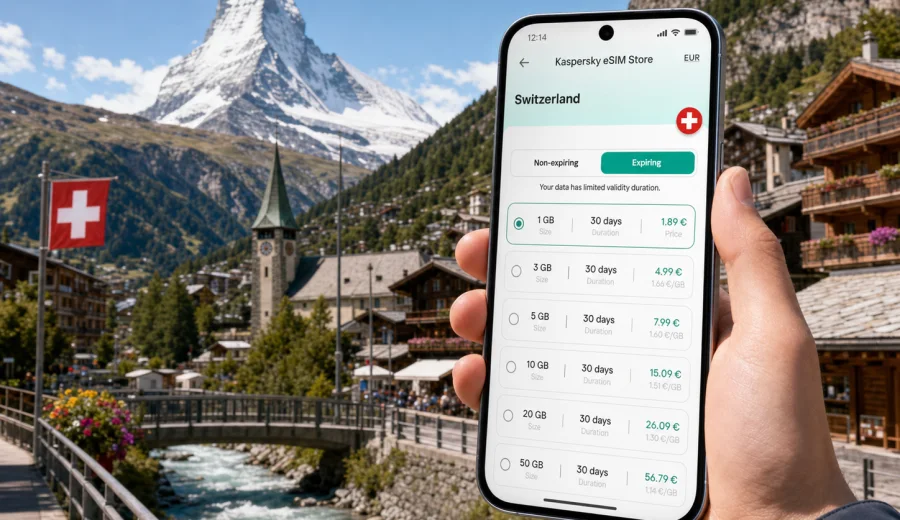
Zermatt eSIM: mobile connection and internet for a trip to the Swiss Alps
Zermatt is a compact mountain resort, but a trip here often depends on your phone more than a city break in a larger destination. You may need mobile internet to show a hotel confirmation at the station, check the next train to Tasch, find the right electric taxi, follow a walking route through the old village, book a mountain lift time, message a guide, or send updates from a business retreat. A Zermatt eSIM helps you prepare this connection before you arrive in Switzerland, so you can focus on the route, the weather, and the altitude instead of looking for a physical SIM card after a long journey.
This guide is written for travelers who are staying in Zermatt, arriving by rail, using the village as a base for the Matterhorn area, or combining it with other Swiss stops. It explains where mobile data matters most, how to think about traffic volume, what to check before installing an eSIM, and how Kaspersky eSIM Store can help you choose, arrange, and activate a suitable eSIM tariff for mobile internet during your trip abroad.
Why mobile internet matters in Zermatt
Zermatt is car-free for most visitors. That makes the arrival experience different from many European resorts: you normally travel to Tasch, park or transfer there if you come by road, and continue by train to Zermatt. Once you reach the village, you move by foot, electric taxi, hotel shuttle, bus, mountain railway, gondola, or train. Each step is easier when your phone is already online.
Mobile data is useful in Zermatt for practical reasons:
- checking train connections between Visp, Tasch, and Zermatt;
- confirming hotel shuttle instructions or late check-in details;
- navigating narrow lanes around Bahnhofstrasse, Winkelmatten, and the old village;
- following weather updates before going toward Gornergrat, Sunnegga, Rothorn, or Matterhorn Glacier Paradise;
- using maps when visibility changes quickly in the mountains;
- paying for services or receiving banking confirmations;
- translating restaurant menus, rental terms, or ski school messages;
- keeping contact with family, colleagues, guides, and transfer providers.
Public Wi-Fi can help in hotels, cafes, stations, and some public areas, but it is not a complete travel connection. You still need internet between Wi-Fi points, during a transfer, on a platform, near a lift, or when plans change outside your accommodation. An eSIM is useful because it gives your compatible device a data line without a removable plastic SIM card.
Arrival scenarios where an eSIM helps
Most Zermatt trips begin before you see the Matterhorn. You may land in Zurich, Geneva, Milan, Basel, or another airport, then continue by train or car-and-train combination. A working data connection helps you avoid small mistakes that can cost time on a mountain route.
| Travel moment | What you may need mobile data for | Why it matters in Zermatt |
|---|---|---|
| Airport arrival | Train search, ticket app, messages, maps | The resort is several hours from major airports, so updates matter |
| Change at Visp | Platform details, delay alerts, group coordination | Connections are usually smooth, but timing can be tight |
| Tasch transfer | Parking, shuttle, station navigation | Visitors arriving by car normally change transport here |
| Zermatt station | Hotel route, electric taxi call, luggage instructions | The village is walkable but not always simple with bags |
| First evening | Restaurant booking, weather check, family messages | Mountain weather can affect the next day’s plan |
If you are arriving late, traveling with children, carrying ski equipment, or joining a business group, mobile internet becomes part of the logistics. It is not only for social media or photo sharing. It helps you make decisions while you are moving.
How much data to plan for Zermatt
The right data amount depends on your style of travel. Zermatt encourages photos, maps, mountain weather checks, and messaging, but it does not require heavy streaming if you prepare well. Download offline maps, travel documents, and entertainment before you travel. Then use mobile data for live tasks that really need a connection.
| Trip style | Typical mobile internet use | Practical data approach |
|---|---|---|
| Weekend stop | Maps, messages, restaurant searches, tickets | A smaller package may be enough if you avoid video |
| Ski or hiking week | Weather apps, lift updates, maps, group chats, photos | Choose more data and monitor usage regularly |
| Family trip | Coordination messages, backups, navigation | Allow extra data for shared planning and changes |
| Business retreat | Email, calendar, messaging | Choose enough validity and a small buffer |
| Alpine photo trip | Cloud uploads, route research, image sharing | Use Wi-Fi for large uploads and keep mobile data for field use |
Video calls, cloud backups, high-resolution photo uploads, and streaming consume data quickly. If you use them often, plan a larger package or reserve them for hotel Wi-Fi. For most travelers, the best approach is simple: keep mobile data for navigation, transport, messaging, payments, and weather; use Wi-Fi for heavy downloads and backups.
Check your phone before you choose an eSIM
Before you buy any eSIM tariff, check that your phone or tablet supports eSIM and is not locked to one operator. This is important because eSIM compatibility depends on the exact device model, market version, and device settings. If you are not sure, use the compatibility check before you make travel decisions: check your device.
Also review these points:
- your device supports eSIM installation;
- your device is not locked to a single mobile operator;
- you have a stable internet connection for the installation step;
- you understand when the selected tariff becomes active;
- you know whether data roaming must be enabled for the eSIM profile;
- you keep your primary SIM active only if you need calls or SMS on your usual number.
An eSIM tariff for travel is mainly about mobile data. It usually does not include a regular local phone number, voice calls, or SMS unless the plan conditions clearly say so. For calls and messages, many travelers use internet-based messengers over mobile data.
Choosing an eSIM tariff for Zermatt
For a city article, the correct country context is Switzerland because Zermatt is in Switzerland and your mobile data plan must match the destination where you will use it. In Kaspersky eSIM Store, you can review available options for the destination, compare data volume and validity, and choose a tariff that fits the length and style of your trip.
If you want to prepare before arrival, you can choose an eSIM tariff for your trip to Zermatt in Switzerland and install it on a compatible device before you need it on the road. Kaspersky eSIM Store is an app and website where you can choose, arrange, and activate an eSIM with a suitable mobile internet tariff for travel abroad. It is not a mobile network operator, and coverage, speed, availability, and conditions depend on the selected tariff and local network situation.
When comparing options, look beyond the headline amount of data. For Zermatt, validity period is just as important as volume. A three-day stopover, a week of skiing, and a two-week workation have different requirements. If you expect to move beyond Zermatt to Zurich, Lucerne, Interlaken, Lausanne, or Geneva, keep the whole Swiss route in mind rather than selecting only for the first night.
Practical data-saving habits
Zermatt is a place where many travelers take photos constantly. That can create silent data use if cloud backup is enabled. Before you leave your hotel, check your phone settings and decide what should use mobile data.
Useful habits:
1. Download offline maps for Zermatt, Tasch, Visp, and your airport city.
2. Save hotel address, booking confirmation, and transport tickets offline.
3. Turn off automatic photo and video backup on mobile data.
4. Restrict app updates to Wi-Fi.
5. Use lower media quality in messaging apps when sending many photos.
6. Keep weather, transport, maps, banking, and messaging apps allowed on mobile data.
7. Monitor data use during the first day and adjust habits early.
This is especially helpful in winter, when ski videos can become large files, and in summer, when hiking days may include many map checks. Good settings help your eSIM tariff last through the trip.
Installing and activating before the mountains
Install your eSIM when you have a reliable connection and enough time to follow the steps calmly. Many travelers prefer to complete installation before departure or at the hotel before the first mountain day. Activation timing can depend on the selected tariff, so read the plan details before you start.
For setup help, use the official instructions for your device type: Android installation guide and iOS installation guide. Keep the installation screen open until the process is complete, and avoid deleting an eSIM profile unless you are sure you no longer need it. In many cases, an activated eSIM cannot simply be moved to another phone.
After installation, check these settings:
- the eSIM is selected for mobile data;
- data roaming is enabled for the eSIM if the tariff instructions require it;
- your primary SIM is still configured the way you want for calls and messages;
- low data mode is enabled if you want extra control;
- background data use is limited for non-essential apps.
Do a small test before you rely on the connection: open a map, send a message, and check a travel app. If something looks wrong, it is easier to troubleshoot in a hotel lobby or station than halfway through a transfer.
Transport, lifts, and local movement
Zermatt travel depends on timing. The Gornergrat railway, Sunnegga funicular, mountain lifts, local buses, and trains to Tasch and Visp all shape the day. Mobile internet helps you compare options when weather changes or when a route is busier than expected.
For example, if the Matterhorn is covered by cloud in the morning, you may decide to delay a viewpoint trip and walk through the village first. If you are skiing, you may need to coordinate a meeting point with friends who took a different lift. If you are leaving Zermatt, you may check whether to take an earlier train to protect a flight connection. These are small decisions, but they are easier with a working data line.
Good mobile data use for transport in Zermatt includes:
- checking departure times before leaving the hotel;
- saving tickets and QR codes offline as a backup;
- sharing live location with your group when meeting points change;
- using maps for walking routes between the station, hotels, and lift stations;
- checking weather and visibility before buying or using mountain excursion tickets.
In the mountains, conditions can change quickly. Do not rely only on mobile data for safety. Keep essential route information offline, follow local guidance, and use appropriate equipment. Your phone is a useful planning tool, but it is not a substitute for mountain judgment.
Hotels, apartments, and business trips
Zermatt has luxury hotels, family-run guesthouses, apartments, chalets, wellness resorts, and event venues. Wi-Fi quality can vary by building, room location, and peak usage times. Even with good hotel Wi-Fi, mobile data remains useful when you are arriving, changing plans, or working away from your room.
Business travelers and remote workers should keep three layers ready: hotel Wi-Fi for long calls and large files, eSIM mobile data for maps and urgent messages between Wi-Fi points, and offline copies of tickets, documents, and route notes. If you have an important call, test the connection in advance and keep a backup plan.
Day trips and onward routes from Zermatt
Many visitors use Zermatt as one part of a larger Switzerland route. You might continue to the Valais wine region, visit Brig, travel toward Interlaken, go to Zurich or Geneva, or connect to Italy through nearby rail routes. A Switzerland eSIM tariff is useful because the same trip often includes airports, trains, cities, and mountain villages.
For day trips and onward travel, mobile internet helps with train platform changes, delay information, hotel check-in messages, station navigation, digital payments, and itinerary updates when weather changes the mountain plan. If your trip crosses into another country, check whether the selected tariff covers that destination or whether you need a separate country or regional option.
Short checklist before you leave for Zermatt
Use this checklist one or two days before departure:
- Confirm your phone supports eSIM and is not operator-locked.
- Choose a data package with enough volume and validity for the full Switzerland stay.
- Install the eSIM while connected to reliable Wi-Fi.
- Save your QR code, booking details, tickets, and hotel address in an offline place.
- Download offline maps for Zermatt and key transfer points.
- Disable automatic media backup on mobile data.
- Check how to switch mobile data between your primary SIM and eSIM.
- Keep your usual SIM active if you need bank SMS or calls on your regular number.
- Test a map, browser page, and messenger before leaving the airport or hotel.
This preparation takes only a short time, but it reduces friction during the most tiring parts of the trip: airport arrival, train changes, luggage transfer, and the first evening in the village.
FAQ: eSIM and mobile internet in Zermatt
Is Zermatt a good place to use an eSIM?
Yes, if your device supports eSIM and the selected tariff covers Switzerland. Zermatt’s rail arrival, mountain routes, and hotel logistics make mobile data useful.
Do I need mobile internet if my hotel has Wi-Fi?
Hotel Wi-Fi helps in your room or lobby, but it does not cover transfers, station areas, walking routes, lift stations, restaurant searches, or changes during the day. An eSIM supports the gaps between Wi-Fi points.
Can I use an eSIM for calls and SMS?
Travel eSIM tariffs are usually focused on mobile data. They normally do not include a regular phone number, voice calls, or SMS unless this is stated in the tariff conditions. You can use messengers and calling apps over mobile internet.
How much data do I need for a Zermatt trip?
A light weekend with maps and messaging uses far less data than a ski week with photo sharing, video calls, and cloud backups. Choose based on trip length, media habits, and whether you will continue to other Swiss destinations.
Will an eSIM remove the need for offline preparation?
No. Save tickets, hotel details, maps, and key contacts offline. Mobile data is useful, but mountains and transport days are easier when essential information is available even without a live connection.
Final preparation for a smoother Zermatt trip
A good Zermatt itinerary is built around timing: train arrivals, hotel check-in, lift schedules, weather windows, restaurant bookings, and the energy level of your group. Mobile internet supports all of those details. With an eSIM on a compatible phone, you can prepare a data connection before the trip, keep your usual SIM for important calls or messages if needed, and avoid spending your first hour in Switzerland looking for a physical SIM card.
Before you travel, review your device compatibility, choose a data amount that matches your real habits, install the eSIM on stable Wi-Fi, and keep essential documents offline. Then use mobile data for the tasks that matter most in Zermatt: navigation, transport updates, weather checks, payments, messaging, and practical decisions while moving through the village and mountains.
If Zermatt is on your Switzerland itinerary, you can prepare an eSIM tariff for mobile internet in Switzerland through Kaspersky eSIM Store before departure and arrive with one less connection task to solve.