Travel connectivity guide
Zlatibor eSIM: Mobile Internet in Serbia
Zlatibor eSIM: mobile connection and internet for your trip
Zlatibor is a mountain resort in southwestern Serbia, not a dense urban centre with one uniform signal environment. A trip can combine the resort’s central streets, accommodation on a hillside, walks across open meadows and day trips to villages or natural sights. Mobile data is useful for checking a transfer, finding a guesthouse entrance, loading a trail map or messaging your group, but reception can vary with terrain, location, weather and the network used.
An eSIM can give you a way to use a travel data plan without swapping out your physical SIM. Before choosing one for Zlatibor, check that the plan is valid in Serbia, confirm the device supports eSIM, and review the data allowance, validity period and activation rules. These checks matter especially if you are arriving through Belgrade and continuing by road or rail: your journey includes more than the resort centre.
When mobile internet helps in Zlatibor
The first useful moment may come before you reach the mountain. If you land at Belgrade Nikola Tesla Airport, you may need to coordinate a pickup, check a bus connection or message your accommodation while planning the onward journey. Zlatibor is roughly 230 km from Belgrade according to Serbia’s tourism information, so allow time for a long transfer and confirm current schedules before setting out. A map on your phone is useful, but it should complement your booked route rather than replace checking departure details with the carrier.
The main resort settlement has shops, restaurants, hotels and visitor services around its centre. Staying close to the bus station can make arrivals and departures simpler; a lodging farther uphill or outside the centre may involve a taxi, a longer walk or a pre-arranged pickup. Save the property’s address and contact details before departure. If the driver uses a local spelling or asks for a landmark, having the booking available offline can help when the connection is temporarily weak.
Typical moments when you may want data
- Arrival and check-in: message your host, confirm a late arrival and navigate from the bus station to your accommodation.
- Moving around the resort: compare walking directions, check opening information and arrange a ride for a steep or longer stretch.
- Outdoor plans: open a map before leaving the built-up area, share your rough itinerary and check forecasts or trail information where available.
- A day trip: coordinate transport to places such as Stopića Cave, Sirogojno or Gostilje, and keep the return plan accessible.
- Work and family contact: join a call from your lodging or send updates without relying on a café’s public Wi-Fi.
These uses do not mean that a phone will have signal at every viewpoint or along every trail. Zlatibor is a broad mountain area, and buildings, valleys, slopes and distance from a base station affect radio reception. Download offline maps, keep essential booking details on the device and agree on a meeting point if your group separates.
A city break with a mountain route
Zlatibor works differently from a city where most activities are clustered within a short walk. The central resort area is convenient for cafés, accommodation and transport links, while some sights are outside it. You may spend one part of the day on foot and another in a car, bus or taxi. The data you use will reflect that pattern: navigation, photo uploads, video calls and streaming consume more than occasional messages or checking directions.
A practical plan is to decide what you will do online and what can be prepared in advance. Save the hotel or apartment address, tickets, transport contacts and any trail or attraction details you have already confirmed. Turn off automatic video playback and large app updates if you want to conserve a limited data allowance. Upload photos when you have a trusted Wi-Fi connection, and use mobile data for maps, messages and changes to plans.
| Part of the trip | What mobile data can help with | Useful backup |
|---|---|---|
| Airport to Zlatibor | Route checks, messages to your driver or host, timetable lookup | Saved ticket, written pickup details and offline map |
| Resort centre | Walking navigation, opening hours, restaurant reservations | Accommodation address saved in Serbian/Latin script if provided |
| Hillside lodging | Ride coordination and checking the final approach | Host’s phone number and a marked location saved beforehand |
| Outdoor excursion | Directions, weather updates and group messages | Offline map, charged battery and a planned return time |
| Work stay | Email, calendar, calls and hotspot use if the tariff permits | Accommodation Wi-Fi and downloaded work files |
Treat the table as a planning guide rather than a promise of service. Local network conditions and the terms of a travel plan determine what works at a particular point. A hotspot may also use data quickly and can be limited by the plan or device settings.
Choose a Serbia plan for the whole itinerary
For a stay in Zlatibor, first check the country or regional coverage stated in the specific plan. A city name in your itinerary does not by itself confirm that a plan includes the destination; the terms should explicitly cover Serbia. If you are travelling onward through another country, check that separately rather than assuming a Serbia plan includes cross-border use.
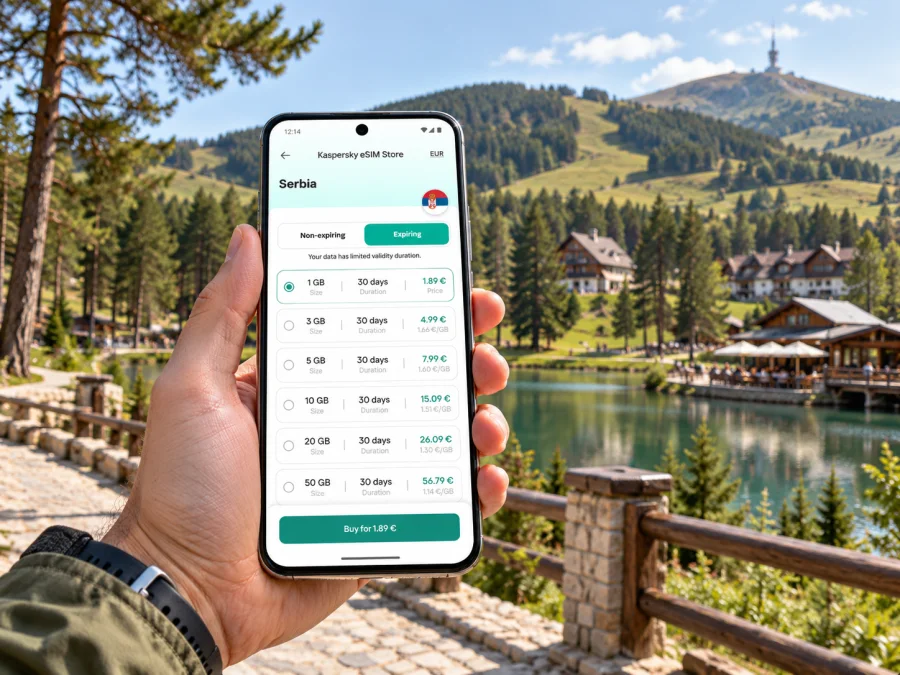
Kaspersky eSIM Store is an app and website where you can choose, purchase and activate an eSIM with a suitable data plan for an international trip. The Serbia destination page lets you review available options; it does not establish coverage at every exact address in the Zlatibor area. Confirm the selected plan’s validity, data allowance, price, supported network conditions and activation policy before you decide.
Match the allowance to your travel style
Estimate usage by the activities you expect rather than choosing a package solely by the number of days. A short visit based around messaging and maps can use less data than a longer stay with video meetings, frequent uploads or a hotspot for a laptop. Your usual apps may continue background syncing unless you adjust their settings.
A simple estimate can be made in three steps:
- List your main uses. Count navigation, messaging, email, calls over apps, social media, photo uploads and laptop tethering separately.
- Check your normal usage. If your phone provides a monthly data report, use it as a rough reference and account for the number of travel days.
- Leave room for changes. A missed bus, a new excursion or a work call can increase usage. Compare plans by both total allowance and validity, and check whether top-ups are available under the terms.
For a one-night stop or a weekend, validity can be as important as capacity. For a longer stay, check whether the selected package remains active for the full trip and how it handles unused data. Do not assume that the plan begins counting down when you install it: activation triggers differ. Read the product terms and instructions so you know whether validity starts on purchase, installation or first connection.
Check the network context
Serbia’s electronic communications regulator, RATEL, identifies Telekom Srbija, Yettel and A1 Serbia among the country’s mobile network operators and provides a tool for comparing measured network quality by location and service. Its results describe measurements, not a guarantee for every handset or moment. A travel eSIM may connect through a partner network according to its own arrangement, so the underlying network available to your eSIM can differ from the one used by a local SIM.
In the centre, a connection may behave differently from one in a valley, inside a thick-walled building or on a road beyond the resort. If you need data for a video meeting or navigation to an outlying attraction, arrange a backup: download a map, tell someone your route, and avoid depending on a single live signal for safety-critical decisions. Ask your accommodation about its Wi-Fi if stable indoor internet is important for work. If you are comparing options for the trip, browse eSIM plans for Serbia and check each plan’s conditions before purchase.
Device compatibility and setup before the trip
An eSIM works only on a compatible, unlocked device. Support can vary by manufacturer, model and the regional version sold in a particular market. Check the exact model number in your phone settings or documentation, confirm that your carrier has not locked the device, and check whether your device supports eSIM before paying for a plan. If the phone has two SIM profiles, decide which one should handle mobile data and which one should remain available for calls or SMS.
Install the eSIM while you have a reliable internet connection and enough time to follow the instructions. You may be able to install it before departure and keep it switched off until you need it, depending on the plan’s rules. Do not delete an eSIM profile just because it is not connecting immediately; some profiles cannot be reinstalled after removal. Follow the plan’s own support guidance if setup does not complete.
Installation checklist
- Confirm the device supports eSIM and is not carrier-locked.
- Read the selected plan’s coverage, data, validity and activation conditions.
- Connect to Wi-Fi and open the installation details or QR code provided for your purchase.
- Add the eSIM in the phone’s mobile-network settings and label it clearly, for example “Serbia travel”.
- Before or after arrival, select that profile for mobile data when appropriate; keep your home line configured for calls or messages if you need it and understand its roaming charges.
- Turn on data roaming for the travel eSIM only if the plan instructions require it, and verify which line is selected for data.
- Once in Serbia, allow the device time to register. If there is no connection, check the selected line, data roaming setting and network selection against the plan instructions.
For device-specific steps, use the Android eSIM installation guide or the iPhone and iOS eSIM installation guide. Menu labels can differ between phone brands and software versions, so follow the wording on your own device.
Getting to Zlatibor and moving around
Belgrade is a common international arrival point, but Zlatibor is not next to the airport. Serbia’s tourism information describes intercity buses and a centrally located bus station in Zlatibor. A rail journey can take you to Užice, followed by a bus or taxi onward. Check current schedules and fares with the operator or station close to your travel date, especially for evenings, weekends and public holidays.
The central station is a useful orientation point, though your lodging may be farther away. Save the address offline and ask your host which entrance or landmark is easiest for drivers to find. If you arrive after dark or in winter weather, arrange the final leg in advance rather than assuming a short map distance will be easy with luggage.
Walking and cycling suit many resort routes; a taxi or booked transfer may be more practical for excursions. Check the transport mode in your navigation app: a pin alone cannot tell you whether a road or path suits your vehicle or conditions. For hikes, follow marked local information and do not treat mobile coverage as an emergency service.
Transfer checklist: keep your ticket and departure point offline; confirm the station name with the operator; download the route before leaving reliable Wi-Fi; carry a power bank; and message your accommodation if the journey is delayed. For a day trip, verify opening times, road conditions and return transport before setting out.
Plan for indoor and outdoor coverage differences
A phone’s signal indicator is only a rough guide. Terrain, building materials, the selected network and the handset’s regional variant can all affect reception. A room behind thick walls or a route beyond the resort may behave differently from an open central street. Ask your accommodation about Wi-Fi if stable indoor access matters for work.
If data is slow, confirm the travel eSIM is selected for mobile data, check whether data roaming is required, move near a window or outdoors, and allow time to register. Use automatic network selection first unless the plan says otherwise. Avoid deleting and reinstalling an eSIM profile at random; some profiles cannot be installed again after removal. Save error details and contact support if the plan remains inactive.
Scenarios: what to prepare
A weekend in the resort centre. Install over Wi-Fi before travelling, save lodging and bus details, and estimate usage for maps, messaging and browsing. Use Wi-Fi for large photo uploads and review home-line roaming charges.
A family trip with excursions. Share the destination and return time, download route information, and agree on a meeting point. If only one person has data, save essential details on everyone’s phone. Mobile data is not a substitute for a local guide or marked trail information.
A work stay. Ask about accommodation Wi-Fi if video calls matter. Confirm tethering is permitted before connecting a laptop, and disable automatic large updates. Keep meeting links and important files available offline.
A stopover en route elsewhere. Check every country on your itinerary. A Serbia-specific plan may not work after a border crossing; choose a plan that explicitly includes each destination or arrange separate coverage.
What to check before you buy
- Destination: Serbia is explicitly included, along with any other country on your route.
- Device: the exact phone variant supports eSIM and is not carrier-locked.
- Data and duration: allowance and validity fit the trip; you know what starts the validity countdown.
- Network and hotspot: the instructions explain network selection, roaming settings and whether tethering is allowed.
- Calls and messages: the plan is for data unless its terms say otherwise; a standard Serbian number, voice calls or SMS may not be included.
- Support and reinstallation: you know how to get help if setup fails and whether a removed profile can be reinstalled.
A dual-SIM phone may keep your home line and travel eSIM available together, but functions depend on the handset and plan. Select the travel profile for mobile data and review home-provider roaming charges before departure.
Frequently asked questions
Is Zlatibor a city or a mountain destination?
The name refers to a mountain region and the resort settlement commonly used by visitors. Distinguish the central resort from the wider area and nearby attractions when planning transport. A Serbia plan may suit the trip if its terms include the destination.
Will an eSIM work everywhere in Zlatibor?
No plan should be assumed to work at every point. Reception depends on the network, terrain, buildings and device. Check the stated network arrangements, download offline maps and ask your accommodation about Wi-Fi.
Does an eSIM give me a Serbian phone number?
A travel eSIM in this context is generally for mobile data; it does not include a regular phone number, calls or SMS unless the plan says so. Internet messaging and calls may work through apps when data is available.
Should I install the eSIM before travelling?
Installing over a reliable connection can simplify arrival. Check when validity starts and whether the plan recommends waiting to activate data. Keep the profile installed and follow its instructions.
Can one plan cover Serbia and a nearby country?
Only if the other country is explicitly included. Check each destination and the plan terms before purchase.
Prepare your connection for Zlatibor
Check device compatibility, compare Serbia plan terms with your itinerary, and save addresses and routes for offline use. Kaspersky eSIM Store helps you choose, purchase and activate a travel eSIM through its app and website. Review current eSIM options for Serbia and read the selected plan’s terms before your trip.


