
Travel connectivity guide
Zurich eSIM: Mobile Internet for Your Trip
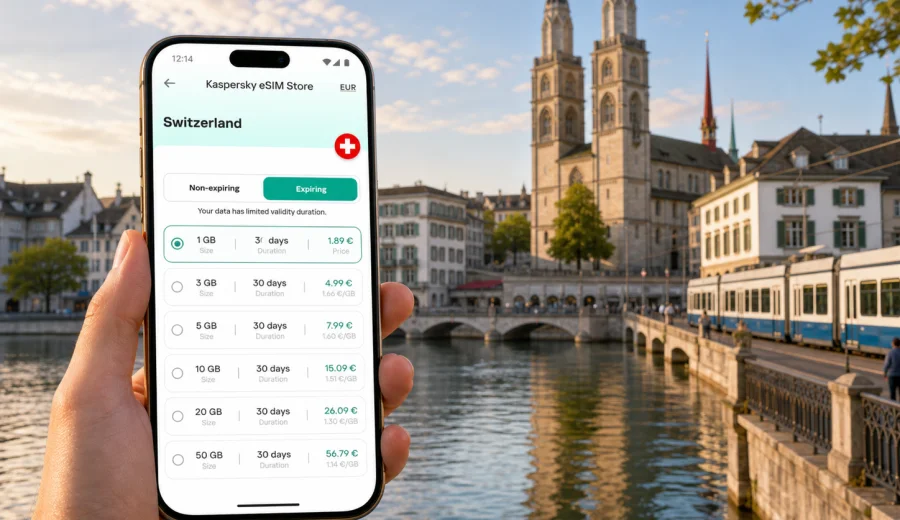
Zurich eSIM: mobile connection and internet for your trip
Zurich is an easy city to explore when your phone is ready before you step out of the airport. The main station, tram stops, hotels around the Old Town, business addresses near Paradeplatz, and lakeside routes are all simple to navigate when you have mobile internet for maps, tickets, messages, and bookings. An eSIM can be a practical way to prepare that connection for a trip to Zurich without looking for a physical SIM card after arrival.
For many visitors, the first online tasks happen in the first hour: checking the train platform at Zurich Airport, opening a hotel address, confirming a meeting, calling a ride, or messaging family that the flight has landed. Public Wi-Fi can help in some places, but it is not always where you need it, and it may not be convenient when you are moving with luggage. With a compatible phone, an eSIM lets you use a digital SIM profile for mobile data while keeping your usual physical SIM in place.
This guide focuses on Zurich city travel, not Switzerland in general. It covers arrival, local transport, districts, business trips, stopovers, hotel stays, and short trips from Zurich where mobile data can make the day smoother.
Why eSIM is useful in Zurich
Zurich rewards precise planning. Trains and trams run frequently, streets in the Old Town can be narrow, and the best route between two addresses may change depending on whether you walk, take a tram, board an S-Bahn train, or continue by boat on Lake Zurich. Mobile internet helps you make those small decisions in real time.
An eSIM can be useful in Zurich when you need to:
- open maps as you leave Zurich Airport or Zurich HB;
- check public transport connections between tram, train, and bus lines;
- show hotel reservations or apartment entry instructions;
- use messaging apps for calls and updates;
- check restaurant bookings, museum tickets, or meeting details;
- manage work email and cloud documents during a business trip;
- use translation, banking, or travel apps while moving around the city;
- plan day trips to Lucerne, Rhine Falls, Zug, Winterthur, or nearby alpine areas.
The key benefit is control. Before choosing a tariff, you can review the data allowance, validity period, destination, and price. That matters in Zurich because one traveler may need only light navigation for a weekend, while another may need steady data for video calls, remote work, and train travel across Switzerland.
Arrival scenarios: Zurich Airport, main station, and hotel transfer
Zurich Airport is connected to the city by train, tram, taxi, ride-hailing services, and hotel transfers. If you land with mobile data ready, the first few steps are easier: check the route to your hotel, follow signs to the correct platform, and message your host or colleagues if baggage or immigration takes longer than expected.
Common arrival tasks include:
| Moment | Why mobile internet helps | Practical note |
|---|---|---|
| At Zurich Airport | Find train times, terminal exits, or a hotel shuttle location | Activate data only after checking the eSIM profile and tariff conditions |
| On the train to Zurich HB | Track stops and confirm the next connection | Zurich HB is large, so maps help with exits and platforms |
| At the hotel | Open booking details, payment confirmation, or digital check-in | Keep the hotel address saved offline as a backup |
| During a late arrival | Contact reception, a host, or a driver | Messaging apps need data if you do not use roaming |
If you prefer to install the eSIM before the flight, do it while you have a stable home connection. Then you can activate the mobile data profile according to the instructions and tariff conditions when you are ready to use it. Some travelers install before departure and turn the eSIM line on after landing; others wait until they reach the hotel Wi-Fi. The right timing depends on the tariff, device settings, and your comfort with phone configuration.
Getting around Zurich with mobile data
Zurich is compact, but it is not a city where you always want to improvise offline. The tram network is excellent, the railway system is dense, and many useful routes combine walking with public transport. Mobile internet is especially helpful when you are deciding between a tram along Bahnhofstrasse, an S-Bahn connection across the city, or a walk through Niederdorf toward the river.
For a short leisure visit, you may use data mostly for maps, search, ticket apps, restaurant bookings, and photos uploaded in the evening. For a work trip, the pattern is different: calendars, email, shared documents, video calls, taxi receipts, and two-factor authentication can use more data. If you are staying outside the center, for example near Oerlikon, Altstetten, Enge, or the airport area, reliable mobile data makes cross-city movement easier.
Zurich situations where data is often useful:
- changing from train to tram at Zurich HB;
- finding the right Old Town bridge or riverside path;
- checking whether a meeting address is closer to Stadelhofen, Enge, or Hardbrucke;
- comparing routes to Uetliberg, Lake Zurich piers, or the FIFA Museum area;
- using a map in residential streets where hotel signs are not obvious;
- receiving access codes for serviced apartments or conference venues.
eSIM is not a replacement for every communication need. Many travel eSIM tariffs are data focused and may not include a local phone number, traditional voice calls, or SMS unless the specific tariff states otherwise. For calls, many travelers use internet-based messaging apps. Before relying on that setup for business or banking, check whether any service you use requires SMS on your primary number.
How much data to consider for a Zurich trip
Your data needs depend more on behavior than on the city itself. Zurich has many places where Wi-Fi may be available, including hotels and business venues, but mobile data is what helps between those places. The safest way to choose is to match the tariff to your actual itinerary.
| Trip style | Typical online behavior | Data planning idea |
|---|---|---|
| 1-day stopover | Maps, messages, train checks, a few searches | A smaller data package may be enough if you avoid video |
| Weekend in Zurich | Navigation, bookings, photos, restaurant search, messaging | Choose a tariff that covers the full stay, not only arrival day |
| Business trip | Email, documents, meeting apps, hotspot use where allowed | Consider a larger package and check tethering conditions |
| Zurich plus day trips | Maps, train routes, weather, tickets, messaging on the move | Pick a Switzerland tariff that fits the full route |
| Family trip | Multiple devices, shared plans, streaming, maps, kid-friendly activities | Estimate data per device and check compatibility separately |
Data disappears faster with video streaming, cloud backups, social media uploads, app updates, and hotspot use. If you want the tariff to last, download offline maps before departure, pause automatic app updates, and use hotel Wi-Fi for large uploads. In the city, save mobile data for live navigation, tickets, messages, and time-sensitive tasks.
Choosing an eSIM tariff for Zurich
For a city trip, the tariff should match Switzerland because Zurich is in Switzerland. A city article can help you plan local use, but the actual destination selection for the tariff is usually the country or region where the eSIM is valid. If your trip stays in Zurich and nearby Swiss destinations, a Switzerland tariff is the natural starting point. If your route also includes Germany, Austria, France, or Italy, compare the country tariff with any suitable regional option available for your itinerary.
Before you decide, check five points:
1. Destination coverage: the tariff should match Switzerland or the wider region you will actually visit.
2. Data allowance: choose enough data for maps, tickets, work, and messaging.
3. Validity period: the tariff should cover the whole stay, including arrival and departure days.
4. Start conditions: review when validity and data usage begin.
5. Device support: confirm that your phone supports eSIM and is not locked by a carrier.
Kaspersky eSIM Store is an app and website where you can choose, set up, and activate an eSIM with a suitable mobile data tariff for an international trip. For Zurich, you can review the available options and choose a mobile internet tariff for Switzerland before you travel or when you already have a stable connection in the city.
Zurich districts and travel situations where eSIM helps
Different parts of Zurich create different mobile internet needs. A tourist staying near the Old Town may use data for walking routes and restaurant searches. A conference visitor in Oerlikon may need calendar updates and transport changes. A traveler near the lake may rely on maps, boat schedules, and weather updates before choosing a walking route.
| Area or route | Typical use case | eSIM planning tip |
|---|---|---|
| Old Town and Niederdorf | Walking navigation, cafes, museums, river crossings | Keep maps active but reduce photo uploads until Wi-Fi |
| Bahnhofstrasse and Paradeplatz | Shopping, meetings, banking district appointments | Save addresses and check meeting room details in advance |
| Zurich HB | Train platforms, transfers, luggage routes | Mobile data helps when changing trains quickly |
| Oerlikon | Conferences, offices, airport connections | A stable data allowance helps with work apps and route changes |
| Lake Zurich | Boat piers, walking routes, weather checks | Use data for live plans and offline maps for backup |
| Uetliberg | Hiking route, weather, return transport | Battery matters as much as data; carry a charged phone |
If your hotel is outside the central districts, eSIM can be especially useful after dinner or late meetings. You may need to check the last convenient public transport connection, open a map in a quiet residential area, or message reception if your arrival time changes.
Setup before you go: a practical checklist
The best time to prepare eSIM is before you are under pressure. Use a reliable internet connection, keep your phone charged, and read the tariff details before installation.
Before leaving for Zurich:
- Check whether your device supports eSIM.
- Confirm that your device is not locked to one carrier.
- Choose a tariff that includes Switzerland or the region you will visit.
- Review the data allowance, validity period, and activation conditions.
- Install the eSIM while connected to stable Wi-Fi if you prefer to prepare early.
- Keep your primary SIM available if you need SMS for banking or account access.
- Download offline maps for Zurich and your hotel area.
- Disable automatic cloud backups and app updates on mobile data.
If you install eSIM yourself, follow the official setup flow for your device. Kaspersky eSIM Store provides step-by-step help through the app and website, and you can also use the installation guide for Android or the installation guide for iOS. The exact screens may vary by device model and operating system, so take time to check the mobile data line, roaming setting for the eSIM if required, and the default SIM for calls and messages.
Business trips to Zurich
Zurich is a major business destination, and business trips often leave little room for connection problems. A typical day can include a landing at Zurich Airport, a train to the city, a meeting near Paradeplatz, a second appointment in Oerlikon, and a late train back to the hotel. Each change of location creates small online tasks: opening a calendar invite, checking a platform, downloading a presentation, confirming a taxi pickup, or answering a message from a colleague.
For work travel, estimate data more generously than you would for sightseeing. Email and chat are usually light, but large attachments, cloud files, video calls, and hotspot use can consume data quickly. If you plan to use your laptop through your phone, check whether tethering is allowed by the selected tariff and watch the balance in your profile or app. Keep your primary number active if your employer or bank requires SMS, and use the eSIM line for mobile data in Switzerland.
Zurich stopovers and short stays
A Zurich stopover can be short enough that buying a physical SIM card feels impractical, but long enough that mobile data is useful. If you have several hours between flights, you might take the train into the center, walk along the Limmat, eat near the lake, and return to the airport. In that scenario, mobile internet supports route checks, ticket apps, time management, and messages.
For a stopover, keep the setup simple:
1. Install and check the eSIM profile before the trip if possible.
2. Use mobile data for live navigation and transport updates.
3. Avoid heavy streaming or large uploads.
4. Set a return reminder with enough time for airport security.
5. Keep the airport terminal and flight details available offline.
If the stopover is part of a longer multi-country trip, choose the tariff based on the full route, not only Zurich. A Switzerland-only tariff may be right for a dedicated Zurich stay, while a wider regional tariff may be more convenient if you continue across borders.
Common mistakes to avoid
Many eSIM issues are not caused by the city. They come from rushed setup, device incompatibility, or mismatched tariff choices. A few checks can prevent most confusion.
Avoid these mistakes:
- choosing a tariff with a validity period shorter than your stay;
- assuming every eSIM tariff includes voice calls or SMS;
- installing the eSIM on a device that does not support eSIM;
- forgetting to select the eSIM profile for mobile data;
- leaving data roaming disabled when the tariff instructions require it;
- using mobile data for automatic backups, app updates, or video uploads;
- deleting the eSIM profile before the trip is finished;
- relying on public Wi-Fi as the only backup for maps and tickets.
If something does not work after installation, check the basics first: the eSIM line is turned on, mobile data is assigned to the correct profile, the device supports eSIM, and the tariff is valid for Switzerland. If the instructions mention data roaming for the eSIM line, confirm that setting as well.
FAQ
Is eSIM useful if my hotel in Zurich has Wi-Fi?
Yes, because hotel Wi-Fi helps only when you are at the hotel. Mobile data is useful between the airport, station, meetings, restaurants, museums, and day-trip routes. It also helps when you need a map or message before you reach a trusted Wi-Fi network.
Can I use eSIM for Zurich and trips outside the city?
Yes, if the selected tariff is valid for Switzerland or the region you are visiting. Zurich is a common base for day trips, so check that the destination and validity period match your full route.
Will eSIM replace my regular SIM card?
Not necessarily. Many travelers keep their regular SIM for their home number and use eSIM for mobile data abroad. Your device settings determine which line is used for mobile data, calls, and messages.
Can I install eSIM after landing at Zurich Airport?
You can install it after arrival if you have a stable internet connection for setup. Many travelers prefer installing before departure to avoid configuring the phone while tired or in a hurry.
What if my phone does not support eSIM?
You need a compatible device to use eSIM. If your phone does not support eSIM or is locked by a carrier, consider another connectivity option before you travel.
Prepare mobile internet for Zurich
Zurich is easier when your phone is ready for the first train, the first address, and the first change of plan. Before you travel, check device compatibility, choose a tariff that fits Switzerland and your route, install the eSIM in a calm moment, and keep offline backups for key addresses.
Kaspersky eSIM Store helps you prepare mobile internet for international travel through an app and website where you can choose, set up, and activate an eSIM with a suitable tariff. If Zurich is your destination, you can prepare an eSIM tariff for your trip to Switzerland and arrive with a clearer plan for staying online.