
Travel connectivity guide
Bangkok eSIM: mobile internet for Thailand travel
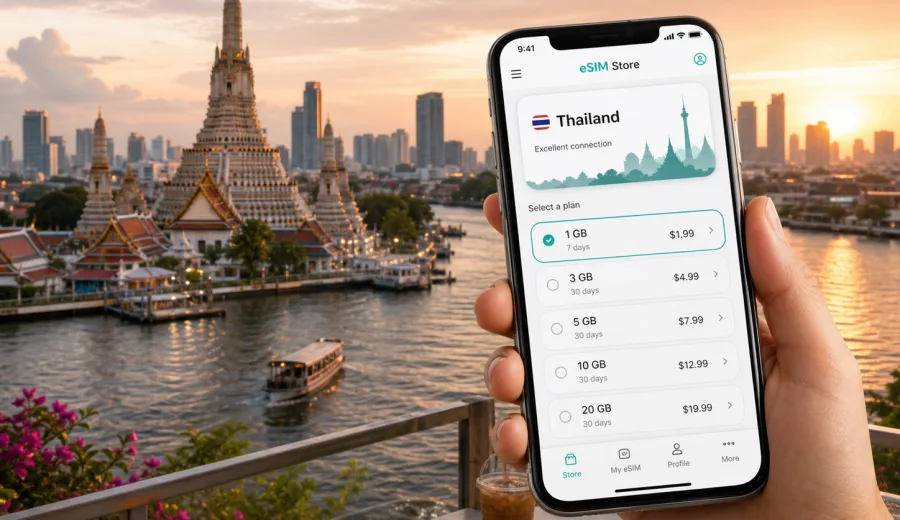
Bangkok eSIM: mobile connection and internet for your trip
Bangkok is a city where mobile internet becomes useful before you even leave the airport. You may need a ride-hailing app at Suvarnabhumi or Don Mueang, a map route to your hotel, a message to your host, a translation app at a food court, or a boarding pass for a domestic flight to Chiang Mai, Phuket, Krabi, or Koh Samui. An eSIM can make these first steps easier because you can prepare mobile data for Thailand without looking for a physical SIM card counter after a long flight.
This guide focuses on Bangkok city travel: arrival, local transport, business trips, stopovers, hotel check-ins, districts, day trips, and practical data use. It is not a general Thailand travel guide. The goal is simple: help you understand when an eSIM is useful in Bangkok, how much data you may need, what to check before purchase, and how to set up your phone so you can use mobile internet more calmly during the trip.
Why eSIM is useful in Bangkok
Bangkok is spread out, busy, and highly app-driven for visitors. The city has several transport systems, heavy road traffic, many hotel districts, and a mix of indoor malls, night markets, temples, office towers, riverside piers, and residential lanes. A stable mobile data plan helps you move between those scenarios without depending only on hotel Wi-Fi or public networks.
Common moments when mobile data helps in Bangkok:
- checking the best route from the airport to Sukhumvit, Silom, Siam, Riverside, or Old Town;
- comparing BTS Skytrain, MRT, airport rail, river boat, taxi, and ride-hailing routes;
- messaging your hotel when traffic changes your arrival time;
- opening maps in a narrow soi where street signs may not be enough;
- using translation for menus, addresses, and short conversations;
- confirming bookings for restaurants, coworking spaces, tours, or clinics;
- joining a video call from a business lounge, hotel lobby, or coworking space;
- sharing live location with family or colleagues.
Bangkok also rewards flexibility. You may plan to take the BTS, then switch to a taxi because of rain. You may start at a mall in Siam, visit a temple near the river, and finish at a night market. You may land for a one-night stopover and need only the essentials: maps, messaging, and transport. In all these cases, an eSIM is mainly about having mobile internet ready when the city changes your plan.
Arrival: Suvarnabhumi and Don Mueang
Most international visitors arrive through Suvarnabhumi Airport, while Don Mueang is common for low-cost regional flights and domestic connections. Both airports can be straightforward, but the first hour still involves decisions: immigration, baggage, cash, transport, hotel address, and sometimes a second flight.
With mobile data available on arrival, you can:
1. Open your hotel booking and copy the address in Thai or English.
2. Check whether the Airport Rail Link, taxi, bus, or ride-hailing app is better for your district.
3. Send your estimated arrival time to the hotel or apartment host.
4. Track the route so you know whether the driver is heading toward the correct area.
5. Rebook or message support if a flight delay affects a domestic transfer.
For a short business trip, this matters because Bangkok traffic can turn a simple transfer into a time-sensitive decision. For a family trip, it helps when several people are tired and you need one phone to coordinate transport. For a solo traveler, it reduces the need to connect to unfamiliar public Wi-Fi just to open a map.
Bangkok districts and data needs
Different areas of Bangkok create different mobile internet habits. A visitor staying in Sukhumvit may use data constantly for BTS routes, restaurant bookings, ride-hailing, and meetings. Someone based in Riverside may use maps, boat schedules, photo backup, and translation around older neighborhoods. A stopover traveler near the airport may need lighter data, mostly for transport and messaging.
| Bangkok scenario | Typical mobile data use | Practical eSIM choice |
|---|---|---|
| One-night stopover | maps, messaging, hotel check-in, airport transfer | small data package with short validity |
| 3-4 day city break | maps, translation, bookings, social apps, rides | moderate data package |
| Business trip | email, calendar, messenger calls, hotspot for laptop when allowed | larger package and enough validity |
| Family holiday | maps, tickets, ride-hailing, shared photos, restaurant searches | larger data allowance |
| Thailand route starting in Bangkok | Bangkok plus domestic flights, trains, islands, or northern cities | plan valid for Thailand or a suitable regional route |
If you mostly use hotel Wi-Fi for streaming and large downloads, you may need less mobile data. If you rely on navigation all day, upload photos, use cloud documents, or join calls outside the hotel, choose more. The right tariff depends on your route, data habits, validity period, and the conditions shown before purchase.
Getting around Bangkok with mobile internet
Bangkok is not a city where one transport method solves everything. You may combine rail, river boats, taxis, walking, and ride-hailing within the same day. Mobile internet helps because real-time decisions matter.
The BTS Skytrain is useful around Sukhumvit, Siam, Silom, and parts of the river area. MRT lines help with Old Town access, Chinatown, Chatuchak, and business districts. River boats can be practical for temples and riverside hotels. Taxis and ride-hailing apps are often convenient for late evenings, rain, luggage, or destinations away from rail stations.
Mobile data supports these choices in practical ways:
- compare walking time from a BTS or MRT station to the final address;
- check whether a river pier is close enough to your destination;
- follow a taxi route when roads are unfamiliar;
- translate a building name or address;
- receive booking updates if traffic delays you;
- find the right hotel entrance inside a mall or mixed-use complex.
Bangkok addresses can be detailed, and buildings with similar names may sit in different sois. When you have mobile internet, you can cross-check the map pin, booking confirmation, and route before you start walking in the heat or rain.
How to choose an eSIM tariff for Bangkok
For a Bangkok-focused trip, start with the country: Bangkok is in Thailand, so the tariff must be valid for Thailand. Then match the plan to the length and style of your visit. A city break with maps and messaging is different from a business week with hotspot use, cloud files, and daily calls.
Use this checklist before choosing:
- Destination: confirm the tariff is valid in Thailand.
- Duration: match validity to your arrival and departure dates, including stopovers.
- Data volume: estimate your use for maps, messaging, browsing, calls, and uploads.
- Device: confirm that your phone or tablet supports eSIM.
- Hotspot: check whether tethering is allowed if you plan to connect a laptop.
- Activation: read when the validity period starts and how the eSIM should be installed.
- Calls and SMS: remember that travel eSIM tariffs are usually for mobile data unless the tariff states otherwise.
For many Bangkok trips, a moderate data package is enough if you use Wi-Fi at the hotel for heavy tasks. For work trips, remote meetings, or longer Thailand routes, a larger package is often more comfortable. Kaspersky eSIM Store helps you choose, set up, and activate an eSIM with a suitable tariff for mobile internet in a foreign trip, while the tariff conditions themselves should always be checked before purchase.
When you are ready to compare options, you can choose an eSIM tariff for your Bangkok trip on the Thailand page and review the data volume, validity period, destination, and price before you proceed.
Setting up eSIM before the flight
Preparing the eSIM before departure can make arrival in Bangkok smoother. You can install the eSIM profile while you still have a reliable home or office internet connection, then activate mobile data according to the tariff instructions when needed. Exact steps depend on your device and the selected tariff.
A simple preparation flow:
1. Check that your device supports eSIM and is not locked to one operator.
2. Choose a tariff valid for Thailand and suitable for your route.
3. Install the eSIM profile using the instructions or QR code provided after purchase.
4. Keep your primary SIM active if you need your usual number for banking, calls, or SMS.
5. After arrival, select the eSIM for mobile data and enable roaming data for that eSIM if the instructions require it.
6. Test maps, messaging, and browser access before leaving the airport or hotel.
For device-specific setup, follow the Android installation guide or the iOS installation guide. The exact menu names may vary by phone model, operating system version, and regional device configuration.
Check device compatibility before purchase
Not every phone supports eSIM, and some devices may be locked by an operator or sold in a regional version with different eSIM support. Before you choose a tariff for Bangkok, check your device and confirm that it can add an eSIM profile.
Also check these details:
- the device has a stable internet connection during installation;
- the operating system is updated enough for eSIM setup;
- the phone is not locked to a single carrier;
- you know which SIM will handle mobile data after arrival;
- you understand whether the eSIM can be reinstalled if you remove it.
This check is important for short Bangkok trips because there may be little time to troubleshoot after landing. If you are traveling for a conference, trade show, medical appointment, or same-day meeting, complete the setup earlier and keep the instructions available offline.
Bangkok travel scenarios where eSIM helps
Short stopover
For a stopover, you may only need mobile data for the airport, hotel, and a few hours in the city. eSIM is useful if you want to leave your luggage, visit a mall or temple, return to the airport, and avoid spending time buying a physical SIM card. Keep the plan simple: maps, ride-hailing, messaging, and boarding pass access.
Business trip
Bangkok business districts often involve moving between hotels, office towers, coworking spaces, malls, and restaurants. Mobile data helps with calendar changes, messenger calls, document access, and backup navigation when traffic affects your schedule. If you plan to use your phone as a hotspot, check whether the selected tariff allows tethering and choose enough data for laptop use.
First Thailand route from Bangkok
Bangkok is often the start of a wider trip. You may continue to Ayutthaya, Pattaya, Hua Hin, Chiang Mai, Phuket, Krabi, or Koh Samui. If your itinerary goes beyond the city, choose a tariff valid for Thailand and long enough for the full route, not only your Bangkok nights. If your journey crosses borders, check whether a regional or separate destination tariff is more suitable.
Pre-trip checklist for Bangkok mobile internet
Use this checklist a day or two before departure:
- Save your hotel address in English and Thai if available.
- Download offline map areas for Bangkok as a backup.
- Disable mobile data for heavy cloud backup if you want to save traffic.
- Update ride-hailing, airline, hotel, banking, and messaging apps.
- Check that your phone can add and manage an eSIM profile.
- Choose a Thailand-valid tariff with enough data and validity.
- Install the eSIM while connected to reliable Wi-Fi.
- Keep installation instructions available in email, screenshots, or your account.
- Decide whether your primary SIM or eSIM will handle data, calls, and SMS.
- Review data roaming settings for the eSIM profile.
These small steps can make the first day in Bangkok easier. Also remember the main limits: travel eSIM tariffs usually focus on mobile data, not a local phone number; calls and SMS are included only if the selected tariff says so; speed and availability depend on local mobile networks and tariff conditions.
FAQ: eSIM for Bangkok
Is eSIM useful if my hotel has Wi-Fi?
Yes, because hotel Wi-Fi only helps when you are at the property. Bangkok travel usually involves maps, transport, booking changes, and messaging while you are outside: at the airport, in a taxi, near a BTS station, by the river, or inside a mall.
Does eSIM include calls and SMS in Bangkok?
Usually, travel eSIM tariffs focus on mobile data. Calls and SMS are not included unless this is clearly stated in the selected tariff. You can use messenger calls and messages over mobile internet, subject to app and network conditions.
Should I activate eSIM before arriving in Thailand?
Install the profile before departure if the instructions allow it, but check when validity starts for the selected tariff. Some travelers install before the flight and turn on the eSIM for mobile data after arrival. Follow the instructions shown for your plan.
Choose mobile internet for Bangkok before you travel
Bangkok is easier to navigate when your phone is ready for maps, transport, hotel messages, translation, bookings, and route changes. An eSIM can help you prepare mobile internet for the trip without waiting to buy a physical SIM card after landing. Check your device, choose the right validity and data volume, install the profile carefully, and keep the tariff conditions in mind.
Before your flight, you can prepare an eSIM tariff for Thailand through Kaspersky eSIM Store and review the available options for your Bangkok itinerary.