
Travel connectivity guide
Chiang Mai eSIM: mobile connection and internet
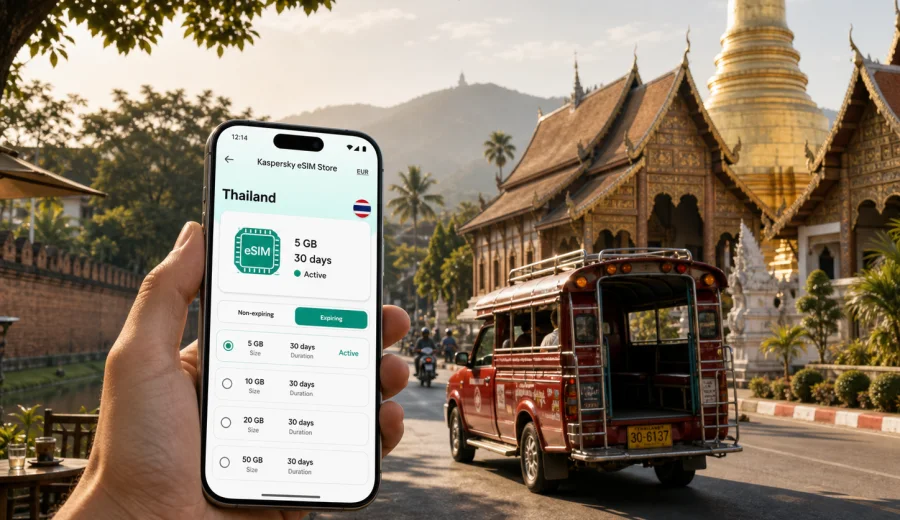
Chiang Mai eSIM: mobile connection and internet for a smooth city trip
Chiang Mai is a city where mobile internet quickly becomes part of the trip rather than a small technical detail. You may need maps while leaving Chiang Mai International Airport, a messaging app to find your hotel in the Old City, a ride-hailing app after dinner near Nimman, or a translation tool at a small market outside the moat. An eSIM helps you prepare mobile data before you start moving, without looking for a physical SIM card shop as soon as you arrive.
This guide focuses on Chiang Mai itself: arrival, local transport, districts, hotels, work trips, short stopovers, and day trips into northern Thailand. It also explains how to choose an eSIM tariff for Thailand in Kaspersky eSIM Store, what to check before buying, and how to keep your primary SIM available while using mobile data abroad.
Why mobile internet matters in Chiang Mai
Chiang Mai is compact compared with Bangkok, but it is not a city where every journey is obvious from the street. The Old City is framed by a moat and historic gates, Nimman has a dense network of cafes and side streets, the Riverside area stretches along the Ping River, and temples, markets, coworking spaces, hotels, and bus stations can be spread across different neighborhoods.
Reliable mobile data is useful in several everyday moments:
- checking the route from the airport to your hotel before you enter a taxi or ride-hailing car;
- navigating between Tha Phae Gate, Wat Chedi Luang, Wat Phra Singh, and the Sunday Walking Street area;
- using maps when a songthaew route is not written clearly in English;
- messaging your hotel or apartment host about check-in time;
- checking weather before riding up to Doi Suthep or planning a day outside the city;
- joining video calls from a coworking space, hotel room, or cafe;
- using translation, payment, booking, and travel apps without waiting for public Wi-Fi.
Public Wi-Fi can be helpful in hotels, airports, and cafes, but it is not always available exactly when you need it. With an eSIM, you can use a compatible phone for mobile internet while keeping your physical SIM slot free or keeping your home SIM active for calls and banking messages, depending on your device settings and tariff conditions.
Arrival: from Chiang Mai airport to your first route
Chiang Mai International Airport is close to the city center, which makes arrival feel simple, but the first hour still benefits from mobile data. You may need to confirm the address of a guesthouse inside the Old City, follow the driver route to a hotel near Nimman, or message someone if your flight lands late. If your eSIM is already installed, you can turn on the data line after landing and avoid searching for Wi-Fi before arranging transport.
For many travelers, the first route in Chiang Mai is one of these:
| Arrival scenario | Why mobile data helps |
|---|---|
| Airport to Old City hotel | Check the gate, street name, and walking distance from the drop-off point. |
| Airport to Nimman | Compare route time and traffic around Maya and Huay Kaew Road. |
| Airport to Riverside | Share your live location or confirm the hotel entrance with reception. |
| Late arrival | Message the host, access booking details, and keep maps available. |
| Short stopover | Plan one compact route without depending on airport Wi-Fi. |
If you plan to activate eSIM after landing, make sure the installation steps are ready before your flight or that you have temporary Wi-Fi available. Many travelers prefer installing the eSIM profile before departure and activating mobile data only when they arrive in Thailand. The exact activation moment and validity period depend on the selected tariff, so check the conditions before purchase.
Choosing data for Chiang Mai, not just for Thailand
A city trip to Chiang Mai usually has a different data pattern from a beach holiday or a long multi-country route. You may spend more time on maps, ride apps, cafe Wi-Fi backups, remote work tools, photo sharing, and messaging than on long highway navigation. The right eSIM tariff depends on how long you stay, how much you move around, and whether Chiang Mai is the whole trip or one stop in a larger Thailand itinerary.
Use this quick planning rule:
- 1-3 days: light data can be enough for maps, messaging, check-ins, and bookings if you avoid heavy video use.
- 4-7 days: choose more data if you plan daily navigation, social media uploads, cloud photo backup, or work calls.
- More than a week: look closely at validity period and top-up options, not only the initial data size.
- Remote work: estimate video meetings separately; a few calls can use more data than several days of maps and messaging.
- Trips beyond the city: add extra data for Doi Suthep, Mae Rim, Chiang Rai, Pai, or travel days when Wi-Fi is less predictable.
The city context matters because Chiang Mai often mixes slow exploration with practical app use. You may walk for long periods in the Old City, then suddenly need a ride because of rain, heat, or a late dinner across town. A prepared eSIM gives you a backup when the plan changes.
Districts and movement: where eSIM is most useful
Chiang Mai has several travel zones where mobile internet solves different problems.
Old City
Inside the moat, street names, temple entrances, guesthouses, small restaurants, and night market routes can be confusing on foot. Mobile maps help you move between Tha Phae Gate, Wat Chedi Luang, Wat Phra Singh, and smaller lanes without losing time. If you are staying in a guesthouse, mobile data also helps with late check-in messages and door codes.
Nimman and Huay Kaew
Nimman is popular for cafes, coworking spaces, shopping, and nightlife. It is a useful area for digital nomads and business travelers, but streets can be busy and similar-looking. Mobile data helps you check opening hours saved in your booking app, order transport, and keep work tools available if cafe Wi-Fi is unstable.
Riverside and Night Bazaar
The Ping River area and Night Bazaar are convenient for evening plans. If you move between restaurants, markets, and hotels after dark, mobile internet helps with route checks and messaging. It also lets you keep digital receipts, booking confirmations, and translation tools available without joining unknown Wi-Fi networks.
Doi Suthep and trips outside town
Routes to Wat Phra That Doi Suthep, Mae Rim, and mountain viewpoints are less walkable and more dependent on transport planning. Download offline maps as a backup, but keep mobile data available for live route changes, weather, and coordination with drivers or tour operators.
Preparing eSIM before your Chiang Mai trip
Before you fly, check whether your smartphone supports eSIM and whether it is locked to a specific operator. Not every phone model or regional version supports eSIM, and a locked device may not allow another mobile plan to be added. You can check your device before choosing a tariff, then review the data volume, validity period, and destination coverage.
A practical setup flow looks like this:
1. Check that your phone supports eSIM and is not operator-locked.
2. Choose Thailand as the destination for your Chiang Mai trip.
3. Compare available tariffs by data volume and validity period.
4. Install the eSIM while you still have a stable internet connection.
5. Keep your primary SIM for calls or SMS if you need it, and use the eSIM line for mobile data.
6. After arrival, select the eSIM as the data line and enable data roaming for that eSIM if the tariff instructions require it.
Kaspersky eSIM Store is an app and website where you can choose, arrange, and activate an eSIM with a suitable mobile data tariff for an international trip. It is not a mobile operator and does not own the local network. The conditions you see before purchase matter: data size, validity period, destination, price, and any activation notes should guide your choice.
For a city trip focused on Chiang Mai, you can choose a mobile internet option for Thailand before departure and keep the setup ready for the airport, hotels, transport, and local routes.
How to install eSIM for a Chiang Mai trip
Installation should be done while you have a stable connection, preferably before departure or while connected to trusted Wi-Fi. After purchase, the eSIM profile is available through the site or app, and you follow the device-specific installation steps. If you need platform instructions, use the Android installation guide or the iOS installation guide.
The exact screens differ by phone, but the general logic is consistent:
- add the eSIM profile to your device;
- label it clearly, for example “Thailand data”;
- keep your home SIM active if you still need calls or SMS;
- set the eSIM as the mobile data line when you are ready to use it;
- check whether data roaming must be enabled for the eSIM profile;
- avoid deleting the eSIM after activation unless you are sure you no longer need it.
Do not wait until you are standing outside the airport without Wi-Fi to learn the installation flow. eSIM setup is usually straightforward, but it still depends on your device, operating system, and connection at the time of installation.
Practical data scenarios in Chiang Mai
Different travelers use mobile internet in different ways. Use these scenarios to estimate your needs.
| Traveler type | Typical mobile data use in Chiang Mai | Planning tip |
|---|---|---|
| Weekend visitor | Maps, ride apps, messaging, restaurant searches, boarding pass access. | A smaller tariff may work if you avoid video streaming. |
| Remote worker | Email, cloud documents, calls, hotspot for laptop, coworking backup. | Choose more data and check whether tethering is allowed by the tariff. |
| Family trip | Multiple maps, messaging, photos, tickets, translation, shared routes. | One phone can be the main navigation device, but each traveler may prefer personal data. |
| Business traveler | Hotel transfers, calendar, messaging, video calls, document access. | Install before departure and test the data line before the first meeting. |
| Northern Thailand route | Chiang Mai plus Doi Suthep, Mae Rim, Chiang Rai, Pai, or Lampang. | Consider data use on travel days and keep offline maps as backup. |
For ordinary travel tasks, maps and messaging are usually manageable. Video calls, cloud photo sync, streaming, and using your phone as a hotspot can change the calculation quickly. If your phone allows it, set app updates, cloud backups, and media downloads to Wi-Fi only before the trip.
Hotels, apartments, and coworking spaces
Chiang Mai is popular with long-stay visitors, remote workers, students, and travelers who spend part of the day online. Hotels and apartments often provide Wi-Fi, and coworking spaces are common in Nimman and nearby neighborhoods. Even so, an eSIM can be useful as a fallback when you arrive before check-in, sit in a cafe with a weak connection, or need to join a call from a taxi.
For work trips, treat mobile data as continuity rather than a replacement for every connection. Before an important call, check that your eSIM is selected for data, close background apps, and avoid automatic uploads. If you plan to use hotspot mode, confirm that the selected tariff and your device settings allow it. Conditions can vary by tariff.
For apartment stays, mobile data is also useful during practical moments: finding the entrance, messaging the host, opening a map in a narrow lane, or translating instructions for laundry, parking, or delivery.
Transport and navigation around the city
Chiang Mai transport can include walking, songthaews, tuk-tuks, taxis, ride-hailing, rented scooters, bicycles, and organized tours. Mobile internet supports all of these, but the way you use it changes.
- Walking: save points of interest and keep maps open around the Old City and markets.
- Songthaews: use maps to confirm direction and distance before agreeing on a route.
- Ride-hailing: keep data available for pickup points, driver messages, and fare confirmation.
- Scooter rental: use mobile data for navigation, but stop safely before checking maps.
- Tours: keep booking confirmations and pickup messages available offline and online.
- Bus or train connections: use data for station directions, tickets, and last-minute schedule checks.
When using maps heavily, download offline areas for Chiang Mai in advance. Offline maps are not a full replacement for live traffic, driver communication, or updated search results, but they reduce data use and help if signal quality changes during a mountain route or day trip.
What to check before buying an eSIM tariff
Before choosing a tariff for Chiang Mai, slow down for a short checklist. It can prevent most setup problems.
- Device compatibility: your phone must support eSIM.
- Operator lock: your device must be able to add another mobile plan.
- Destination: choose a tariff that covers Thailand for a Chiang Mai trip.
- Validity: check when the validity period starts and how long it lasts.
- Data volume: match the tariff to your route, work needs, and media habits.
- Calls and SMS: many travel eSIM tariffs are for mobile data and may not include a regular phone number, calls, or SMS.
- Roaming setting: some eSIM profiles require data roaming to be enabled for that line.
- Installation timing: install with stable internet before you need mobile data.
- Support path: know where to find instructions or support if activation takes longer than expected.
This checklist is especially important if Chiang Mai is part of a longer route through Thailand. A tariff that is fine for a two-day city break may feel small if you also plan a week of mountain trips, remote work, or heavy media sharing.
Short stopovers and one-day visits
Some travelers pass through Chiang Mai for a short layover, a quick meeting, or one full day before heading to another part of northern Thailand. In that case, mobile internet is less about large data volume and more about speed of action. You want the route from the airport, hotel luggage storage, one or two key sights, dinner, and the return journey to work without technical delays.
For a one-day plan, prepare these items before arrival:
- hotel or luggage storage address saved offline;
- one compact walking route inside the Old City;
- transport app ready and logged in;
- screenshots of booking confirmations;
- eSIM installed and labeled on your phone;
- offline map downloaded as a backup.
This setup keeps the day flexible. If it rains, a temple closes earlier than expected, or traffic changes your timing, you can adjust without hunting for Wi-Fi.
FAQ: eSIM and mobile internet in Chiang Mai
Is eSIM useful if my hotel has Wi-Fi?
Yes, because hotel Wi-Fi only helps when you are at the hotel. eSIM is useful during airport transfer, walking routes, ride-hailing, markets, restaurant searches, day trips, and check-in coordination.
Can I use eSIM for ordinary phone calls in Thailand?
Many travel eSIM tariffs focus on mobile data and may not include a local phone number, voice calls, or SMS. You can usually use internet-based calling and messaging apps through mobile data, but check the exact tariff conditions.
Should I install eSIM before flying to Chiang Mai?
Installing before departure is often more convenient because you can use a stable connection and read the instructions calmly. You can then activate or select the data line according to the tariff instructions when you arrive.
Will eSIM work outside Chiang Mai?
For a city article, choose the Thailand destination because Chiang Mai belongs to Thailand. If your route includes other countries, check whether a regional or separate tariff is more suitable. Coverage and conditions depend on the selected tariff and local network availability.
Do I still need offline maps?
Offline maps are a good backup. They reduce data use and help if signal quality changes, especially on mountain roads or trips outside the city. Mobile data remains useful for live search, messaging, bookings, and route changes.
Final preparation before you travel
Before your Chiang Mai trip, make mobile internet part of the same checklist as passport, hotel booking, and airport transfer. Confirm that your phone supports eSIM, choose a tariff with enough data and validity for your route, install the profile with a stable connection, and keep the instructions available. This is especially helpful if you arrive late, work during the trip, or plan to move between the Old City, Nimman, Riverside, Doi Suthep, and nearby towns.
Kaspersky eSIM Store helps you choose, arrange, and activate an eSIM with a suitable mobile data tariff for international travel. For Chiang Mai, select Thailand as the destination and review the available data options before you fly. You can prepare an eSIM tariff for your trip to Chiang Mai and arrive with mobile internet already planned.