
Travel connectivity guide
Hua Hin eSIM for Mobile Internet in Thailand
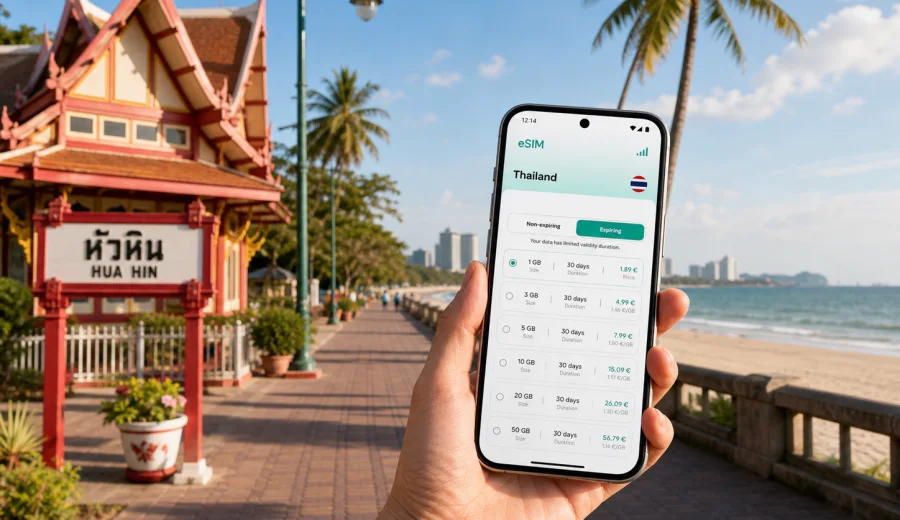
Hua Hin eSIM: mobile connection and internet for your city trip
Hua Hin is an easy city to enjoy when your mobile internet is ready before the first taxi ride. The resort sits on Thailand's Gulf coast, with long beaches, golf courses, night markets, railway heritage, hillside viewpoints, wellness hotels, and weekend routes to national parks. The city is calmer than Bangkok and less spread out than Phuket, but it still rewards travelers who can check maps, compare transport options, message hotels, and manage bookings without waiting for a Wi-Fi password.
An eSIM is useful in Hua Hin because many practical travel moments happen between fixed Wi-Fi points. You may arrive from Bangkok by car, minivan, train, or private transfer; move between the beach, Cicada Market, Bluport, Khao Takiab, and your hotel; or take day trips toward Phraya Nakhon Cave, Sam Roi Yot National Park, or the vineyards west of town. In each of those moments, a working data connection helps you keep the trip simple.
This guide focuses on mobile connection and internet in Hua Hin: when you need data, how to prepare an eSIM, what to check before travel, and how to choose a data plan for a short beach break, a family holiday, a business visit, or a longer stay on Thailand's coast.
Why mobile internet matters in Hua Hin
Hua Hin is not a high-rise megacity where every errand is one metro stop away. It is a coastal resort city made of beachfront hotels, residential neighborhoods, shopping centers, markets, golf areas, and nearby nature routes. Distances are manageable, but they are not always walkable in the heat. Mobile data helps you make small decisions quickly:
- confirm your hotel address with a driver;
- check whether a night market is open before you go;
- compare ride-hailing, songthaew, taxi, and private transfer options;
- follow walking directions around the railway station or beachfront lanes;
- message a tour operator during a national park day trip;
- check restaurant menus, reviews, and reservation details;
- use translation apps when arranging transport or local services;
- share live location with family or colleagues;
- manage mobile boarding passes, train tickets, and onward travel bookings.
The city is relaxed, but travel still has moving parts. A beach hotel may be several kilometers from the station. A villa in the hills may need a precise map pin. A golf resort transfer may ask for your arrival time through a messenger app. An eSIM gives you another way to stay online without depending only on hotel Wi-Fi or public networks.
Arrival scenarios: when data becomes useful
Most international visitors reach Hua Hin after landing in Bangkok, then continue south by road or rail. Some travelers also arrive from other Thai beach areas or combine Hua Hin with Bangkok, Cha-am, Pranburi, or Prachuap Khiri Khan. The first hours are where mobile internet can prevent confusion.
| Arrival route | Why mobile data helps | Practical tip |
|---|---|---|
| Bangkok airport transfer | Driver messages, pickup points, live traffic, hotel confirmation | Save the hotel name in English and Thai if provided by the hotel |
| Train from Bangkok | Station changes, delays, walking directions, local taxi coordination | Keep your ticket and hotel map available offline too |
| Minivan or bus | Drop-off points can vary by operator | Check the exact stop before departure and again near arrival |
| Private car from another resort | Route changes and rest stops may depend on traffic | Share your live location with the hotel or host if needed |
| Weekend trip from Bangkok | Plans can change around market hours and traffic | Use data for reservations and real-time navigation |
City areas where an eSIM is especially helpful
Hua Hin's travel rhythm changes by district. In the center, you may use data for short walks, restaurants, or transport. Near Khao Takiab, you may need it for beach access, hill viewpoints, or local taxis. On day trips, you may depend on it for routing, translations, and schedule changes.
Central Hua Hin
The area around the railway station, beach access roads, restaurants, and hotels is convenient, but it can still be busy in the evening. Data is useful for checking walking routes, calling a ride, finding a specific restaurant, or coordinating with friends after dinner. If you are staying near the beach, your hotel Wi-Fi may be fine indoors, but you will likely use mobile internet outside.
Night Market and local food streets
At night markets, data helps with digital payments where accepted, translation, maps, and ride coordination after dinner. It is also useful if your group splits up or if you need to find the exact pickup point for a driver. Avoid relying on open public Wi-Fi in crowded areas for sensitive activity.
Khao Takiab and the southern beach area
Khao Takiab has beaches, cafes, temples, viewpoints, seafood restaurants, and hotels that can be more spread out than the center. Mobile internet helps you check routes, tide-related beach access notes, and transport availability. If you are traveling with children or older family members, having data also makes it easier to adjust plans without returning to the hotel lobby.
Shopping centers and resort zones
Bluport, Market Village, resort complexes, and golf hotels are comfortable places to spend time, but mobile data still helps between them. It is useful for pickup points, opening hours, and work messages if Hua Hin is part of a business or remote-work trip.
Trips beyond the city
Popular routes from Hua Hin include Sam Roi Yot National Park, Phraya Nakhon Cave, Pranburi, Cha-am, vineyards, water parks, and golf courses. These are exactly the situations where cafe Wi-Fi is not enough. Coverage and speed depend on the selected local network and location, so download key maps and booking confirmations before you leave the city.
What eSIM changes for a Hua Hin trip
An eSIM is a digital SIM profile installed on a compatible phone or tablet. Instead of inserting a physical SIM card, you add the eSIM profile to your device and use it for mobile data while traveling. In Hua Hin, this can make the arrival and city movement smoother because you can prepare before you reach a shop or hotel.
Kaspersky eSIM Store is an app and website where you can choose, set up, and activate an eSIM with a suitable data plan for mobile internet during an international trip. The key point is preparation: you can review the destination, data amount, validity period, and plan conditions before deciding what fits your route.
An eSIM for Hua Hin is not only for beach photos. It supports practical travel tasks: maps, ride apps, messenger calls, translation, hotel messages, mobile banking checks, restaurant searches, and remote work tools. Standard phone calls and SMS are usually not included unless the chosen plan says so. For voice communication, travelers commonly use internet-based apps through mobile data.
At this stage of planning, it is sensible to review mobile internet options for Thailand before your Hua Hin trip and compare plan size, validity, and conditions against your itinerary. Hua Hin is the city focus, but your data plan should also cover Bangkok transfer days and any side trips inside Thailand.
Before you choose a data plan
Check your device and trip pattern before selecting a plan. Hua Hin travelers often underestimate data because the city feels laid-back. In practice, data usage can rise quickly if you stream video, use maps heavily, upload photos, or work from a laptop through hotspot mode.
Use this checklist before you travel:
- Check whether your device supports eSIM and is not locked to one carrier.
- Confirm the number of travel days in Thailand, including Bangkok transfer days.
- Estimate whether you will use hotspot mode for a laptop or another phone.
- Decide whether you need data only in Hua Hin or across a wider Thailand route.
- Download offline maps, booking confirmations, hotel addresses, and insurance details.
- Keep your main SIM active if you need bank SMS or calls, but manage roaming settings carefully.
- Read the selected plan conditions before activating it.
If you plan to install the eSIM yourself, keep the setup instructions available before departure. Kaspersky eSIM Store provides an Android installation guide and an iOS installation guide for the main device flows. Installation steps can vary by phone model and operating system version, so follow the instructions shown for your device.
How much data do you need in Hua Hin?
There is no single correct amount because a weekend visitor and a remote worker use the city differently. The safest approach is to match the plan to your real behavior, not only to the number of days.
| Traveler profile | Typical data use in Hua Hin | What to consider |
|---|---|---|
| Weekend visitor | Maps, messengers, taxi apps, restaurant searches | A smaller plan can be enough if hotel Wi-Fi handles video |
| Family holiday | Navigation, shared plans, photos, translation, ride coordination | Add extra allowance if several people depend on one hotspot |
| Business traveler | Email, calendar, messenger calls, files, maps | Choose a plan with room for work tasks and backup data |
| Golf or wellness trip | Resort transfers, course information, messaging, maps | Data matters most outside the hotel or resort Wi-Fi area |
| Day-trip traveler | Maps, tickets, guide messages, location sharing | Download offline maps and choose enough data for routes outside the city |
| Long-stay traveler | Daily errands, banking checks, delivery apps, remote tools | Look at validity period as carefully as data volume |
As a practical rule, navigation and messaging use modest amounts of data, while video streaming, cloud backups, social media uploads, and hotspot work sessions consume much more. If you use hotel Wi-Fi for heavy downloads and mobile data for movement, a moderate plan may be enough. If you expect to work from cafes, upload video, or tether a laptop, choose more capacity.
Choosing an eSIM before your Hua Hin trip
Once you know your route and data habits, choose a plan for Thailand rather than searching for a separate city-only product. Hua Hin belongs to Thailand, and your travel days may include Bangkok airports, transfer roads, nearby towns, and other coastal stops.
Look at four details before checkout:
1. Destination: make sure the plan matches Thailand or the region that includes your route.
2. Data volume: choose enough for maps, messaging, uploads, and any hotspot use.
3. Validity period: cover arrival, Hua Hin days, and departure or Bangkok connection days.
4. Activation rules: understand when the validity period starts and what steps are required on your device.
Do not choose only by price. The best plan is the one that fits your route with a little buffer for delays, work calls, navigation, or extra photo uploads.
Practical setup sequence
You can prepare most of the eSIM process before travel, then activate according to the plan instructions:
1. Confirm that your phone supports eSIM and is unlocked.
2. Choose Thailand as the destination for a Hua Hin trip.
3. Select a data amount and validity period that match your itinerary.
4. Complete the eSIM setup while you have stable Wi-Fi.
5. Keep the QR code or setup details available until installation is complete.
6. On arrival, select the eSIM for mobile data if the plan instructions require it.
7. Check data roaming settings for the eSIM line if your device needs that option enabled.
8. Keep your primary SIM available for calls or banking messages if needed.
Avoid setup in a moving car, at a crowded station, or when your phone battery is low.
FAQ
Is an eSIM useful if my Hua Hin hotel has Wi-Fi?
Yes. Hotel Wi-Fi covers only part of the trip; mobile data helps during transfers, taxi rides, markets, day trips, and schedule changes.
Should I choose a Hua Hin plan or a Thailand plan?
Choose a plan for Thailand or a region that covers Thailand. Hua Hin is part of Thailand, and your route may include Bangkok airports, Cha-am, Pranburi, or other stops.
Can I install an eSIM before flying?
In many cases, you can complete installation before departure while you have stable Wi-Fi, then activate or use the plan according to its instructions. Always read the plan details and device prompts before travel.
Does an eSIM include a phone number?
Travel eSIM data plans usually focus on mobile internet. Standard voice calls and SMS are not included unless the selected plan explicitly says so.
What should I do before leaving for Hua Hin?
Check device compatibility, choose a Thailand data plan that covers your full route, install the eSIM with stable Wi-Fi, download offline maps, save your hotel address, and confirm how your phone will select the eSIM for mobile data.
Prepare mobile internet for Hua Hin
Hua Hin is easier when your phone is ready for the practical parts of travel: the Bangkok transfer, hotel check-in, beach routes, night markets, family coordination, day trips, and last-minute changes. An eSIM helps you prepare mobile internet before those moments happen, as long as your device is compatible and you choose a plan that fits your route.
Before departure, check your device, compare data volume and validity period, and keep setup instructions close. If Hua Hin is your main destination in Thailand, you can choose an eSIM data plan for your trip to Thailand through Kaspersky eSIM Store and prepare your mobile internet before you start moving around the city.