
Travel connectivity guide
Krabi eSIM: mobile internet for your trip
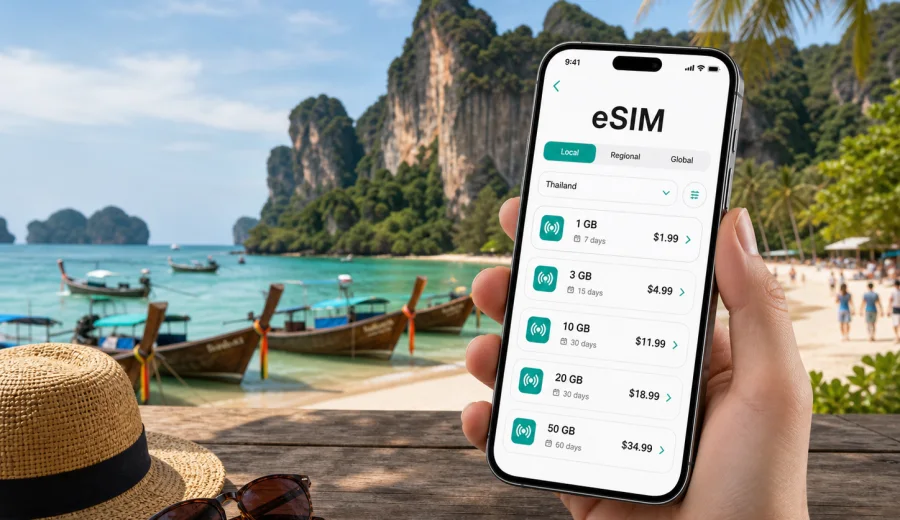
Krabi eSIM guide: mobile connection and internet for your trip
Krabi is a practical destination for travelers who move often: airport transfer, hotel check-in, boat tickets, island trips, food delivery, maps, and messaging can all happen on the same day. An eSIM can make this easier because you can prepare mobile internet for Thailand before you arrive, without looking for a physical SIM card at the airport or relying only on hotel Wi-Fi.
This guide focuses on Krabi city travel scenarios: landing at Krabi International Airport, getting to Ao Nang or Krabi Town, navigating to Railay Beach, checking ferries, organizing island tours, and staying connected during short stopovers or business trips. It also explains how to choose an eSIM tariff, what to check before purchase, and how Kaspersky eSIM Store can help you select, install, and activate an eSIM for mobile internet in Thailand.
Why mobile internet matters in Krabi
Krabi looks relaxed, but travel logistics can be very mobile-first. Many hotels, transfer services, tour desks, taxi drivers, and boat operators confirm details through messages. If your plan changes because of weather, tides, traffic, or a late flight, mobile data helps you adjust without waiting for Wi-Fi.
Common Krabi situations where mobile internet is useful:
- finding your driver after arrival at Krabi International Airport;
- opening maps for the road to Ao Nang, Klong Muang, Tubkaek, or Krabi Town;
- confirming a long-tail boat to Railay or a ferry to nearby islands;
- checking hotel messages and digital booking confirmations;
- using translation apps in markets, piers, and local restaurants;
- paying for ride-hailing or scanning digital vouchers where available;
- keeping in touch with family or colleagues through messengers;
- using mobile hotspot mode for a laptop if the selected tariff and device settings allow it.
An eSIM does not replace every part of a mobile subscription. In most travel scenarios it is mainly about mobile internet. Ordinary voice calls and SMS are not included unless the conditions of the selected tariff say otherwise. For calls, many travelers use messengers over mobile data.
Arrival in Krabi: the first hour after landing
Krabi International Airport is close enough to the main town areas, but the first hour can still be busy. You may need to message a hotel, locate a transfer desk, compare taxi options, or check the route to your accommodation. If you arrive late, mobile internet can be more convenient than trying to solve everything at the airport counter.
A prepared eSIM can help in these first steps:
1. Before the trip, check that your phone supports eSIM and is not locked to one carrier.
2. Choose a Thailand tariff with a data volume and validity period that match your stay.
3. Install the eSIM while you still have stable Wi-Fi at home or at your hotel before departure.
4. After landing, enable the eSIM for mobile data and follow the activation instructions.
5. Keep your primary SIM active only for the functions you need, such as receiving important messages, if your device settings and home operator allow it.
The exact activation moment and network behavior depend on the tariff, device, and local network conditions. Plan a few minutes for setup rather than assuming everything will happen at the baggage belt.
Krabi neighborhoods and routes where eSIM is especially useful
Krabi is not one compact beach district. Travelers often sleep in one area, take tours from another, and move through piers or local roads. That is why mobile data planning should match your route, not just the city name.
| Area or route | Typical need for mobile internet | Practical note |
|---|---|---|
| Krabi International Airport | Transfers, maps, booking confirmations | Useful immediately after arrival |
| Krabi Town | Markets, cafes, local transport, admin errands | Good for short stays and stopovers |
| Ao Nang | Hotels, beach routes, tour offices, restaurants | Many travelers use it as a base |
| Railay Beach | Boat schedules, messaging, offline backup maps | Access is by boat, so plan ahead |
| Klong Muang and Tubkaek | Resort transfers, navigation, ride coordination | Distances are longer than they look on a map |
| Tiger Cave Temple route | Maps, taxi pickup, weather checks | Useful if you arrange return transport |
| Island trips from Krabi | Digital vouchers, boat updates, messaging | Coverage and speed can vary by location and network conditions |
For a short Ao Nang beach stay, a modest data package may be enough if you use hotel Wi-Fi for heavy downloads. For a longer trip with islands, navigation, remote work, and hotspot use, choose a larger package and read the conditions carefully.
How to choose an eSIM tariff for Krabi
For a city trip, the right tariff is usually based on four questions: where you will travel, how many days you will stay, how much data you use, and whether you need backup for work or only everyday travel tasks.
Start with the destination. Krabi is in Thailand, so a Thailand tariff is the natural choice for most Krabi-only trips. If your itinerary includes several countries in Southeast Asia, check whether a regional option is more suitable. Always compare the countries included, data volume, validity period, price, activation rules, and any hotspot conditions before paying.
Then estimate your data use:
- Light use: maps, messengers, email, ride-hailing, occasional browsing.
- Medium use: daily navigation, social media, restaurant searches, image uploads, video calls on Wi-Fi where possible.
- Heavy use: frequent video calls, cloud documents, hotspot for a laptop, large photo backups, streaming.
Do not choose only by the highest number of gigabytes. A tariff with the right validity period may be more practical than a larger package that expires too soon for your travel dates.
City scenarios: what to prepare before each day
Krabi days can change quickly. Weather can affect boat plans, a transfer may move earlier, and a restaurant or tour desk may send an updated meeting point. Mobile internet helps when your schedule is not fully fixed.
For an airport-to-hotel day, save your hotel address, transfer confirmation, and driver contact. For an Ao Nang beach day, keep maps, restaurant reservations, and tour messages easy to find. For a Railay day trip, download the area map in advance and keep mobile data for messages, boat timing, and emergency contact. For a workday, test mobile hotspot mode before relying on it, and check whether your selected tariff allows tethering.
Before leaving the hotel, it is useful to check:
- remaining data balance;
- battery level and power bank;
- whether mobile data is assigned to the eSIM profile;
- whether data roaming needs to be enabled for that eSIM;
- offline copies of hotel address, pier name, and booking documents;
- a backup way to contact your hotel or transfer provider.
eSIM, roaming, local SIM, and Wi-Fi in Krabi
Different connection options suit different travel styles. The most reliable choice is not always the same for every traveler.
| Option | When it can fit | What to watch |
|---|---|---|
| Travel eSIM | You want to prepare mobile internet before arrival and avoid a physical SIM swap | Device compatibility, tariff validity, activation rules |
| Home operator roaming | You need your usual number active and accept your operator's roaming terms | Daily fees, fair use rules, cost of data |
| Local physical SIM | You are comfortable visiting a shop and replacing or adding a SIM card | Shop hours, queues, documents or local process requirements |
| Public Wi-Fi | You need occasional connectivity at a hotel, cafe, or airport | Availability, speed, security, and login limits |
An eSIM is often a convenient middle ground: you can prepare it in advance, keep your physical SIM in the phone, and use mobile data when you are away from Wi-Fi. It is still important to read the selected tariff conditions and keep realistic expectations about coverage in remote or offshore areas.
Preparing mobile internet through Kaspersky eSIM Store
Kaspersky eSIM Store is an app and website where you can choose, arrange, and activate an eSIM with a suitable mobile internet tariff for an international trip. For Krabi, you should look at Thailand as the destination, because the city belongs to Thailand and the country tariff is the relevant landing point.
If you want to prepare before departure, you can choose an eSIM tariff for your trip to Krabi in Thailand after checking the data amount, duration, destination, price, and activation details. That way, mobile internet planning follows your real Krabi route instead of becoming a last-minute airport task.
Use the tariff page as part of a checklist, not as a last-minute guess:
- choose Thailand as the destination unless your route needs a wider regional option;
- compare data packages by realistic daily use;
- check how long the tariff remains valid;
- confirm whether the plan suits your arrival and departure dates;
- review installation and activation instructions before you travel;
- keep the purchase confirmation and QR code accessible until setup is complete.
This approach works well for travelers who want mobile internet ready for airport arrival, hotel transfers, navigation, and messaging without depending on a physical SIM counter.
Device compatibility: check before you buy
Before choosing any eSIM tariff, confirm that your smartphone or tablet supports eSIM and is not restricted by a carrier lock. This matters more than the destination. If the device cannot add an eSIM profile, the tariff cannot be used on that device.
Check your device before purchase, especially if you use an older phone, a device bought through a carrier contract, or a model with regional differences. Some phones share the same commercial name but differ by market, SIM configuration, or software settings.
Also check these points:
- your operating system is up to date enough for eSIM management;
- you can access Wi-Fi during installation;
- you know where eSIM settings are on your device;
- you will not delete the eSIM profile unless the tariff instructions allow reinstalling it;
- you understand which SIM profile is used for mobile data and which one is used for calls or messages.
How to install and activate an eSIM for a Krabi trip
The general setup is simple, but it is worth doing calmly. Install the eSIM before leaving home or while you have reliable Wi-Fi, then activate it according to the tariff instructions. Some tariffs begin counting validity only after connecting to a supported network, while others may have different rules. Read the details before setup.
Basic installation flow:
1. Open the selected tariff instructions in your profile or email.
2. Add the eSIM to your device by following the QR code or in-app instructions.
3. Label the eSIM profile clearly, for example Thailand data.
4. Keep your primary SIM settings unchanged unless you intentionally want to adjust them.
5. When you arrive or when the instructions say to activate, choose the eSIM for mobile data.
6. Enable data roaming for the eSIM if the tariff instructions require it.
7. Test a map or message app before leaving the airport or hotel Wi-Fi.
For detailed device steps, use the official Android installation guide or iOS installation guide. The exact labels in settings can vary by phone model and operating system version.
Data planning for common Krabi trips
It is easy to underestimate mobile data when a trip includes maps, photos, and last-minute coordination. Use the table as a planning tool, not an exact forecast.
| Trip type | Likely data pattern | Planning suggestion |
|---|---|---|
| Two-day stopover in Krabi Town | Maps, messages, hotel and airport transfer | Small or medium package may be enough |
| Five nights in Ao Nang | Daily maps, restaurants, tour messages, social apps | Medium package with enough validity is safer |
| Resort stay in Tubkaek or Klong Muang | Hotel Wi-Fi plus transfer coordination | Choose based on time away from the resort |
| Island-focused itinerary | Maps, weather, boat messages, photo sharing | Allow extra data and keep offline copies |
| Remote work trip | Email, documents, video calls, hotspot backup | Larger package and careful hotspot checks |
If you need video calls, download large files, or back up photos, use hotel Wi-Fi when it is stable and keep eSIM data for movement around the city and time-sensitive tasks.
Practical Krabi travel tips for using mobile data
Mobile internet is most valuable when you plan the small details that usually slow travelers down.
Use these habits in Krabi:
- save your hotel in maps before leaving the airport;
- screenshot the Thai address of your hotel or villa;
- keep the name of your pier or meeting point visible in messages;
- download offline maps for Ao Nang, Krabi Town, Railay, and your resort area;
- avoid starting major cloud backups on mobile data;
- turn off automatic app updates during the trip;
- keep a power bank for long transfer and island days;
- check whether your phone switches mobile data back to the primary SIM after restarts.
For boat trips, keep vouchers, pickup times, and return details offline. Coverage quality can change offshore, between cliffs, or near smaller islands.
Business trips and remote work in Krabi
Krabi is also used for team retreats, long stays, and remote work weeks. If you will join calls, share files, or use a laptop hotspot, plan more carefully than a traveler who only needs maps.
Before your first meeting, check:
- whether your selected tariff permits hotspot use;
- whether your laptop can connect to the phone hotspot reliably;
- whether video calls are better scheduled from hotel Wi-Fi;
- whether you have enough data for emergency backup;
- whether two-factor authentication messages still arrive on your primary SIM or through an app.
Use eSIM data as a flexible backup for movement between hotels, cafes, meeting points, and the airport. For long video sessions, a stable private Wi-Fi network may be more appropriate.
Short stopovers in Krabi
Even a short stopover can justify mobile internet if you need a transfer, a hotel night, or a few hours in town. The risk is timing: searching for a physical SIM card can be inconvenient when every hour matters.
For a one-night stopover:
1. Install the eSIM before departure.
2. Keep hotel and flight details available offline.
3. Use mobile data for maps, driver messages, and flight updates.
4. Choose a tariff duration that covers possible delays.
5. Avoid streaming or large downloads on mobile data.
FAQ: eSIM and internet in Krabi
Is Krabi a city or country destination for eSIM selection?
Krabi is in Thailand, so most travelers should choose Thailand as the destination. If your trip includes several countries, compare regional options and included destinations.
Can I use eSIM for calls in Krabi?
Travel eSIM tariffs are usually focused on mobile data. A regular phone number, voice calls, and SMS are not included unless the selected tariff conditions specifically say so. You can use messengers over mobile internet for many communication needs.
Should I install the eSIM before flying to Thailand?
Installing before departure is often more comfortable because you can use stable Wi-Fi. Activate the eSIM according to the tariff instructions and check when validity starts.
Will eSIM data be enough for island trips from Krabi?
It depends on your route, data habits, device, tariff, and local network conditions. Keep essential documents offline and use mobile data for messaging, maps, and updates.
Do I need to remove my physical SIM card?
Usually no. On many compatible devices, you can keep your physical SIM and add an eSIM profile. Choose in settings which profile handles mobile data, calls, and messages.
What should I do if the eSIM does not connect after arrival?
Check that the eSIM profile is installed, mobile data is assigned to that profile, data roaming is enabled if required, and airplane mode is off. If the issue continues, review the setup guide and contact support with your device model and tariff details.
Final checklist before you travel to Krabi
Before leaving for Krabi, make sure you have:
- confirmed that your device supports eSIM;
- checked that the phone is not carrier-locked;
- chosen Thailand or a suitable regional destination;
- compared data volume and validity period;
- installed the eSIM while connected to reliable Wi-Fi;
- saved the Android or iOS setup instructions;
- downloaded offline maps for your main Krabi areas;
- saved hotel, pier, transfer, and booking details offline;
- decided which SIM profile will handle mobile data after arrival.
Choose an eSIM tariff for Krabi
A Krabi trip often involves movement: airport transfer, beach districts, piers, island routes, restaurants, hotels, and sometimes work calls. Preparing mobile internet in advance gives you more control over those small travel moments.
With Kaspersky eSIM Store, you can choose the destination, review the tariff details, arrange the eSIM, and activate it on a compatible device. Before purchasing, check compatibility, tariff validity, data volume, and activation rules. Then prepare an eSIM tariff for your trip to Krabi in Thailand so mobile internet is part of your travel plan before you arrive.