
Travel connectivity guide
Phuket eSIM: Mobile Internet for Travel
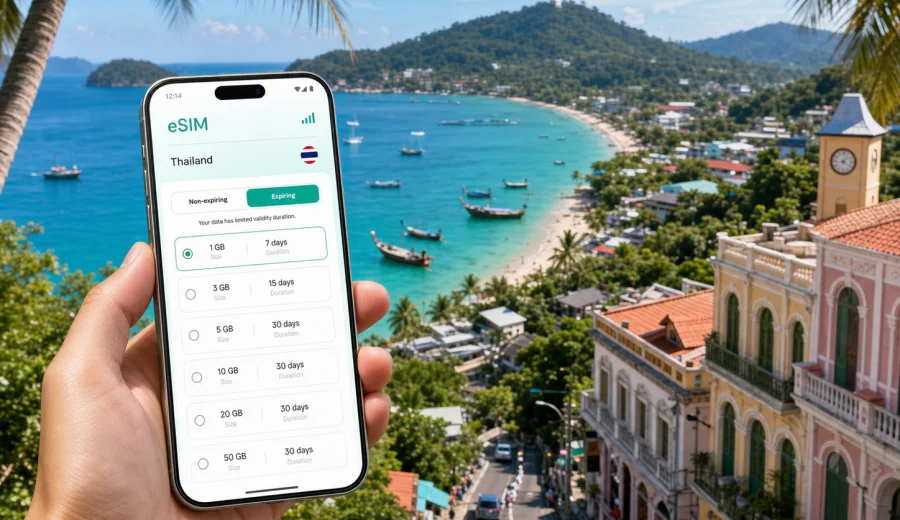
Phuket eSIM: mobile connection and internet for your trip
Phuket is a city and island destination where mobile internet quickly becomes part of the trip itself. You may need a map as soon as you leave Phuket International Airport, a ride-hailing app for the transfer to Patong or Phuket Town, a messenger call to the hotel, or a booking confirmation while you are standing at a pier. An eSIM can make these first steps easier because you do not have to look for a physical SIM card before you can use data on a compatible phone.
This guide focuses on Phuket travel scenarios: arrival, beach districts, Old Town walks, transport across the island, hotel stays, business trips, short stopovers, and day trips to nearby islands. It explains how to prepare mobile connection and internet access with an eSIM plan, what to check before purchase, and how Kaspersky eSIM Store can help you choose, order, install, and activate an eSIM for mobile internet during a trip to Thailand.
Why mobile internet matters in Phuket
Phuket looks compact on a map, but real journeys across the island can take time. The airport is in the north, many beach hotels are on the west coast, Phuket Town is inland, and popular piers are in different parts of the island. Mobile data helps you coordinate these moves without depending only on hotel Wi-Fi or public hotspots.
Typical moments when internet access is useful in Phuket:
| Travel moment | Why mobile data helps | Practical eSIM benefit |
|---|---|---|
| Arrival at Phuket International Airport | Check transfer details, message the hotel, open maps | Use data after installation without buying a plastic SIM at the airport |
| Ride to Patong, Kata, Karon, Kamala, or Phuket Town | Follow the route and confirm the destination | Keep navigation and messenger apps online during the transfer |
| Beach and island days | Share location, check weather, confirm boat times | Use data away from the hotel Wi-Fi zone |
| Old Town walks | Navigate cafes, galleries, markets, and bus stops | Keep maps and translation apps available |
| Business trip | Join calls, review documents, use email between meetings | Have a data option separate from hotel or venue Wi-Fi |
| Departure day | Check flight status and ride timing | Stay online while moving from hotel to airport |
An eSIM is especially convenient if your phone supports dual SIM use. You can keep your usual number active for calls or banking messages while using the eSIM profile for mobile data. Exact behavior depends on your device, your home mobile plan, and the selected eSIM plan conditions.
Phuket arrival: where an eSIM helps first
The first hour after landing is often the most data-heavy part of the trip. You may need to open a transfer voucher, confirm the driver pickup point, download the hotel address in Thai or English, and check whether the route crosses the island through busy areas. If you arrive in the evening or during rain, searching for a SIM counter can be an unnecessary extra step.
With an eSIM, you can prepare before departure and activate the data profile when the trip starts according to the plan rules. This gives you a practical fallback if airport Wi-Fi is slow, registration is inconvenient, or you simply want to leave the terminal quickly.
For Phuket, prepare these details before you fly:
- the hotel district: Patong, Kata, Karon, Kamala, Bang Tao, Rawai, Mai Khao, Phuket Town, or another area;
- the exact hotel address and check-in instructions saved offline;
- the transfer contact in a messenger app;
- the name of the pier if you are continuing to Phi Phi, Koh Yao, or another island;
- an offline copy of your passport page and booking confirmations;
- a working payment method for transport or emergency bookings.
Mobile data does not replace normal travel planning, but it keeps the small steps manageable. When your route changes, the ferry time moves, or the hotel asks for an arrival update, you can respond without hunting for a hotspot.
Choosing an eSIM plan for Phuket
For a city article, the correct plan destination is the country where the city is located. For Phuket, that means choosing a plan for Thailand, unless your itinerary also needs a regional or global option. The right choice depends on the length of the trip, how much data you expect to use, and whether Phuket is your only destination.
Use this simple planning method:
1. Count your full days in Phuket, including arrival and departure days.
2. Decide whether you will stream video, work on calls, or mainly use maps and messengers.
3. Check whether you will continue to Bangkok, Chiang Mai, Krabi, Koh Samui, or another Thai destination.
4. Compare plan validity with your travel dates.
5. Check the data allowance and top-up rules before checkout.
6. Confirm that your phone supports eSIM and is not locked to one carrier.
A light traveler who mostly uses maps, chat, email, ride apps, and restaurant searches may need far less data than someone who uploads videos from beach days or joins long video calls from a hotel. If you plan to use mobile hotspot mode for a laptop, choose more data and check whether tethering is allowed by the selected plan.
Before you buy: compatibility and device checks
Before choosing any eSIM plan, check that your smartphone or tablet supports eSIM and is not restricted by a carrier lock. This matters more than the destination: an eSIM profile can only be installed on a compatible device, and some devices sold in specific markets may have different eSIM support.
Use this checklist:
- Check your device before purchase.
- Make sure your phone is updated enough to support eSIM setup.
- Confirm that you can access the internet during installation, either through Wi-Fi or an existing mobile connection.
- Check whether your primary SIM should stay enabled for calls and SMS.
- Review when the selected plan starts counting validity and data use.
- Save the installation details before your flight, especially if you expect limited Wi-Fi on arrival.
Kaspersky eSIM Store is designed to help you choose a destination and a suitable eSIM plan for mobile internet in a foreign trip. It does not turn your phone into a local voice number by default. Voice calls and SMS are not included unless the selected plan explicitly says so. For calls in Phuket, many travelers use messenger apps over mobile data.
When to install and activate the eSIM
The safest approach is to prepare while you still have stable Wi-Fi at home, then activate according to the instructions and plan conditions. Some travelers install the eSIM before departure and switch the data line after landing. Others wait until arrival if the plan validity starts immediately after activation. The important point is to read the terms before you leave.
General setup flow:
1. Choose the destination and eSIM plan.
2. Complete the order.
3. Open the installation instructions or QR code in your profile or email.
4. Add the eSIM profile to your compatible device.
5. Set the eSIM as the mobile data line when you are ready to use it.
6. Turn on data roaming for the eSIM if the instructions or device settings require it.
7. Test maps or a messenger app before leaving the airport or hotel.
For device-specific setup, use the Android installation instructions or the iOS installation instructions. Keep your primary SIM settings clear: one line can handle your usual number, while the eSIM handles mobile data for the trip, if your device supports that setup.
Preparing mobile internet for a Phuket trip
Once you know your route and data needs, you can choose a suitable option before departure instead of solving everything at the airport. In Kaspersky eSIM Store, you can review available choices for the destination, compare data amount and validity, and prepare an eSIM plan for Thailand before your Phuket trip. This is the main country page to use for a Phuket city itinerary because Phuket is in Thailand.
This preparation is useful for several common Phuket routes:
- a direct holiday flight into Phuket International Airport;
- a Bangkok to Phuket domestic connection;
- a family stay in Kata or Karon with daily taxi rides;
- a remote-work week in Phuket Town or Bang Tao;
- a beach and island itinerary with boat departures;
- a short stopover before flying onward.
If your trip crosses several countries, compare a Thailand plan with any relevant regional option in the store. Do not assume one plan is best for every route. The practical question is where you will need data, how long you will need it, and how much traffic your apps will use.
Transport, maps, and moving around the island
Phuket transport is not just one city grid. Distances between beaches, hills, viewpoints, and piers can be longer than expected. Mobile data helps you manage the details: pickup points, traffic, route changes, and messages from drivers or tour operators.
Useful data scenarios:
- checking whether the driver is going to the right hotel entrance;
- opening the route from the airport to Patong, Kata, or Phuket Town;
- translating an address or showing it to a driver;
- confirming pier departure times for island trips;
- checking weather before a viewpoint or boat tour;
- contacting a hotel if traffic delays your check-in;
- keeping a backup map active when the road splits near beach areas.
If you rent a scooter or car, do not depend only on live navigation. Save key places offline and use mobile data for updates, not as your only source of route information. Mountain roads, rain, and unfamiliar traffic patterns make it better to plan the route before you start moving.
Hotels, work trips, and day trips
Hotel Wi-Fi is useful in Phuket for large downloads, video calls, cloud backups, and streaming, but it does not cover taxis, beaches, piers, markets, or Old Town walks. An eSIM plan gives you a mobile data option for the in-between moments: opening a room confirmation at reception, receiving ride notifications outside a mall, translating a menu, checking a restaurant route after leaving the hotel, or messaging a tour operator before pickup.
For business or remote-work travel, treat mobile data as a continuity tool. Use stable Wi-Fi for long calls when possible, but keep enough mobile data for email, messenger updates, meeting routes, calendar changes, and hotspot backup if the selected plan allows tethering. If workplace or banking systems rely on SMS, keep your primary SIM settings clear so you do not lose access to verification messages.
For trips from Phuket to nearby islands, Phang Nga Bay, diving sites, or beaches outside your hotel district, save the operator name, pier, pickup time, return point, emergency contact, and booking voucher offline. Mobile signal and data experience can vary by route, weather, and local network conditions, so use mobile data for confirmations while keeping critical details available without a connection.
How much data do you need in Phuket?
There is no single correct amount for every traveler. A short weekend with maps and chat may use a modest data package. A two-week trip with hotspot use, frequent video calls, social uploads, and streaming can need much more.
Use these practical categories:
| Traveler type | Typical use | Data planning note |
|---|---|---|
| Light user | Maps, chat, email, ride apps | Choose based on trip length and keep media uploads for Wi-Fi |
| Standard tourist | Maps, messengers, searches, some social media | Allow extra data for route changes and daily planning |
| Family traveler | Multiple bookings, maps, shared photos, calls | Consider higher data or separate plans for different devices |
| Remote worker | Email, calls, documents, hotspot backup | Choose more data and rely on Wi-Fi for long video sessions |
| Island-hopping traveler | Piers, transfers, weather, bookings | Save critical information offline and keep data for coordination |
To control use, turn off automatic cloud backups on mobile data, download offline maps, set streaming apps to Wi-Fi only, and review app background data settings before travel.
Common mistakes to avoid
Avoid these Phuket eSIM mistakes:
- buying a plan without checking device compatibility;
- waiting until the airport exit to read installation instructions;
- choosing too little data for a remote-work trip;
- assuming eSIM includes a local phone number;
- forgetting to set the eSIM as the mobile data line;
- leaving data roaming disabled when the plan instructions require it;
- relying on mobile data alone for remote day trips;
- deleting the eSIM profile before you are sure the trip is over.
If the eSIM does not connect immediately, check the installed profile, selected mobile data line, roaming setting for that profile, and whether you are in an area with service. Connection can take a few minutes and may depend on the device and local network conditions.
Quick Phuket eSIM checklist
Before departure:
- Confirm your phone supports eSIM.
- Check your device is not carrier-locked.
- Choose Thailand as the destination for a Phuket-only trip.
- Match plan validity with your travel dates.
- Choose enough data for maps, rides, messengers, and bookings.
- Read installation instructions while you have stable Wi-Fi.
- Save hotel, transfer, and pier details offline.
After arrival:
- Set the eSIM as the mobile data line.
- Enable data roaming for the eSIM if required.
- Test maps, messenger, and the hotel route.
- Keep your main SIM settings under control to avoid unwanted roaming.
- Monitor data use during video calls, hotspot sessions, and uploads.
FAQ: eSIM and mobile internet in Phuket
Is an eSIM useful if my hotel has Wi-Fi?
Yes. Hotel Wi-Fi helps at the property, while mobile data helps during airport transfers, taxis, beach days, Old Town walks, boat departures, restaurant searches, and messages away from the hotel.
Should I choose a Phuket plan or a Thailand plan?
For a Phuket city trip, choose the destination that covers the country where the city is located: Thailand. If your itinerary includes other countries, compare country, regional, or global options based on the route.
Can I keep my normal SIM active?
Many compatible phones support dual SIM use. You may keep your usual SIM for calls or SMS while using the eSIM for mobile data, depending on device and carrier settings.
Does eSIM include calls and SMS in Phuket?
Usually, travel eSIM plans focus on mobile data. Calls and SMS are included only if the selected plan terms say so. Messenger calls over mobile internet are a common alternative.
Can I install the eSIM before flying to Phuket?
Often, yes, but check when validity begins. Some plans start after installation or activation, while others start when they connect to a supported network.
Prepare your Phuket mobile connection before you travel
Phuket is easier to navigate when your phone is ready for maps, rides, hotel messages, booking updates, and day-trip coordination. An eSIM can reduce the need to find a physical SIM card after arrival and gives you a practical way to prepare mobile internet before the trip.
Before you fly, check device compatibility, review the plan validity, choose a data amount that fits your Phuket itinerary, and read the setup instructions. Then use Kaspersky eSIM Store to choose an eSIM plan for your trip to Thailand and keep your mobile connection ready for Phuket from the airport to the beach districts, Old Town, hotels, piers, and return transfer.