
Travel connectivity guide
Thailand eSIM: Mobile Internet for Travel
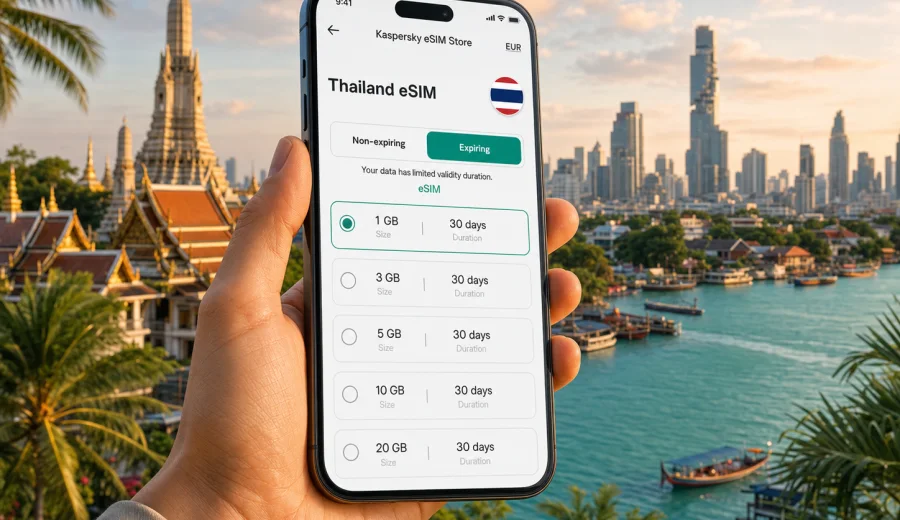
Thailand eSIM: mobile connection and internet for your trip
Planning mobile internet with mobile internet for a trip to Thailand is easier when you separate the trip into real situations: arriving at the airport, ordering a taxi, checking hotel messages, navigating between islands, paying for activities, and staying in touch with family or colleagues. An eSIM helps with that because you can prepare a mobile data plan before you travel and activate it on a compatible device without looking for a physical SIM card counter after a long flight.
For many travelers, an eSIM is a practical way to organize mobile connection and internet for Bangkok, Chiang Mai, Phuket, Krabi, Pattaya, Koh Samui, and multi-stop routes across the country. Kaspersky eSIM Store is an app and website where you can choose, arrange, and activate an eSIM with a suitable mobile data plan for an international trip. It does not replace your home operator, and the exact conditions depend on the plan you select, but it can make the first hours and daily online tasks much simpler.
Why mobile internet matters in Thailand
Thailand is a comfortable country to explore, but mobile data often becomes essential earlier than travelers expect. You may need internet before you reach your hotel, before you understand the local transport options, or before you find a reliable Wi-Fi network.
Typical moments when mobile data is useful:
- checking the address of your hotel or apartment;
- opening ride-hailing, taxi, delivery, map, and messenger apps;
- translating menus, signs, and chat messages;
- confirming ferry, train, bus, and domestic flight details;
- reading travel insurance, booking, and payment notifications;
- sharing documents or location with companions;
- using a hotspot for a laptop when hotel Wi-Fi is unstable.
Public Wi-Fi can help in airports, malls, cafes, and hotels, but it is not always available exactly when you need it. A prepared eSIM gives you another option: once the eSIM is installed and activated according to the selected plan conditions, your phone can use mobile data without a physical SIM swap.
What an eSIM gives you on a Thailand trip
An eSIM is a digital SIM profile installed on a compatible smartphone or tablet. In travel use, it is usually selected for mobile internet rather than ordinary voice calls or SMS. This distinction matters: unless the chosen plan says otherwise, you should expect data access only. For calls and messages, many travelers use internet-based apps.
For Thailand, an eSIM can be especially helpful if your route includes several places. You might land in Bangkok, fly to Chiang Mai, continue to Phuket, take a ferry to islands, and return through another airport. With an eSIM profile ready on the phone, you do not have to plan your first stop around a SIM card shop.
Short practical summary:
| Travel need | How eSIM helps |
|---|---|
| Arrival in Thailand | Prepare mobile data before leaving home and activate according to the plan instructions |
| Navigation | Use maps for airports, city routes, beaches, piers, and hotel transfers |
| Messaging | Keep messengers available for bookings, drivers, guides, and family |
| Multi-city travel | Use one prepared data setup for a route inside the selected destination coverage |
| Device convenience | Keep your physical SIM in place if your phone supports dual SIM behavior |
Before purchase, always check the plan details: country coverage, data amount, validity period, activation rules, price, and whether top-up is available. A low-data plan may be enough for maps and messaging, while video calls, cloud backups, social media uploads, and laptop hotspot use need more traffic.
When to prepare eSIM for Thailand
The best time to prepare mobile internet is before departure, while you still have stable home internet and enough time to check your device. You can arrange the eSIM in advance, read the installation instructions, and keep the QR code or activation details ready. In many cases, installation can be done before travel, while activation or data usage starts according to the conditions of the selected plan.
A careful preparation flow looks like this:
1. Check that your phone supports eSIM and is not restricted by a carrier lock.
2. Choose Thailand as the destination.
3. Compare plans by data amount and validity period.
4. Arrange the plan through Kaspersky eSIM Store.
5. Install the eSIM while you have reliable internet.
6. Activate it when the plan instructions say it is appropriate.
7. Set the eSIM for mobile data and keep your usual SIM for calls if needed.
If you want to prepare your mobile data before the trip, choose a suitable Thailand plan in Kaspersky eSIM Store and review the conditions before activation.
How much data do you need in Thailand?
Data use depends on habits, not only on trip length. Two people can spend the same ten days in Thailand and need very different data amounts. One traveler may use maps, chat, and restaurant searches; another may post videos, join work calls, upload photos to cloud storage, and share a hotspot with a laptop.
Use this planning table as a practical starting point:
| Trip style | Typical online behavior | Data planning note |
|---|---|---|
| Light traveler | Maps, messengers, booking checks, occasional web search | A smaller plan may be enough if you use hotel Wi-Fi for heavy tasks |
| Balanced traveler | Navigation, social media, photos, translation, daily searches | Choose a plan with room for everyday use, not only emergencies |
| Remote worker | Email, documents, video meetings, hotspot for laptop | Consider a larger data allowance and monitor usage closely |
| Family or group organizer | Messaging, tickets, maps, ride apps, shared logistics | Extra data helps because one phone often handles many tasks |
| Content-heavy traveler | Video, reels, frequent uploads, cloud backup | Avoid relying on a small plan; video can consume data quickly |
To reduce unnecessary data use, download offline maps before departure, disable automatic cloud photo backup on mobile data, update apps over Wi-Fi, and check whether video apps are using high-quality streaming by default.
Thailand travel scenarios where eSIM is useful
Thailand routes are diverse. Your mobile connection needs in Bangkok may be different from island travel or a northern mountain itinerary, but the core requirement is the same: reliable access to basic online services when Wi-Fi is not convenient.
Bangkok arrival and city transport
Bangkok is often the first stop. Travelers may arrive at Suvarnabhumi Airport or Don Mueang Airport, then continue by train, taxi, ride-hailing service, or hotel transfer. Mobile data helps you check the terminal, message the driver, confirm the address in Thai or English, and follow the route on a map.
In the city, online maps are useful for BTS Skytrain and MRT planning, walking routes, mall entrances, riverside piers, and restaurant searches. A prepared eSIM is useful because your internet plan is not tied to finding a shop immediately after landing.
Beaches, islands, and ferries
Trips to Phuket, Krabi, Koh Samui, Koh Phangan, Koh Tao, Phi Phi, and other island areas often involve several transport steps: flight, van, ferry, taxi, and hotel transfer. Mobile data helps you track schedule changes, contact accommodation, open e-tickets, and share your location.
Coverage and speed depend on local network conditions and the plan used. This is why it is better to avoid absolute expectations. Plan for the important tasks first: messaging, maps, tickets, and emergency information. Save heavy downloads for Wi-Fi when possible.
Once your route and approximate data needs are clear, you can choose a suitable eSIM data plan for the trip and compare data volume, validity period, and activation conditions before installation.
Chiang Mai and northern Thailand
Chiang Mai, Chiang Rai, Pai, and other northern routes often mix city time with day trips, mountain roads, temples, cafes, and outdoor activities. An eSIM can help you coordinate drivers, read route information, translate details, and stay reachable during longer day plans.
For remote work, check your accommodation Wi-Fi reviews and keep mobile data as a backup for essential tasks. If you know you will use a laptop hotspot, choose a larger plan and test the hotspot setting before an important call.
Device compatibility before you buy
Not every phone supports eSIM, and not every eSIM-capable phone is ready for travel eSIM use. Some devices are locked to a carrier, some regional models have limitations, and some tablets or watches work differently from smartphones.
Before choosing a plan, check your device and confirm three points:
- your phone or tablet supports eSIM;
- the device is not locked in a way that prevents adding another mobile plan;
- you know where the eSIM settings are on your operating system.
If you recently changed phones, reset your device, or bought a device in another country, check compatibility again. eSIM profiles may not be transferable after activation, depending on the plan and device behavior, so it is better to install the eSIM on the phone you will actually take to Thailand.
How to install and activate eSIM
The exact steps depend on your phone model, operating system version, and the instructions for the selected plan. In general, you install the eSIM profile, choose how the phone should use it, and then activate mobile data according to the plan conditions.
For detailed setup, use the official installation guides:
Practical installation checklist:
1. Use a stable Wi-Fi connection during installation.
2. Keep your QR code or activation details available on another screen if needed.
3. Do not remove the eSIM profile unless the instructions or support team tell you to.
4. Label the eSIM clearly, for example "Thailand data", so you do not confuse it with your home SIM.
5. Set the eSIM for mobile data when you are ready to use it.
6. Check whether data roaming must be enabled for the eSIM profile.
7. Turn off mobile data for your home SIM if you want to avoid accidental roaming use.
If something does not connect immediately, wait a few minutes, check that the correct line is selected for mobile data, confirm roaming settings for the eSIM, and restart the device if the instructions recommend it. Avoid deleting the eSIM profile as a first troubleshooting step.
eSIM, roaming, physical SIM, and Wi-Fi: what to compare
There is no single best option for every traveler. The right setup depends on your operator, your device, your route, and your data needs. A practical comparison helps you decide.
| Option | Strengths | What to check |
|---|---|---|
| Travel eSIM | Can be prepared before the trip; no physical SIM swap; useful for data-focused travel | Device compatibility, plan coverage, data amount, validity, activation rules |
| Home operator roaming | Keeps your usual number and operator relationship | Roaming price, included countries, daily limits, speed policy |
| Local physical SIM | May suit long stays or travelers who want a local SIM card experience | Shop availability, registration process, opening hours, language support |
| Public Wi-Fi | Useful for hotels, cafes, airports, and heavy downloads | Availability, stability, security, login limits |
Many travelers use a combination: eSIM for mobile data, hotel Wi-Fi for large downloads, and the home SIM kept active for bank messages or calls where needed. If you use dual SIM, check which line handles mobile data, calls, and messages before you leave the airport.
Practical settings for a smoother trip
A few phone settings can prevent confusion and wasted data:
- Rename your lines. Use clear labels such as "Home SIM" and "Thailand eSIM".
- Set mobile data to the eSIM when you want to use the travel plan.
- Keep data switching under control. Some phones can switch mobile data lines automatically; check whether you want this.
- Disable automatic app updates on mobile data.
- Restrict background data for cloud storage and video apps.
- Download offline maps for Bangkok, Phuket, Chiang Mai, and your island routes.
- Save hotel addresses and booking confirmations offline.
- Monitor data usage daily if your plan has a fixed allowance.
If your phone supports hotspot sharing, check whether your selected plan and device settings allow it. A hotspot can be helpful for a laptop, but it can also consume data quickly, especially during video calls or system updates.
Choosing a plan for Thailand
When you compare eSIM plans, do not look only at the data number. A plan should match the whole trip: destination, length of stay, daily habits, and timing.
Key plan details to review:
| Detail | Why it matters |
|---|---|
| Destination | The plan must include Thailand or the region you will use |
| Data amount | Determines how much browsing, messaging, maps, and media use you can do |
| Validity period | Should cover your travel dates, including arrival and departure days |
| Activation rule | Some plans start after installation, some after first network use, depending on conditions |
| Top-up availability | Useful if your trip changes or you use more data than expected |
| Price | Compare against your roaming option and expected usage |
For a short city break, a smaller data package may be enough if you mainly use maps and messaging. For two weeks with islands, video sharing, and frequent transport coordination, choose more room. For remote work, treat mobile data as part of your work setup and avoid selecting a plan only for light tourist use.
Common mistakes to avoid
The most common eSIM problems are not technical failures; they are preparation mistakes. Avoid these before and during your Thailand trip:
- buying a plan before checking device compatibility;
- installing the eSIM on a phone you will not travel with;
- deleting the eSIM profile during troubleshooting;
- leaving your home SIM selected for mobile data by accident;
- assuming ordinary calls and SMS are included when the plan is data-only;
- using mobile data for automatic cloud backup;
- waiting until airport Wi-Fi is weak or crowded before reading setup instructions;
- choosing a plan that expires before the last travel day.
It is also useful to keep a screenshot of your eSIM details and support information, stored offline. If you travel with another person, agree who will handle maps, bookings, and emergency contacts if one phone loses battery.
A simple Thailand eSIM preparation checklist
Use this checklist a few days before departure:
- Passport, tickets, hotel bookings, and insurance details are saved offline.
- Your phone supports eSIM and is not carrier-locked.
- Battery health and charger setup are ready for long travel days.
- Offline maps are downloaded for your main destinations.
- Important messenger contacts are saved.
- Automatic media backup on mobile data is disabled.
- A Thailand data plan is selected with enough validity for the whole trip.
- Installation instructions are opened and understood before departure.
- Your home SIM roaming settings are checked to avoid accidental costs.
This preparation is especially helpful if your flight arrives late, your transfer is already waiting, or your first accommodation is outside a central tourist area.
FAQ about eSIM and mobile internet in Thailand
Can I use eSIM in Thailand instead of buying a physical SIM card?
Yes, if your device supports eSIM and the selected plan covers Thailand. An eSIM can be more convenient for travel because you do not need to swap a physical card. Check the plan conditions before buying.
Does an eSIM include a phone number?
In travel scenarios, eSIM plans are usually focused on mobile data. Ordinary voice calls and SMS are not included unless the selected plan states otherwise. You can use internet-based calling and messaging apps over mobile data.
Should I install the eSIM before I fly?
It is often more convenient to install it before travel while you have reliable Wi-Fi. Activation timing depends on the plan conditions, so read the instructions carefully before using mobile data.
Can I keep my home SIM active?
On many dual SIM phones, yes. You can often keep your home SIM for calls or messages and use the eSIM for mobile data. Check your device settings so the correct line is used for data.
What if I visit nearby countries after Thailand?
If your route includes another country, check whether your Thailand plan covers only Thailand or whether you need a regional plan. Do this before crossing a border or boarding the next flight.
Is eSIM good for a long stay?
It can be useful, especially for data access and simple setup, but you should compare plan validity, data allowance, and top-up options against your length of stay. Long stays usually need more careful data planning.
Final advice before you travel
For Thailand, the best mobile internet setup is the one you understand before you land. Check your device, choose a plan that fits your route, install the eSIM with stable Wi-Fi, and keep your phone settings clear. Use mobile data for the tasks that matter most on the move: maps, bookings, taxis, ferries, translation, and communication.
Choose an eSIM plan for your trip to Thailand through Kaspersky eSIM Store, review the data amount and validity period, and prepare your mobile connection before departure.